•
ou
are
in
the Navigation menu, tap IP
Find
Favorites
Iand then tap
2.
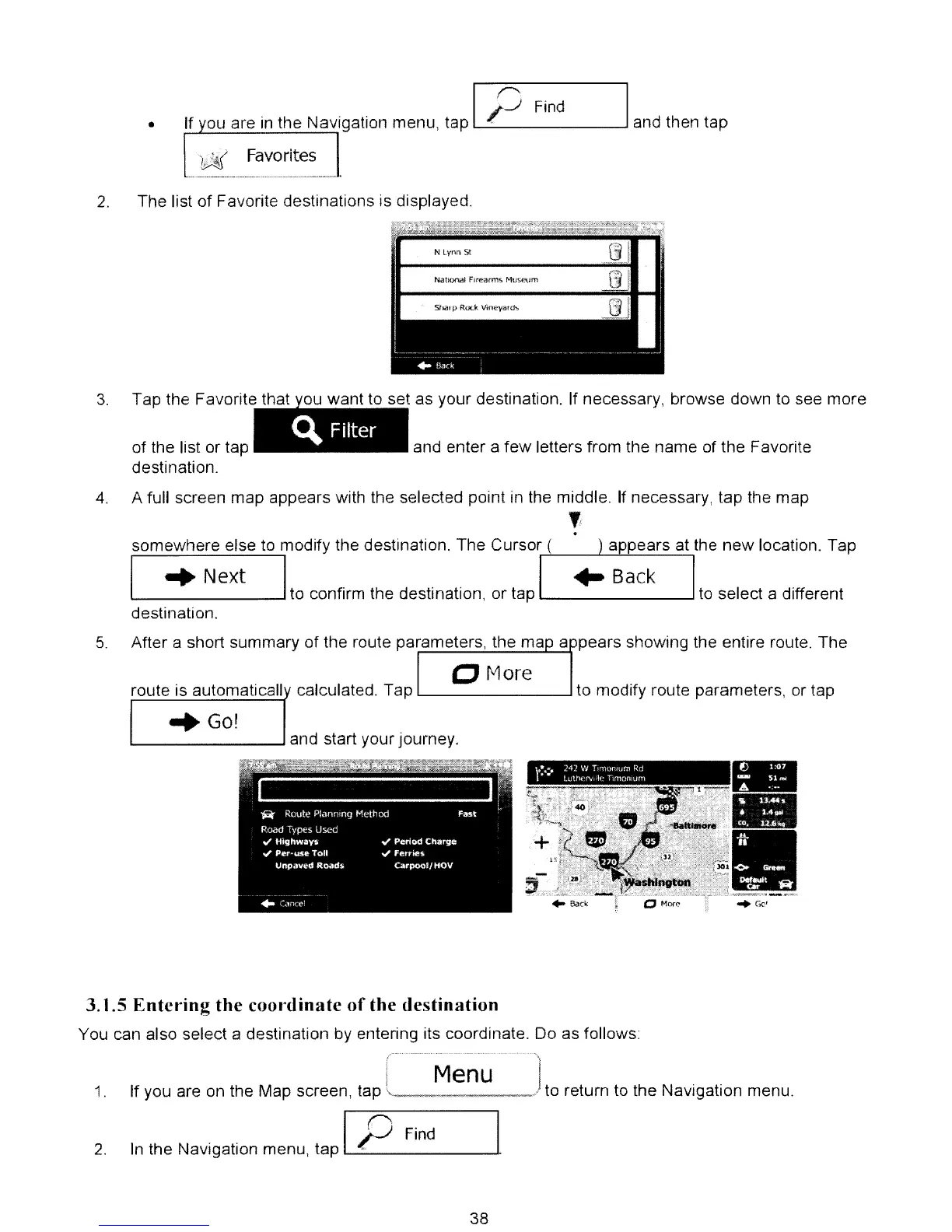
The list of Favorite destinations is displayed.
and enter a few letters from the name of the Favorite
t as your destination. If necessary, browse down to see more
t t
C\.
Filter
3.
Tap the Favorite th
of the list or tap
destination.
4.
A full screen map appears with the selected point
in
the middle.
If
necessary, tap the map
,
.
appears at the
new
location. Tapsomewhere else to modify the destination. The Cursor (
I
..
Next I
to confirm the destination, or tap
L..-
---'
to
select a different
destination.
5.
After a short summary of the route parameters, the ma a pears showing the entire route. The
o More
route is automaticall calculated. Tap
L...-
---l
to modify route parameters, or tap
"Go!
-
-
•
..
,
.•
<,..
-.
. -.
t
..
.:.
242
W
Tp'11011H.lf:'l
R-d
•
lultlt
....
"'dle
11mOrlllJm
L...-
---l
and start your journey.
3.1.5
Enter'ing
the
coordinate
of
the
destination
You can also select a destination by entering its coordinate. Do as follows:
1.
2.
Menu
If you are on the Map screen, tap
.,
..
./
to return to the Navigation menu.
In
the Navigation menu, tap IP
Find
38



 To Next Page