ROSEN
./
www.rosenentertalnment.com
• Touch Screen Calibration
To
re-calibrate the touch screen settings follow the steps below.
To
ensure accuracy please use the stylus provided with your system and be sure to touch the center
point
of
the cross as close as possible othelwise the precision
of
the touch calibration will be
affected.
"'tJ
o
Q.
()
C
c
<
C
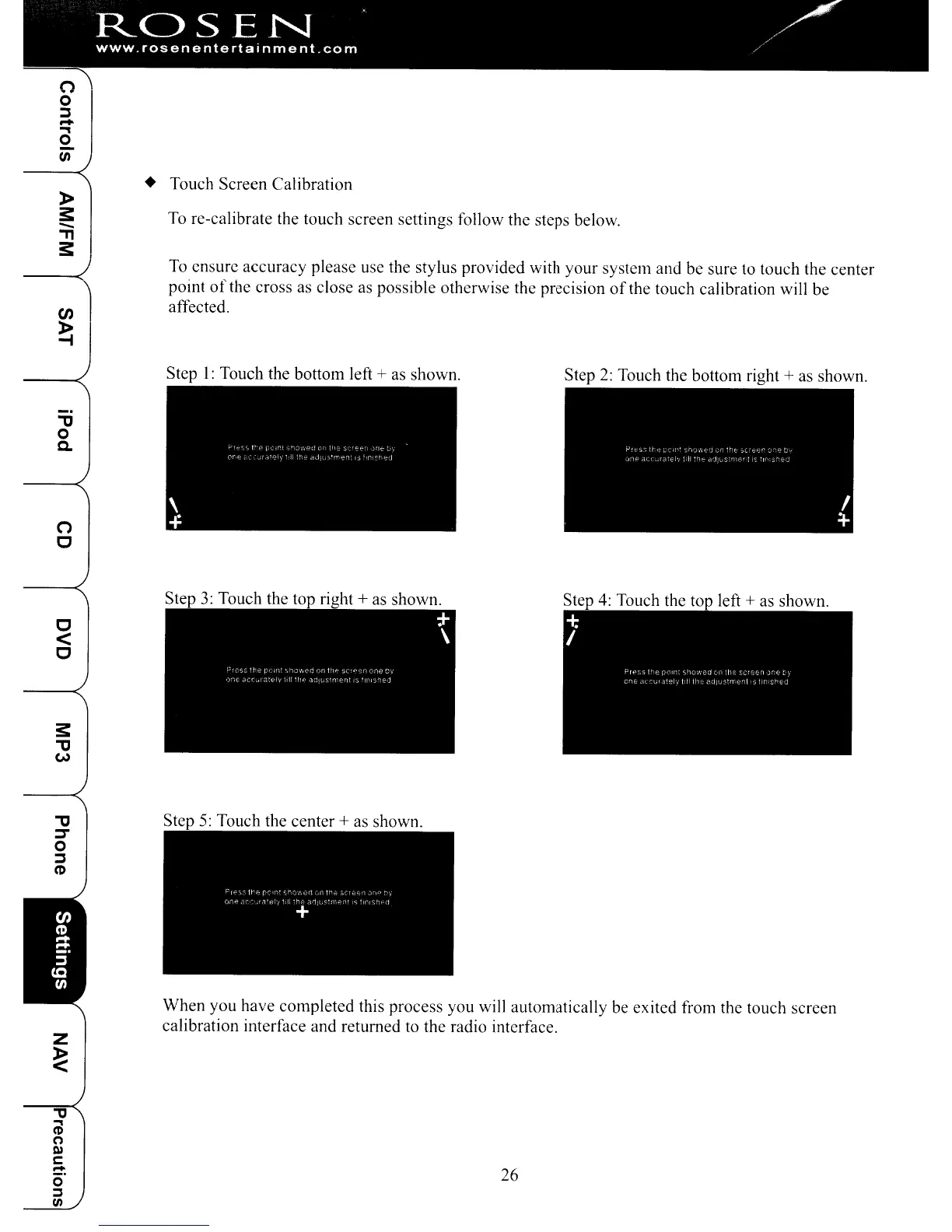
Step I: Touch the bottom left
+ as shown.
Step
3:
Touch the top right + as shown.
Step
2:
Touch the bottom right + as shown.
Step
5:
Touch the center + as shown.
When you have completed this process you will automatically be exited from the touch screen
calibration interface and returned to the radio interface.
26
ROSEN
./
www.rosenentertalnment.com
• Touch Screen Calibration
To
re-calibrate the touch screen settings follow the steps below.
To
ensure accuracy please use the stylus provided with your system and be sure to touch the center
point
of
the cross as close as possible othelwise the precision
of
the touch calibration will be
affected.
"'tJ
o
Q.
()
C
c
<
C
Step I: Touch the bottom left
+ as shown.
Step
3:
Touch the top right + as shown.
Step
2:
Touch the bottom right + as shown.
Step
5:
Touch the center + as shown.
When you have completed this process you will automatically be exited from the touch screen
calibration interface and returned to the radio interface.
26



 To Next Page