3.15 OPERATING INSTRUCTIONS
DOC01-V6ULB+ 31
3.15 Integrated scale (optional)
The integrated scale option lets you measure a patient's weight. These functions can be
accessed via the display and directional keys on the footboard.
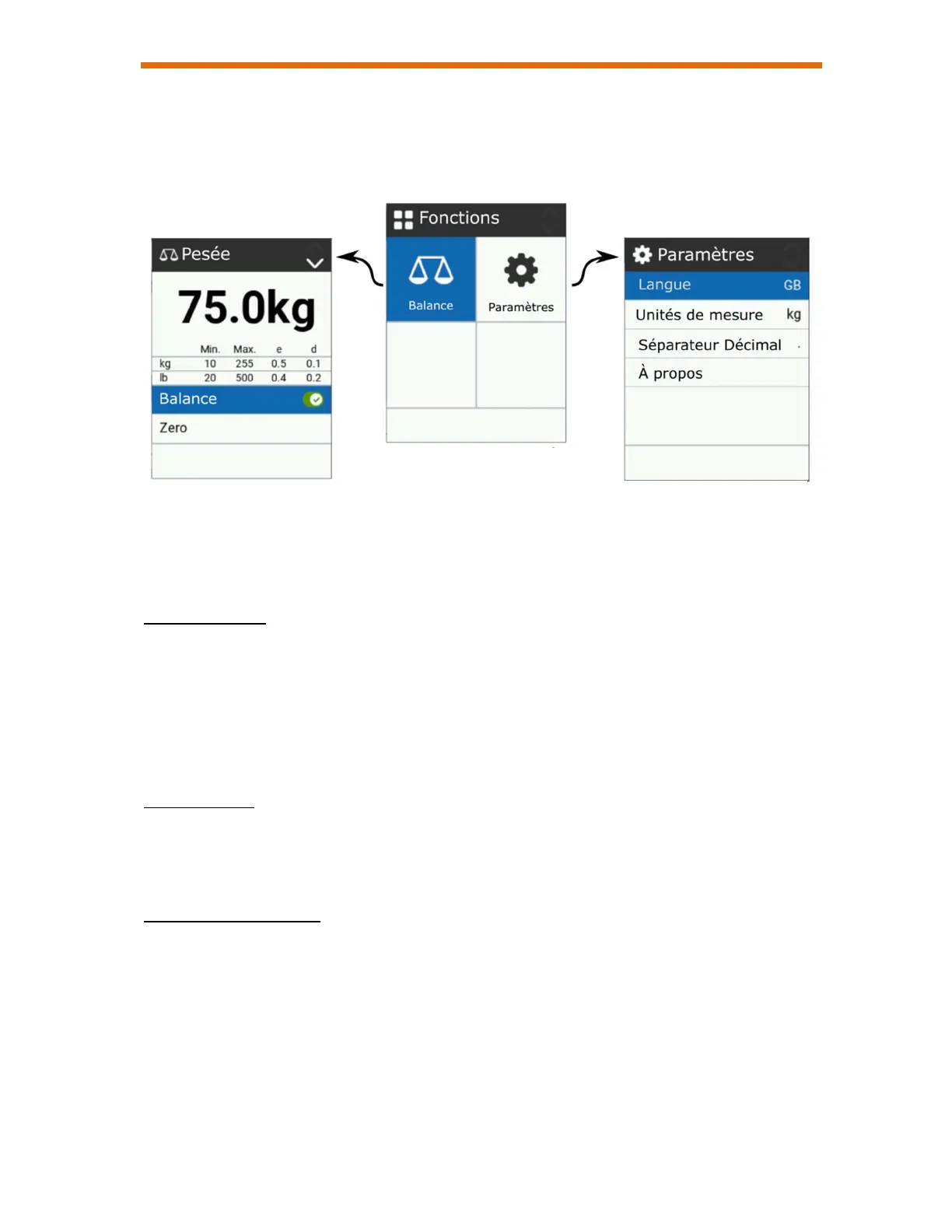
Use the arrow keys to navigate the menus. The highlighted blue color indicates the
current selection.
Weighing menu
From the main menu, select the Scale icon and press the OK button to access the
weighing menu. Note that the bed must be plugged in to use the scale.
Weighing menu functions :
Scale On/Off: Activates or deactivates the function.
Zero: Resets the scale to zero in order to remove the weight of accessories. Only
possible when bed is empty.
Settings menu
From the main menu, select the Settings icon and press the OK button to access the
Settings menu.
You can change the display language and other scale system parameters.
Note on scale accuracy
- The error will be +/- 1KG (2 lb) maximum when in use.
- It is advisable to align the castors in the same direction as when moving the bed, and
to keep the castors locked during a series of measurements. Moving the bed and
changing the orientation of the castors may change the measured value. Measurements
taken before moving the bed should not be compared with those taken afterwards.
Weighing Menu Settings Menu
Main Menu


 To Next Page