3.1 OPERATING INSTRUCTIONS
16 DOC01-V6ULB+
3 OPERATING INSTRUCTIONS
3.1 Electrical bed functions
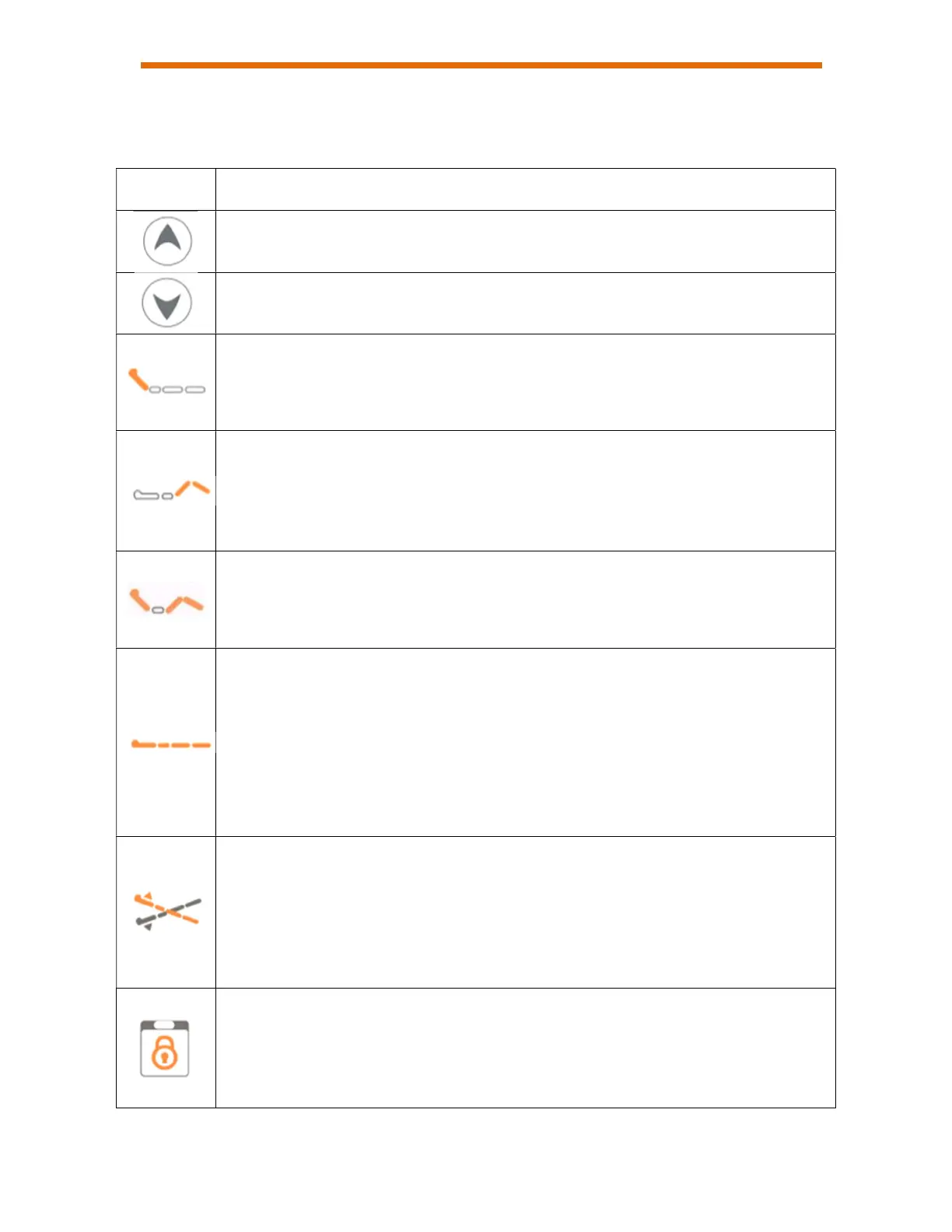
Symbols Descriptions
Up arrow: adjusts the various functions of the device upwards.
Down arrow: adjusts the various functions of the device downwards.
Backrest function: tilts the backrest section up or down.
Press the nearby up or down arrow to engage the actuator. Release to stop
movement.
Thigh function: tilts the thigh section and adjusts the height of the foot section
up or down.
Press the nearby up or down arrow to engage the actuator. Release to stop
movement.
Auto-contour function: Allows you to tilt the thigh and back sections and adjust
the height of the foot section up or down at the same time
Press the nearby up or down arrow key
Bed Height function: adjusts the height of the bed upwards or downwards.
Press the nearby up or down arrow to engage the actuator. Release to stop
movement.
Note: for safety reasons, the function on the hand control and on the side
panels inside the unit are limited from lowering the unit completely. Please use
the function at the foot of the bed to lower the unit to its minimum height.
Trendelenburg function: tilts the bed platform so that the foot of the bed is
lower than the head of the bed, and vice versa.
Press the nearby up or down arrow to engage the actuator. Release to stop
movement.
Note: function stops when bed platform returns to horizontal position
Lock function: locks a function on the remote control and on the fixed inside
control for the patient from the nurse control at the foot of the bed.
Press this button to lock the function displayed nearby. A red light will illuminate
above the padlock symbol, indicating that the function is locked.


 To Next Page