3. Description of the QABrowser
QABrowser Applications
Piranha & QABrowser Reference Manual
2014-06/5.5C
56
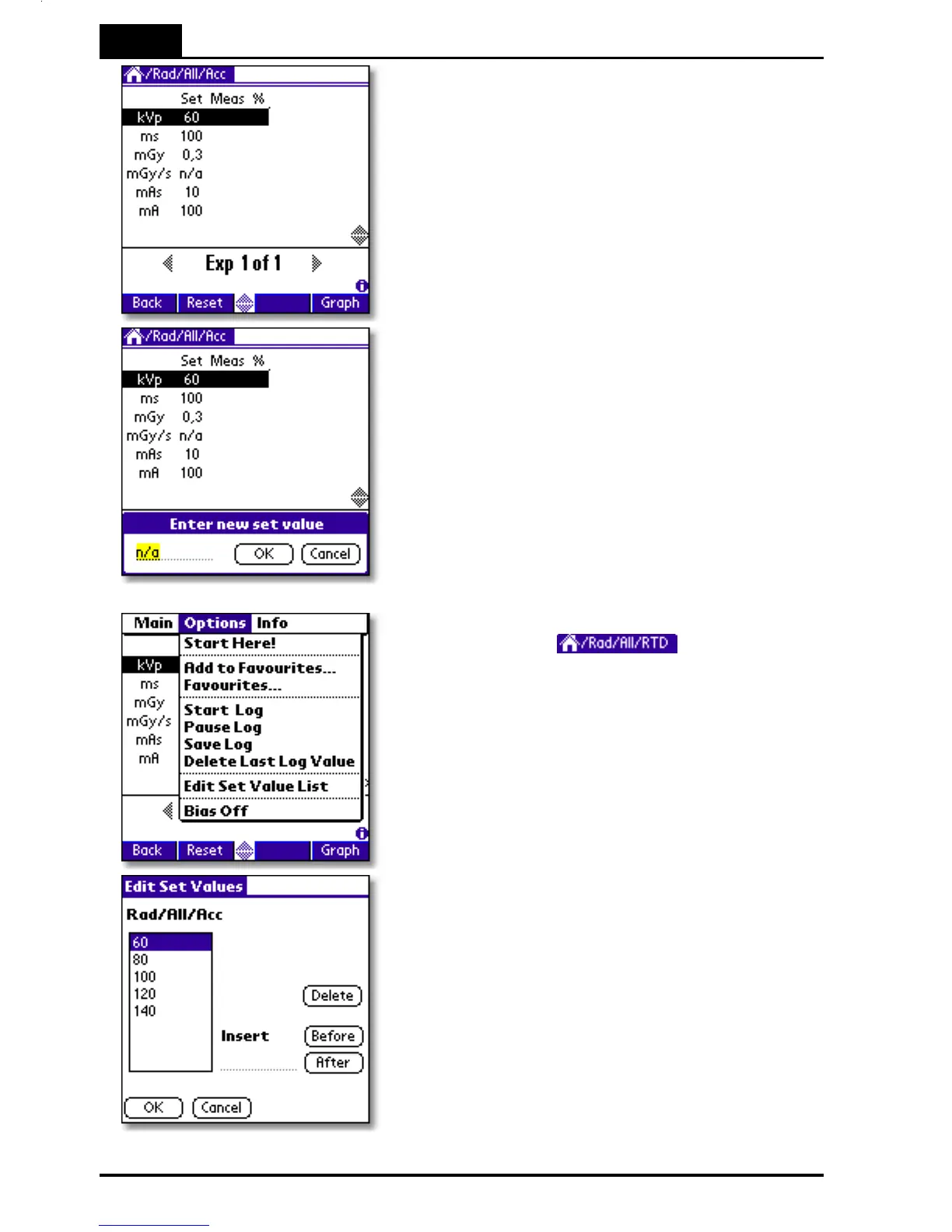
3. The multi-parameter application is shown.
In this mode only one exposure at a time
is shown on the screen. You can here also
change individual set values or the
complete list for a specific parameter.
To modify an individual set value tap with
the pen on it. In this case tap 60.
4. An input box is shown at the bottom of the
screen allowing input of a new set value.
Enter a new value using the pen on the
graffiti area, then tap OK.
Tap Cancel to leave without modifying the
set value.
If you want to, edit or view the complete set
value list. Then tap , at the top
of the screen, or the Menu icon (the lower
icon to the left of the graffiti area) and select
Options | Edit Set Value List from the pull-
down menu.
You can now change/delete/insert values in
the set value list for current application. Use
the graffiti area to enter new values.
Tap OK to save changes or Cancel to return
to the application without changing the list.



 To Next Page