24
English
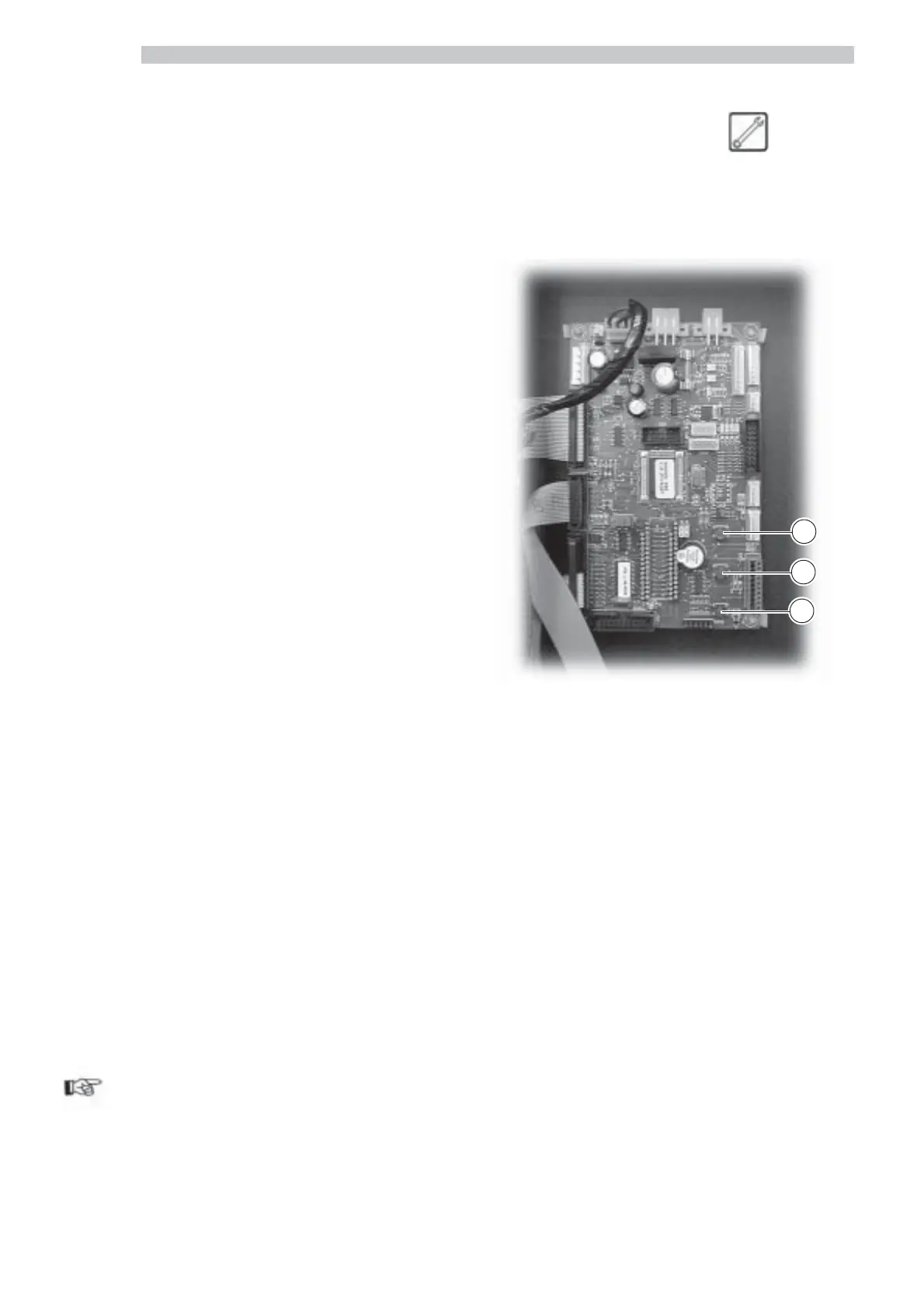
Key 1 (Fig. 60)
Enables to enter the programming menu. To exit the menu,
press it again.
Key 2 (Fig. 60)
Enables to enter the maintenance menu. To exit the menu,
press it again.
Key 3 (Fig. 60)
If pressed after the vending machine start-up, it allows to
bypass HOT DRINKS warming phase and reach directly
the ‘”MACHINE READY” condition.
Pressed, during its ordinary dispensing phase, it allows
free dispensing of a product only if the entry “Y” is set in
the “FREE KEY” function (see 8.2.3).
Keeping it pressed, in the programming mode, it moves
the cup column (rotation of 180°) inside the loader.
Fig. 60
6.5 CPU card keys
The CPU electronic card has three keys that allow the
Maintenance Technician to program or upkeep the system
(Fig. 60).
3
2
1
6.4 Description of keys in
ordinary dispensing mode
HOT DRINKS SECTION
Decaffeinated Key (7 – Fig. 59)
This preselection key will be active only if the “DECA
PRESELECTION” function is enabled during the
programming phase (see 8.2.3).
To brew a beverage with decaffeinated coffee, press first
this key and then the desired beverage key (example: to
brew a decaffeinated cappuccino, press the
Decaffeinated key and then the Cappuccino key).
The pre-selection remains active for 8 seconds.
Cup Selling Key (8 – Fig. 59)
The cup will be dispensed only if the CUP KEY function
was enabled during the programming phase (8.2.3).
The pre-selection remains active for 8 seconds.
“-” Key - Sugar quantity (9 - Fig. 59)
Decreases the quantity of sugar into selected beverage.
Press the key before selecting the beverage.
The pre-selection remains active for 8 seconds.
“+” Key - Sugar quantity (10 - Fig. 59)
Increases the quantity of sugar into selected beverage. Press
the key before selecting the beverage.
The pre-selection remains active for 8 seconds.
A-B-C-D-E-F-G-H-I Keys (11 to 19 - Fig. 59)
Press these keys to brew the programmed beverages.
SNACKS SECTION
1-2-3-4-5-6 Keys (from 1 to 6 - Fig. 59)
Press these keys to select the codes of the products (snacks)
to be dispensed.
Important
The functions of the programming keys are described at
8.1 (page 32).



 To Next Page