EasyManua.ls Logo

Samsung BD-D7500 - Page 20

Samsung BD-D7500
93 pages
Print Icon
To Next Page IconTo Next Page
To Previous Page IconTo Previous Page
Loading...
Getting
Started
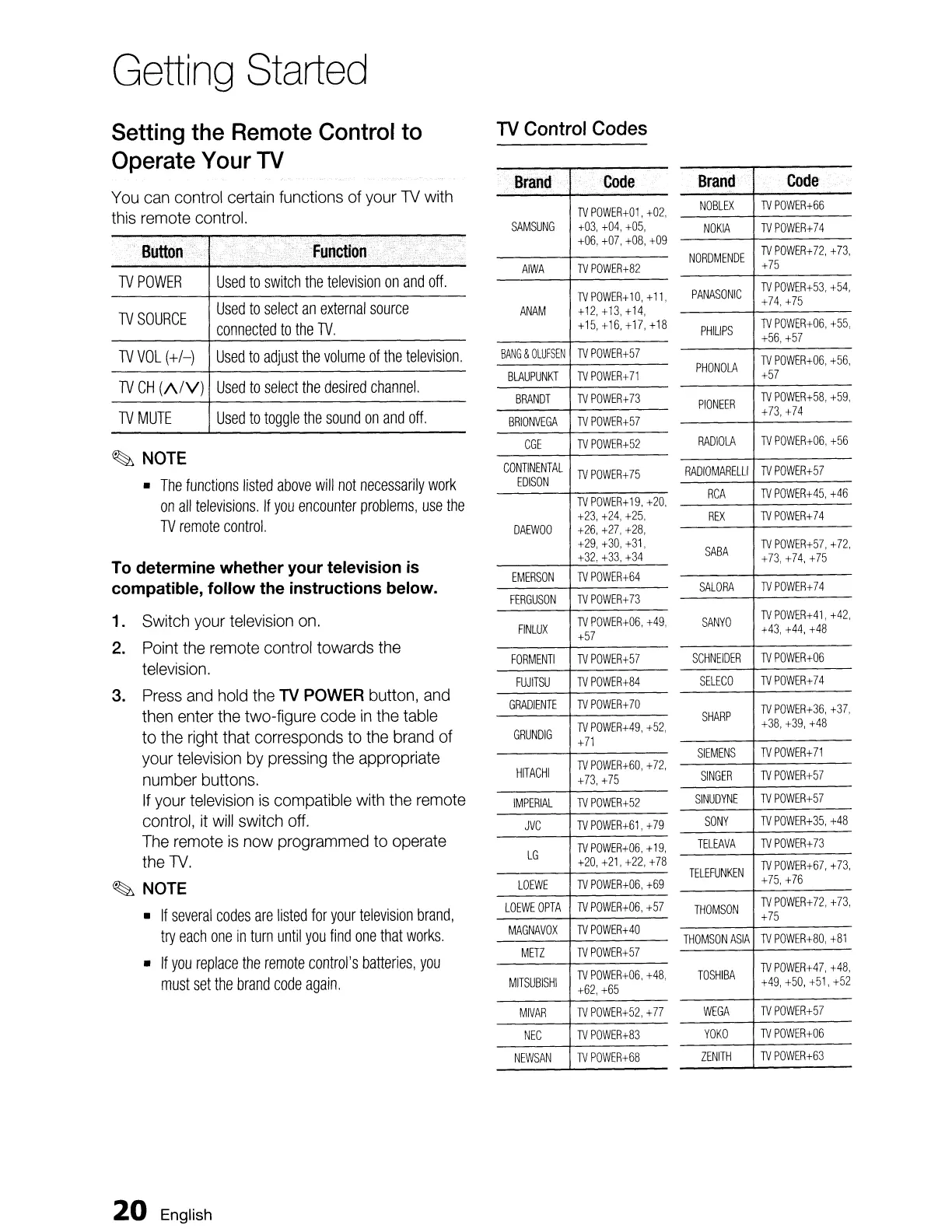
You
can
control
certain
functions of your
TV
with
this
remote
control.
Setting the Remote Control to
Operate Your TV
Brand
Code'
NOBLEX
TV
POWER+66
NOKIA
TV
POWER+74
NORDMENDE
TV
POWER+72,
+73,
+75
PANASONIC
TV
POWER+53,
+54,
+74,
+75
PHIUPS
TV
POWER+06,
+55,
+56,+57
PHONOLA
TV
POWER+06,
+56,
+57
PIONEER
TV
POWER+58,
+59,
+73,
+74
RADIOLA
TV
POWER+06,
+56
RADIOMARELLI
TV
POWER+57
RCA
TV
POWER+45,
+46
REX
TV
POWER+74
SABA
TV
POWER+57,
+72,
+73, +74,
+75
SALORA
TV
POWER+74
SANYO
TV
POWER+41,
+42,
+43, +44,
+48
SCHNEIDER
TV
POWER+06
SELECO
TV
POWER+74
SHARP
TV
POWER+36,
+37,
+38,
+39,
+48
SIEMENS
TV
POWER+71
SINGER
TV
POWER+57
SINUDYNE
TV
POWER+57
SONY
TV
POWER+35,
+48
TELEAVA
TV
POWER+73
TELEFUNKEN
TV
POWER+67,
+73,
+75,
+76
THOMSON
TV
POWER+72,
+73,
+75
THOMSON
ASIA
TV
POWER+80,
+81
TOSHIBA
TV
POWER+47,
+48,
+49, +50, +51,
+52
WEGA
TV
POWER+57
YOKO
TV
POWER+06
ZENITH
TV
POWER+63
.Brand
'Code
TV
POWER+01,
+02,
SAMSUNG
+03,
+04, +05,
+06,
+07,+08,+09
AIWA
TV
POWER+82
TV
POWER+
10,
+
11,
ANAM
+12, +13, +14,
+15, +16,
+17,
+18
BANG
&
OLUFSEN
TV
POWER+57
BLAUPUNKT
TV
POWER+71
BRANDT
TV
POWER+73
BRIONVEGA
TV
POWER+57
CGE
TV
POWER+52
CONTINENTAL
TV
POWER+75
EDISON
TV
POWER+
19,
+20,
+23,
+24,
+25,
DAEWOO
+26,
+27,
+28,
+29,
+30, +31,
+32,
+33,
+34
EMERSON
TV
POWER+64
FERGUSON
TV
POWER+73
FINLUX
TV
POWER+06,
+49,
+57
FORMENTI
TV
POWER+57
FUJITSU
TV
POWER+84
GRADIENTE
TV
POWER+70
GRUNDIG
TV
POWER+49,
+52,
+71
HITACHI
TV
POWER+60,
+72,
+73,
+75
IMPERIAL
TV
POWER+52
JVC
TV
POWER+61,
+79
LG
TV
POWER+06,
+
19,
+20,
+21,+22,+78
LOEWE
TV
POWER+06,
+69
LOEWE
OPTA
TV
POWER+06,
+57
MAGNAVOX
TVPOWER+40
METZ
TVPOWER+57
MITSUBISHI
TV
POWER+06,
+48,
+62,+65
MIVAR
TV
POWER+52,
+
77
NEC
TV
POWER+83
NEWSAN
TV
POWER+68
TV
Control
Codes
Used
to
select
an
external
source
connected
to
the
TV.
Used
to
switch
the
television
on
and
off.
Used
to
toggle
the
sound
on
and
off.
Used
to
select
the
desired
channel.
Used
to
adjust
the
volume
of
the
television.
TV
POWER
TVCH
(A/V)
TV
VOL
(+/-)
TV
MUTE
TV
SOURCE
~
NOTE
•
The
functions
listed
above
will
not
necessarily
work
on
all
televisions.
If
you
encounter
problems,
use
the
TV
remote
control.
To determine whether your television is
compatible, follow the instructions below.
1. Switch
your
television
on.
2.
Point
the
remote
control towards
the
television.
3.
Press
and
hold
the
TV
POWER
button,
and
then
enter
the two-figure code
in
the
table
to
the
right
that corresponds
to
the
brand
of
your
television
by
pressing
the
appropriate
number buttons.
If
your
television
is
compatible
with
the
remote
control,
it
will
switch
off.
The
remote
is
now programmed
to
operate
the
TV.
~
NOTE
•
If
several
codes
are
listed
for
your
television
brand,
try
each
one
in
turn
until
you
find
one
that
works.
•
If
you
replace
the
remote
control's
batteries,
you
must
set
the
brand
code
again.
20
English

Table of Contents