EasyManua.ls Logo

Samsung BD-D7500 - Case 2: Connecting to an Audio System (AV Receiver with Dolby Digital or DTS Decoder); Case 3: Connecting to an Audio System; (Stereo Amplifier) - Good Quality

Samsung BD-D7500
93 pages
Print Icon
To Next Page IconTo Next Page
To Previous Page IconTo Previous Page
Loading...
Connections
Case
2:
Connecting
to
an
Audio
System
(A
V
receiver
with
Dolby
Digital
or
DTS
decoder)
-
Better
Quality
1.
Using
an
optical
cable,
connect
the
DIGITAL
AUDIO
OUT
(OPTICAL)
terminal
on
the
player
to
the
DIGITAL
AUDIO
IN
(OPTICAL)
terminal
of
your
AV
receiver.
2.
Using
the
video
signal
cable(s),
connect
the
HDMI
or
AN
OUT
terminal
on
the
player
to
the
HOM
I
or
VIDEO
IN
terminal
of
your
TV.
(See
pages
21-22)
3.
Turn
on
the
player,
TV,
and
AV
receiver.
4.
Press
the
input
select
button
of
the
AV
receiver
to
select
the
external
input
and
hear
sound
from
the
player.
Refer
to
your
AV
receiver's
user
manual
to
set
the
AV
receiver's
audio
input.
5.
Press
the
input
selector
on
your
TV
remote
control
to
select
the
video
source
(HOMI
or
Video.)
Case
3:
Connecting
to
an
Audio
System
(Stereo
Amplifier)
-
Good
Quality
1.
Using
the
AudioNideo
cable,
connect
the
AN
OUT
(yellow)
terminal
on
the
player
to
the
AUDIO
IN
(red
and
white)
terminals
of
your
stereo
using
the
red
and
white
wires.
2.
Using
the
video
signal
cable(s),
connect
the
HDMI
terminal
on
the
player
to
the
HDMI
terminal
on
your
TV
or
connect
the
yellow
wire
from
the
AudioNideo
cable
to
the
AV
In
terminal
of
your
TV.
(See
pages
21-22)
3.
Turn
on
the
player,
TV
and
Stereo
Amplifier.
4.
Press
the
input
select
button
of
the
Stereo
Amplifier
to
select
the
external
input
in
order
to
hear
sound
from
the
player,
Refer
to
your
Stereo
Amplifier's
user
manual
to
set
the
Stereo
Amplifier's
audio
input.
5.
Press
the
input
selector
on
your
TV
remote
control
to
select
the
video
source
(HOMI
or
Video.)
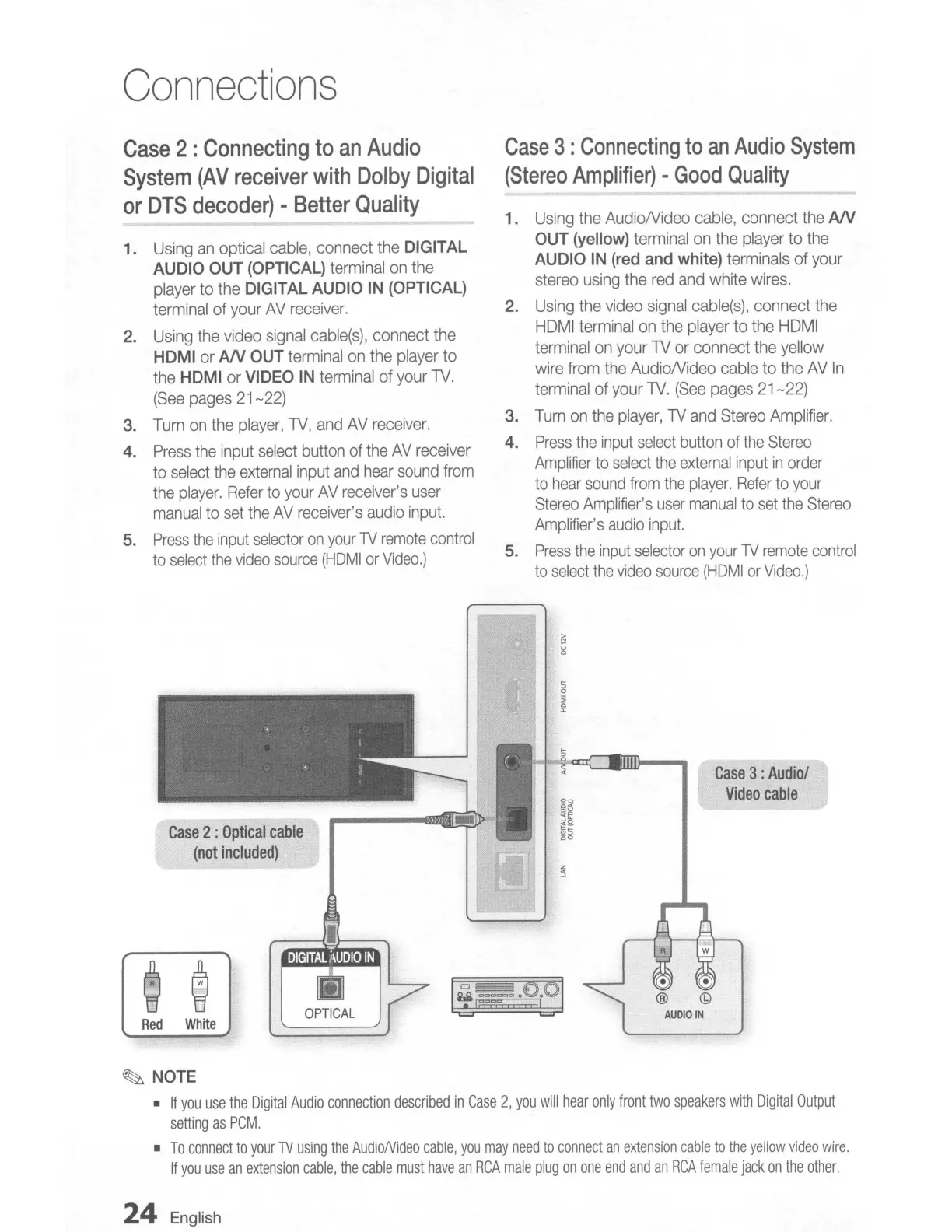
Case
2:
Optical
cable
(not
included)
Case
3:
Audio/
Video
cable
Red
White
~
NOTE
•
If
you
use
the
Digital
Audio
connection
described
in
Case
2,
you
will
hear
only
front
two
speakers
with
Digital
Output
setting
as
PCM,
•
To
connect
to
your
TV
using
the
AudioNideo
cable,
you
may
need
to
connect
an
extension
cable
to
the
yellow
video
wire,
If
you
use
an
extension
cable,
the
cable
must
have
an
RCA
male
plug
on
one
end
and
an
RCA
female
jack
on
the
other,
24
English

Table of Contents