EasyManua.ls Logo

Samsung BD-D7500 - Case 2: Installing on a Wall

Samsung BD-D7500
93 pages
Print Icon
To Next Page IconTo Next Page
To Previous Page IconTo Previous Page
Loading...
Connections
Case
2 :
Installing
on
a
wall
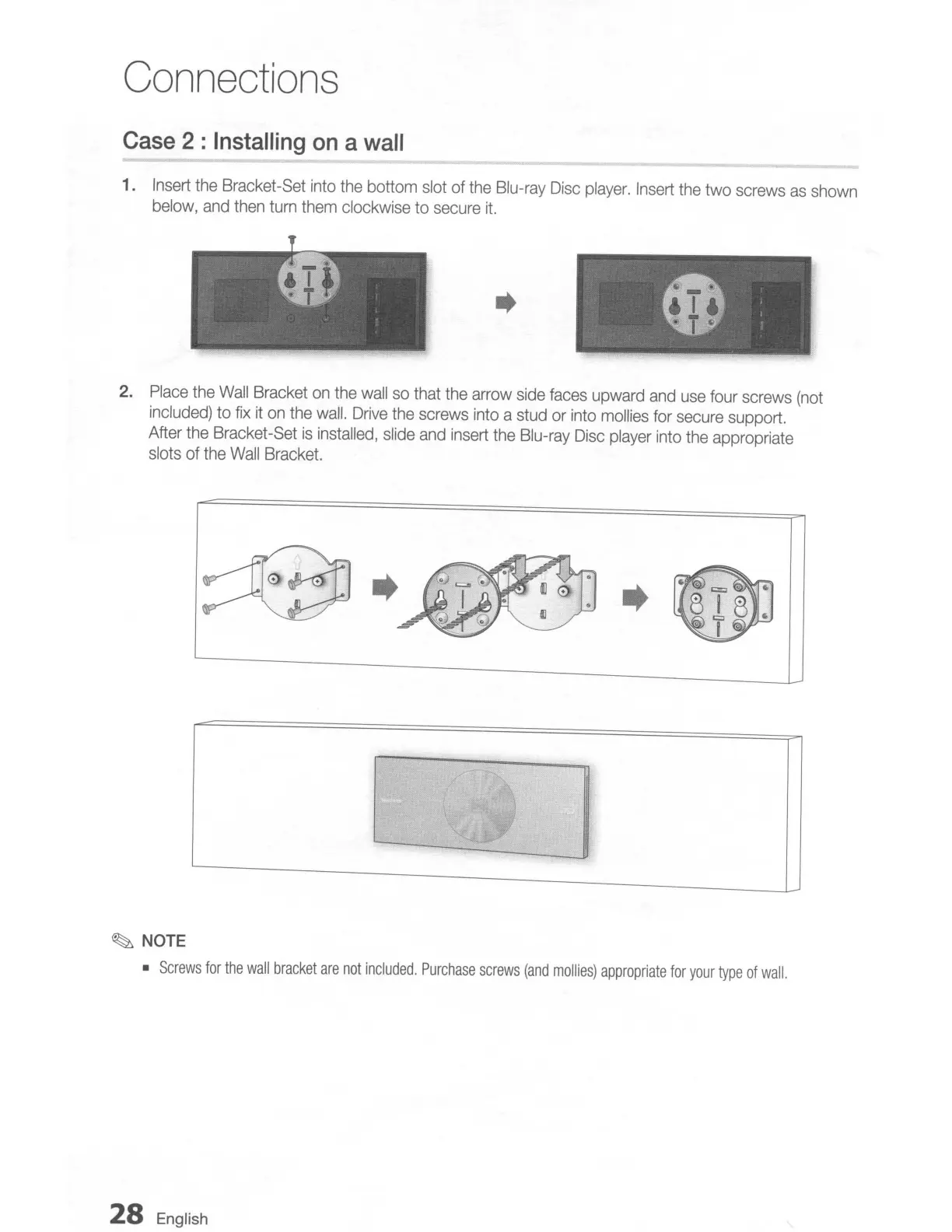
1.
Insert
the
Bracket-Set
into
the
bottom
slot
of
the
Blu-ray
Disc
player.
Insert
the
two screws
as
shown
below,
and
then
turn
them
clockwise
to
secure
it.
..
2.
Place
the
Wall
Bracket
on
the
wall
so
that
the
arrow
side
faces
upward
and
use
four screws
(not
included)
to
fix
it
on
the
wall.
Drive
the
screws
into
a
stud
or
into
mol
lies
for
secure
support.
After the Bracket-Set
is
installed,
slide
and
insert
the
Blu-ray
Disc
player
into
the
appropriate
slots of
the
Wall
Bracket.
~
NOTE
Screws
for
the
wall
bracket
are
not
included.
Purchase
screws
(and
mollies)
appropriate
for
your
type
of
wall.
28
English

Table of Contents

Related product manuals