EasyManua.ls Logo

Samsung BD-D7500 - Disc Structure; Using the Disc Menu; Using the Title Menu; Playing the Title List

Samsung BD-D7500
93 pages
Print Icon
To Next Page IconTo Next Page
To Previous Page IconTo Previous Page
Loading...
Basic
Functions
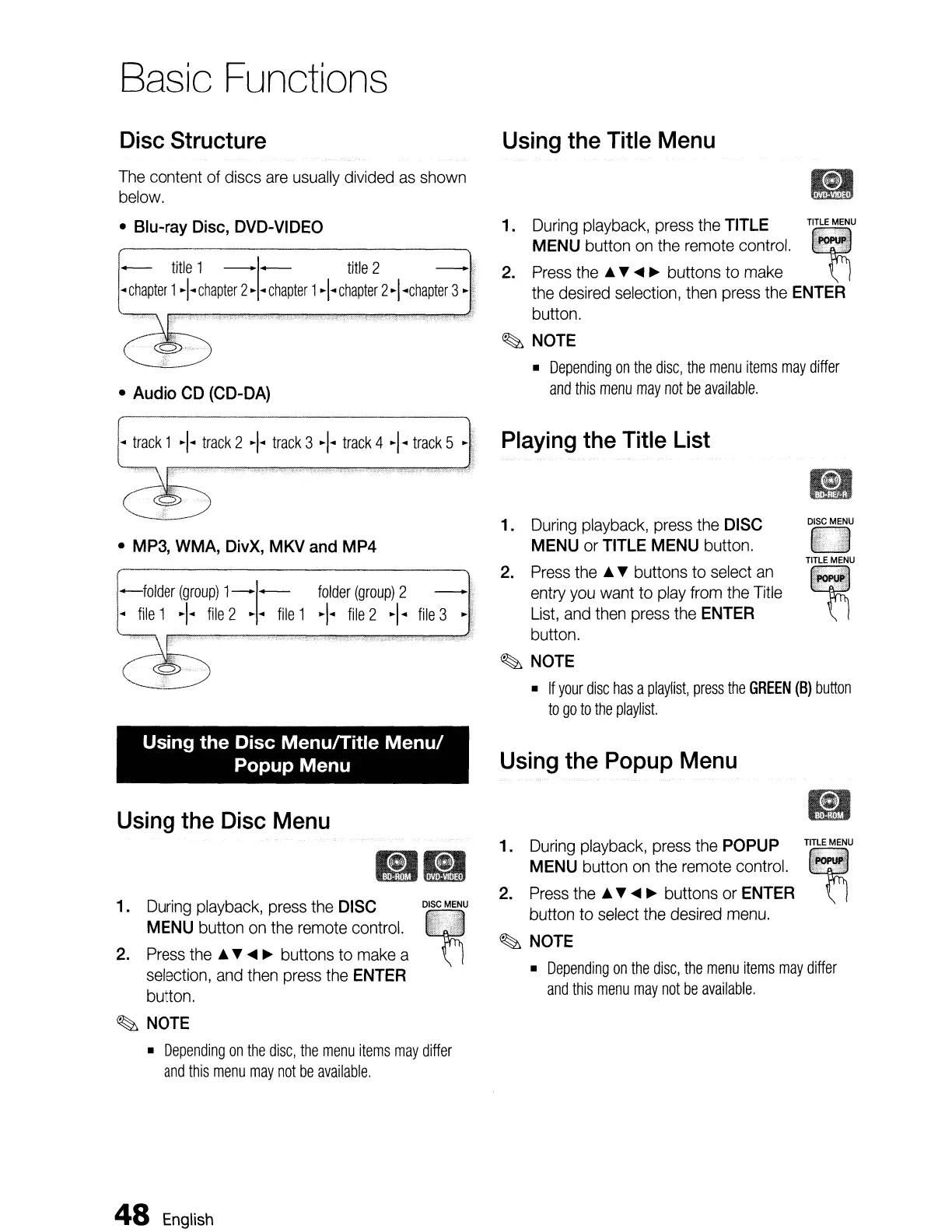
Disc
Structure
Using
the
Title
Menu
The
content
of
discs
are
usually
divided
as
shown
below.
•
Blu-ray
Disc,
DVD-VIDEO
-
title
1 -1-
title
2 -
..
chapter
1+
chapter
2·
..
chapter
1+
chapter
2
·I
..
chapter
3•
•
Audio
CD
(CD-DA)
1. During playback, press the TITLE
""
2.
~:~S~h~u:o;
:n~th:u~~::t:o
c~:::1.
:¥ii~
the
desired
selection,
then
press
the
ENTER
button.
~
NOTE
•
Depending
on
the
disc,
the
menu
items
may
differ
and
this
menu
may
not
be
available.
..
track
1 +
track
2 +
track
3 +
track
4
·1
..
track
5 •
Playing
the
Title
List
DISC
MENU
TITLE
MENU
Ell
n
2.
Press
the
•
~
buttons to
select
an
entry
you
want
to
play
from
the
Title
List,
and
then
press
the
ENTER
button.
~
NOTE
•
If
your
disc
has
a
playlist,
press
the
GREEN
(B)
button
to
go
to
the
playlist.
1.
During
playback,
press
the
DISC
MENU
or
TITLE
MENU
button.
-folder
(group)
1-1-
folder
(group)
2
..
file
1 +
file
2
...
file
1 +
file
2
·1
..
file
3
•
MP3,
WMA,
DivX,
MKV
and
MP4
Using the Disc Menu/Title
Menu/
Popup Menu
Using
the
Popup
Menu
DISC
MENU
~
'6
Using
the
Disc
Menu
•
1.
During
playback,
press
the
DISC
MENU
button
on
the
remote
control.
2.
Press
the
•
~
....
~
buttons
to
make
a
selection,
and
then
press
the
ENTER
button.
~
NOTE
•
Depending
on
the
disc,
the
menu
items
may
differ
and
this
menu
may
not
be
available.
::
~::~!~~;:~~::;::t~~:~
~"
button to
select
the
desired
menu.
~
NOTE
•
Depending
on
the
disc,
the
menu
items
may
differ
and
this
menu
may
not
be
available.
48
English

Table of Contents