EasyManua.ls Logo

Samsung BD-D7500 - Playing an Audio CD (CD-DA);MP3; Repeat an Audio CD (CD-DA);MP3; Playlist

Samsung BD-D7500
93 pages
Print Icon
To Next Page IconTo Next Page
To Previous Page IconTo Previous Page
Loading...
SKIP
button:
During
playback,
moves
to
the
next
page
in
the
Music
List
or
moves
to
the
next
track
in
the
Playlist.
SKIP
button
:
During
playback,
moves
to
the
previous
page
in
the
Music
List
or
moves
to
the
previous
track
in
the
Playlist.
If
you
press
this
button
after
three
seconds
of
playback
in
the
Playlist,
the
current
track
is
replayed
from
the
beginning.
But,
if
you
press
this
button
less
than
three
seconds
after
playback
starts
in
the
Playlist,
the
previous
track
is
played.
NUMBER
buttons:
During
the
Playlist
playback,
m
press
the
desired
track
number.
The
selected
track
is
played.
Playing
an
Audio
CD
(CD-DA)/MP3
1.
Insert
an
Audio
CD
(CD-DA)
or
an
MP3
Disc.
For
an
Audio
CD
(CD-DA),
the
first
track
plays
automatically.
For
an
MP3
disc,
press
the'"
T buttons
to
select
Music,
then
press
the
ENTER
button.
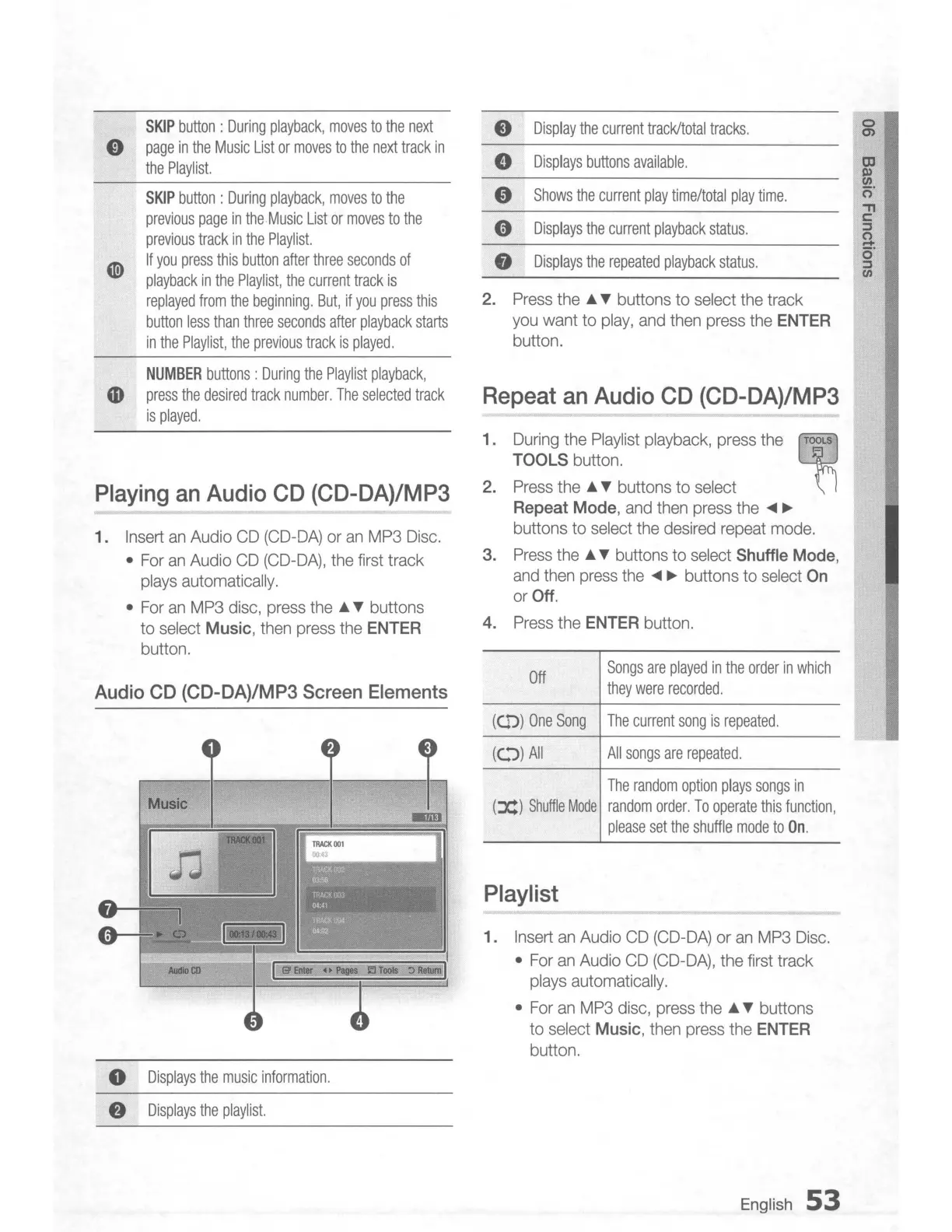
0
Display
the
current
track/total
tracks.
0
m
0
Displays
buttons
available.
OJ
~
CJ)
Shows
the
current
play
time/total
play
time.
o'
'"T1
e
Displays
the
current
playback
status.
c:
:;:,
0
-
8
Displays
the
repeated
playback
status.
o'
:;:,
CJ)
2.
Press
the
...
T buttons
to
select
the
track
you
want
to
play,
and
then
press
the
ENTER
button.
Repeat an Audio CD (CD-DA)/MP3
1.
During the Playlist playback, press the
l'f1
TOOLS button.
2.
Press
the
...
T buttons
to
select
Repeat
Mode,
and
then
press
the
....
~
buttons
to
select
the
desired
repeat
mode.
3.
Press
the'"
T buttons to
select
Shuffle Mode,
and
then
press
the
....
~
buttons
to
select
On
or
Off.
4.
Press
the
ENTER button.
Audio CD (CD-DA)/MP3 Screen Elements
Off
Songs
are
played
in
the
order
in
which
they
were
recorded.
(CD)
One
Song
The
current
song
is
repeated.
Playlist
The
random
option
plays
songs
in
(JC)
Shuffle
Mode
random
order.
To
operate
this
function,
please
set
the
shuffle
mode
to
On.
1.
Insert
an
Audio
CD
(CD-DA)
or
an
MP3
Disc.
For
an
Audio
CD
(CD-DA),
the
first
track
plays
automatically.
For
an
MP3
disc,
press
the'"
T buttons
to
select
Music,
then
press
the ENTER
button.
All
songs
are
repeated.
((."))
All
I I
Music
o
Displays
the
music
information.
f)
Displays
the
playlist.
English
53

Table of Contents

Related product manuals