EasyManua.ls Logo

Samsung BD-D7500 - Changing the Camera Angle; Setting BONUSVIEW; Listening to Music; Buttons on the Remote Control Used for Music Playback

Samsung BD-D7500
93 pages
Print Icon
To Next Page IconTo Next Page
To Previous Page IconTo Previous Page
Loading...
Basic
Functions
Changing
the
Camera
Angle
When
a
Blu-ray
Disc/DVD
contains multiple
angles
of
a particular
scene,
you
can
use
the
ANGLE
function.
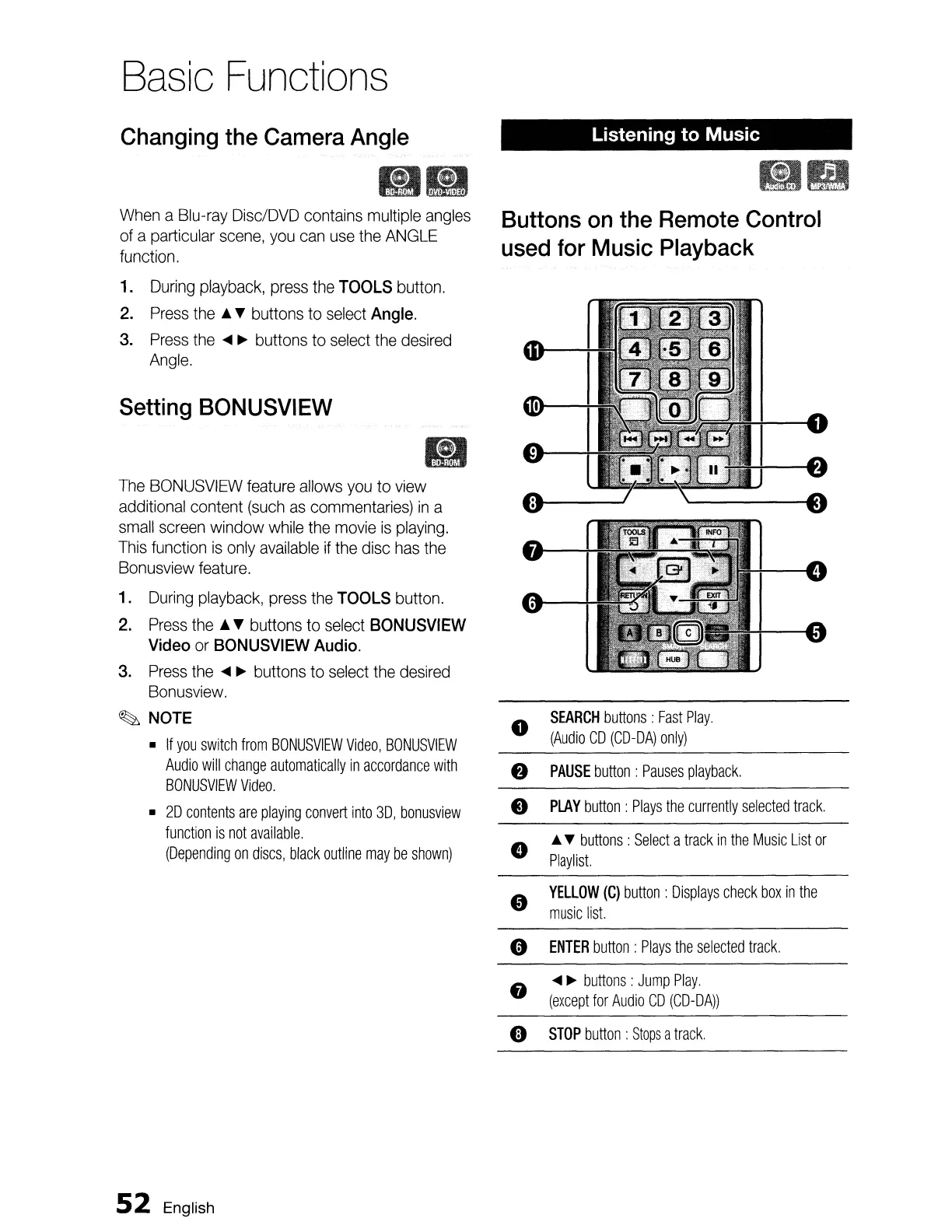
1.
During
playback,
press
the
TOOLS
button.
2.
Press
the
& buttons
to
select
Angle.
3.
Press
the
...
~
buttons
to
select
the
desired
Angle.
Setting
BONUSVIEW
It)
The
BONUSVIEW
feature
allows
you
to
view
additional content
(such
as
commentaries)
in
a
small
screen
window
while
the
movie
is
playing.
This
function
is
only
available
if
the
disc
has
the
Bonusview
feature.
1.
During
playback,
press
the
TOOLS
button.
2.
Press
the
~.
buttons
to
select
BONUSVIEW
Video
or
BONUSVIEW
Audio.
3.
Press
the
...
~
buttons
to
select
the
desired
Bonusview.
~
NOTE
If
you
switch
from
BONUSVIEW
Video,
BONUSVIEW
Audio
will
change
automatically
in
accordance
with
BONUSVIEW
Video.
20
contents
are
playing
convert
into
3D,
bonusview
function
is
not
available.
(Depending
on
discs,
black
outline
may
be
shown)
52
English
Listening to Music
Buttons
on
the
Remote
Control
used
for
Music
Playback
G
SEARCH
buttons:
Fast
Play.
(Audio
CD
(CD-DA)
only)
8
PAUSE
button:
Pauses
playback.
e
PLAY
button:
Plays
the
currently
selected
track.
e
~
buttons
:
Select
a
track
in
the
Music
List
or
Playlist.
"
YELLOW
(C)
button
:
Displays
check
box
in
the
music
list.
0
ENTER
button:
Plays
the
selected
track
.
8
...
~
buttons:
Jump
Play.
(except
for
Audio
CD
(CD-DA))
0
STOP
button
:
Stops
a
track.

Table of Contents

Related product manuals