EasyManua.ls Logo

Samsung BD-D7500 - Playing Back Pictures; Playing a JPEG Files; Using the TOOLS Button

Samsung BD-D7500
93 pages
Print Icon
To Next Page IconTo Next Page
To Previous Page IconTo Previous Page
Loading...
Basic
Functions
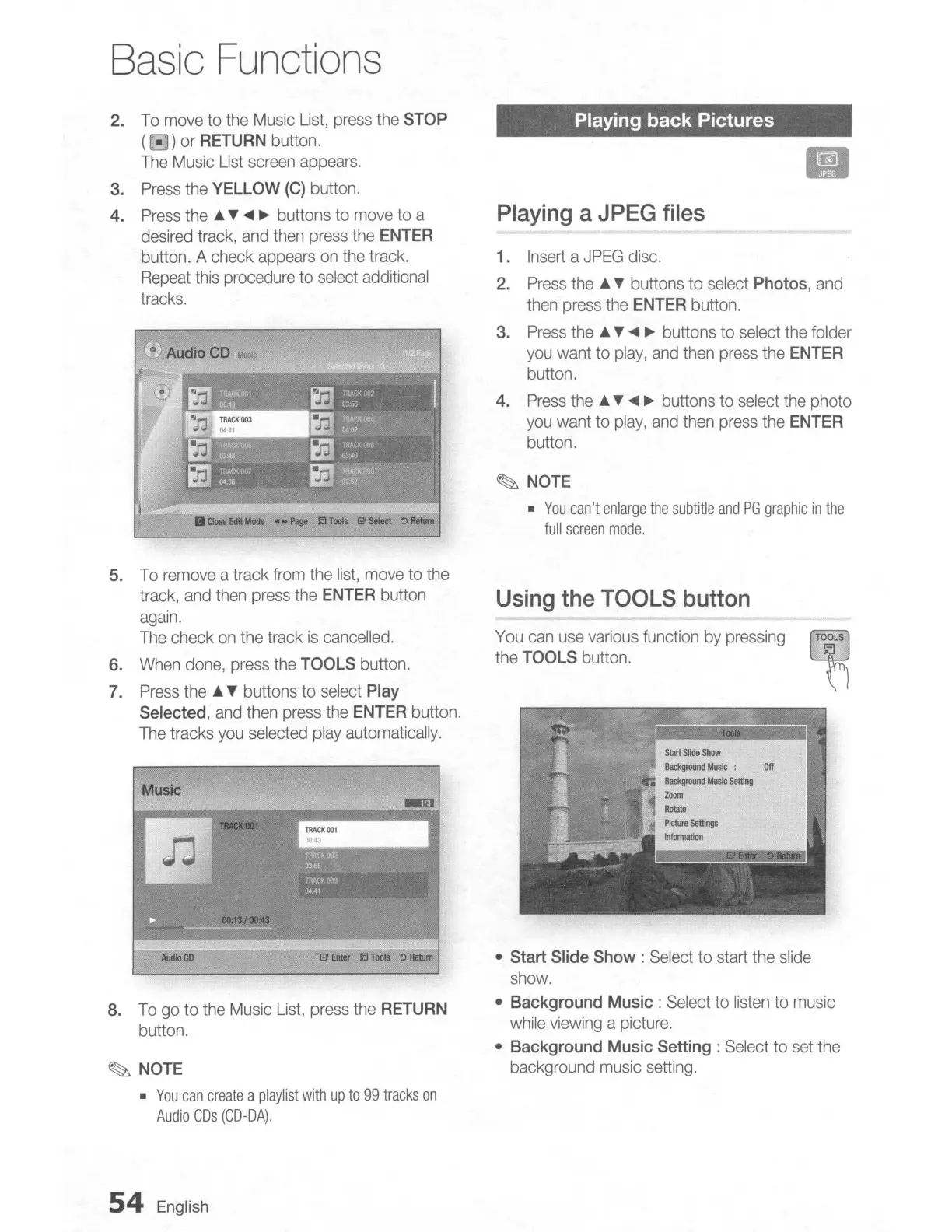
2.
To
move
to
the
Music
List,
press
the
STOP
(0)
or
RETURN
button.
The
Music
List
screen
appears.
3.
Press
the
YELLOW
(C)
button.
4.
Press
the
...
T
....
~
buttons
to
move
to
a
desired
track,
and
then
press
the
ENTER
button. A check
appears
on
the
track.
Repeat
this
procedure
to
select
additional
tracks.
o Audio
CD
M_
II
Close
Edit
Mode
....
Page
J.:J
Tools
13'
select
~
Return
Playing back Pictures
II
Playing
a
JPEG
files
1.
Insert
a
JPEG
disc.
2.
Press
the'"
T buttons
to
select
Photos,
and
then
press
the
ENTER
button.
3.
Press
the
...
T
....
~
buttons to
select
the
folder
you
want
to
play,
and
then
press
the
ENTER
button.
4.
Press
the
...
T
....
~
buttons
to
select
the
photo
you
want
to
play,
and
then
press
the
ENTER
button.
~
NOTE
•
You
can't
enlarge
the
subtitle
and
PG
graphic
in
the
full
screen
mode.
8.
To
go
to
the
Music
List,
press
the
RETURN
button.
Start
Slide
Show
Background
Music
:
Off
Background
Music
setting
Zoom
Rotate
PIcture
settJngs
Infonmation
You
can
use
various
function
by
pressing
~
the
TOOLS
button.
Using
the
TOOLS
button
• Start
Slide
Show:
Select
to
start
the
slide
show.
•
Background
Music:
Select
to
listen
to
music
while
viewing
a
picture.
•
Background
Music
Setting:
Select
to
set
the
background
music
setting.
13'
Enter
J.:J
Tools
:)
Return
Audio
CO
Music
~
NOTE
•
You
can
create
a
playlist
with
up
to
99
tracks
on
Audio
CDs
(CD-DA).
5.
To
remove
a track
from
the
list,
move
to
the
track,
and
then
press
the
ENTER
button
again.
The
check
on
the
track
is
cancelled.
6.
When
done,
press
the
TOOLS
button.
7.
Press
the
...
T buttons to
select
Play
Selected,
and
then
press
the
ENTER
button.
The
tracks
you
selected
play
automatically.
54
English

Table of Contents