EasyManua.ls Logo

Samsung BD-D7500 - Connections; Case 2: Connecting to a 1 V with an Audionideo Cable - Good Quality

Samsung BD-D7500
93 pages
Print Icon
To Next Page IconTo Next Page
To Previous Page IconTo Previous Page
Loading...
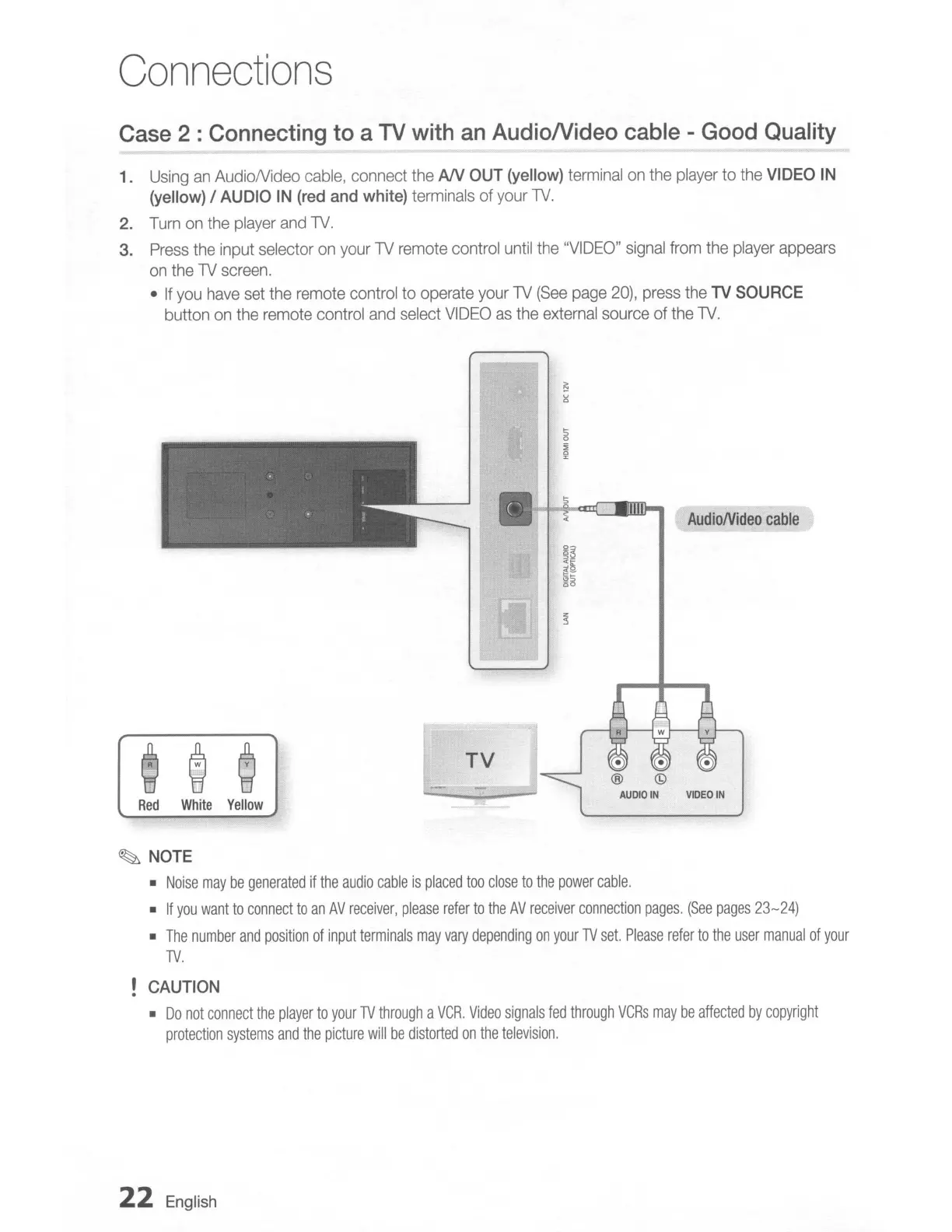
Connections
Case
2 :
Connecting
to
a
TV
with
an
AudioNideo
cable
-
Good
Quality
1.
Using
an
AudioNideo
cable,
connect
the
AN
OUT
(yellow)
terminal
on
the
player
to
the
VIDEO
IN
(yellow)
/
AUDIO
IN
(red
and
white)
terminals
of
your
TV.
2.
Turn
on
the
player
and
TV.
3.
Press
the
input
selector
on
your
TV
remote
control
until
the
"VIDEO"
signal
from
the
player
appears
on
the
TV
screen.
If
you
have
set
the
remote
control to
operate
your
TV
(See
page
20),
press
the
TV
SOURCE
button
on
the
remote
control
and
select
VIDEO
as
the
external
source
of
the
TV.
AudioNideo
cable
Red
White
Yellow
TV
~
NOTE
Noise
may
be
generated
if
the
audio
cable
is
placed
too
close
to
the
power
cable.
If
you
want
to
connect
to
an
AV
receiver,
please
refer
to
the
AV
receiver
connection
pages.
(See
pages
23-24)
The
number
and
position
of
input
terminals
may
vary
depending
on
your
TV
set.
Please
refer
to
the
user
manual
of
your
TV.
CAUTION
Do
not
connect
the
player
to
your
TV
through
a
VCR.
Video
signals
fed
through
VCRs
may
be
affected
by
copyright
protection
systems
and
the
picture
will
be
distorted
on
the
television.
22
English

Table of Contents

Related product manuals