EasyManua.ls Logo

Samsung BD-D7500 - Page 67

Samsung BD-D7500
93 pages
Print Icon
To Next Page IconTo Next Page
To Previous Page IconTo Previous Page
Loading...
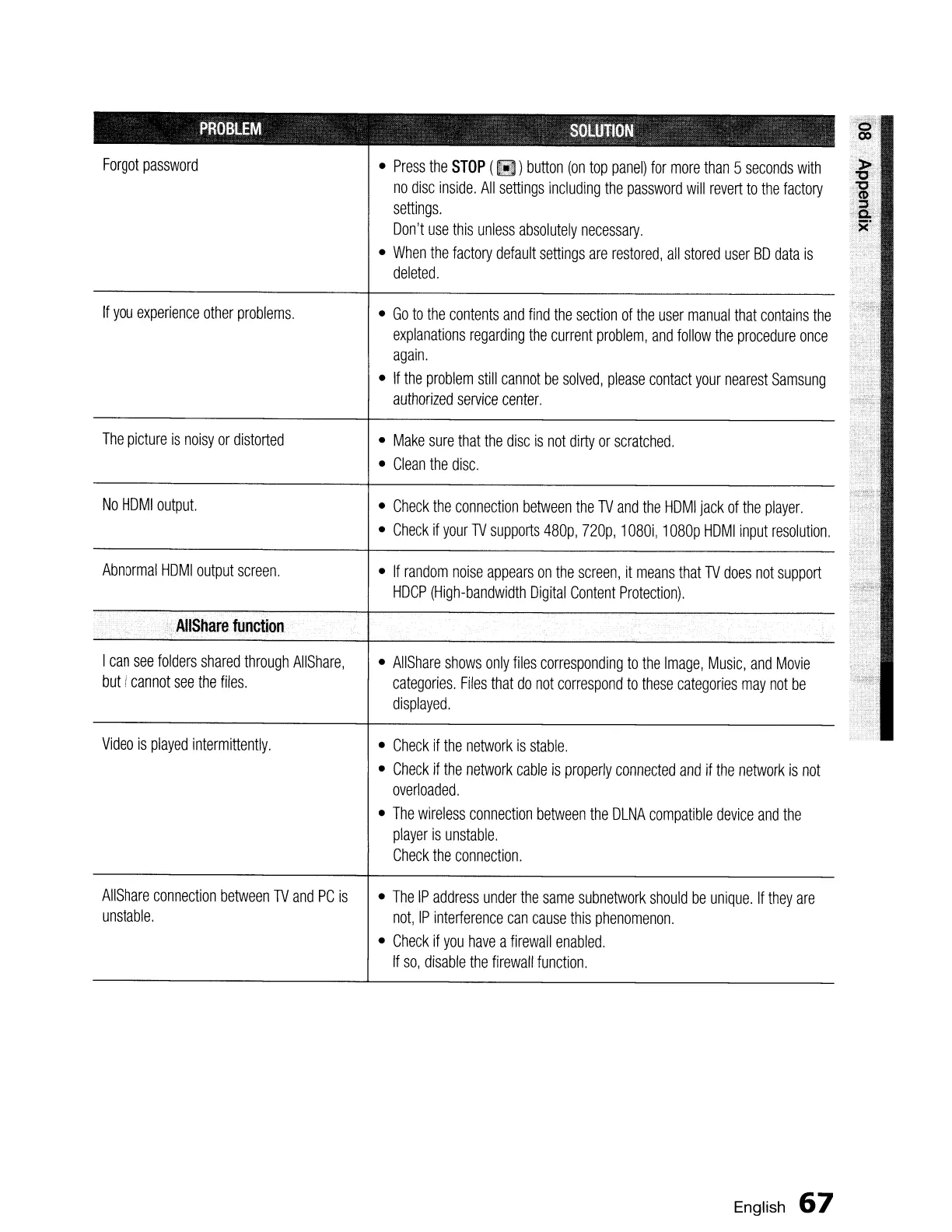
PROBLEM
SOLUTION
Forgot
password
No
HDMI
output.
•
Check
if
the
network
is
stable.
•
Check
if
the
network
cable
is
properly
connected
and
if
the
network
is
not
overloaded.
•
The
wireless
connection
between
the
DLNA
compatible
device
and
the
player
is
unstable.
Check
the
connection.
•
AllShare
shows
only
files
corresponding
to
the
Image,
Music,
and
Movie
categories.
Files
that
do
not
correspond
to
these
categories
may
not
be
displayed.
•
If
random
noise
appears
on
the
screen,
it
means
that
TV
does
not
support
HDCP
(High-bandwidth
Digital
Content
Protection).
•
Make
sure
that
the
disc
is
not
dirty
or
scratched.
•
Clean
the
disc.
•
Check
the
connection
between
the
TV
and
the
HDMI
jack
of
the
player.
•
Check
if
your
TV
supports
480p,
nap,
1080i,
1
080p
HDMI
input
resolution.
•
Press
the
STOP
(~)
button
(on
top
panel)
for
more
than
5
seconds
with
no
disc
inside.
All
settings
including
the
password
will
revert
to
the
factory
settings.
Don't
use
this
unless
absolutely
necessary.
•
When
the
factory
default
settings
are
restored,
all
stored
user
SD
data
is
deleted.
•
Go
to
the
contents
and
find
the
section
of
the
user
manual
that
contains
the
explanations
regarding
the
current
problem,
and
follow
the
procedure
once
again.
•
If
the
problem
still
cannot
be
solved,
please
contact
your
nearest
Samsung
authorized
service
center.
,,,AIIShare
function
Video
is
played
intermittently.
Abnormal
HDMI
output
screen.
I
can
see
folders
shared
through
AIiShare,
but
I
cannot
see
the
files.
The
picture
is
noisy
or
distorted
If
you
experience
other
problems.
«,
AIiShare
connection
between
TV
and
PC
is
unstable,
•
The
IP
address
under
the
same
subnetwork
should
be
unique.
If
they
are
not,
IP
interference
can
cause
this
phenomenon.
•
Check
if
you
have
a
firewall
enabled.
If
so,
disable
the
firewall
function.
English
67

Table of Contents