SATEL Installation and Programming Manual 29
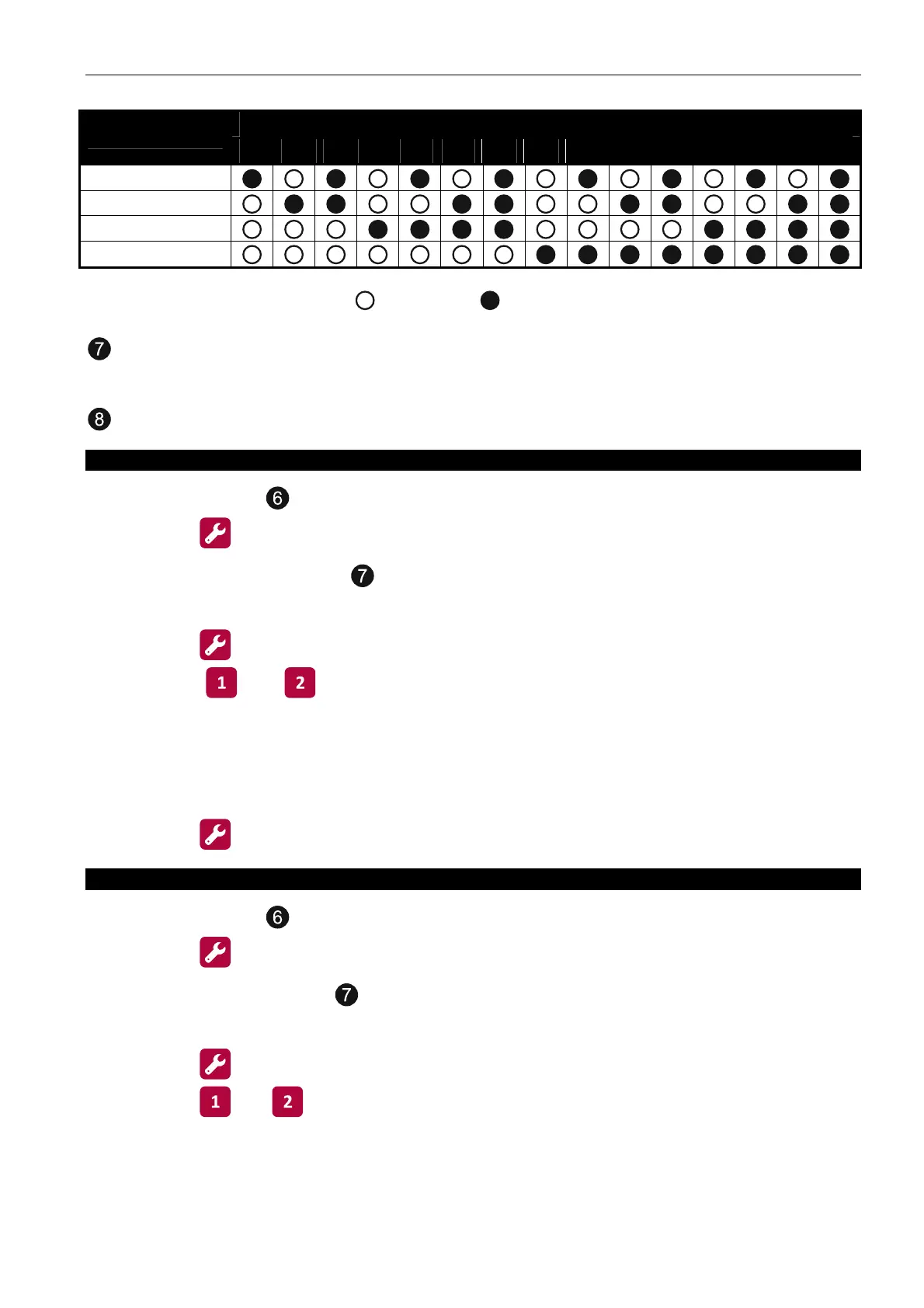
Function number
LED number
1 2 3 4 5 6 7 8 9 10 11 12 13 14 15
1
2
3
4
Table 1. The way of presenting function numbers by means of LEDs
( - LED OFF; - LED ON).
the buttons allow you to select the zone, input, output, etc., and also to enter data (in
the CSP-104 control panel, only four buttons are available). Pressing the button makes
the LED next to the button turn ON / OFF.
the button confirms the selection made or the data entered.
1. Programming the alarm mode for zones
1. Using the buttons
,
select the function 1 (see: Table 1).
2. Press the button.
3. Press one of the buttons to select the zone for which the alarm mode will be
programmed.
4. Press the button.
5. Using the and button, determine the alarm mode. The ON LED indicates the
selected alarm mode (only one LED can be ON):
1 – one-stage;
2 – two-stage.
6. Press the button to save the changes made.
2. Programming the zone dependency (coincidence)
1. Using the buttons
, select the function 2 (see: Table 1).
2. Press the
button.
3. Press one of the buttons
to select the zone for which the dependency (coincidence
detection) rules will be programmed.
4. Press the
button.
5. Using the
and buttons, determine the dependency (coincidence detection) rules.



 To Next Page