14 PERFECTA SATEL
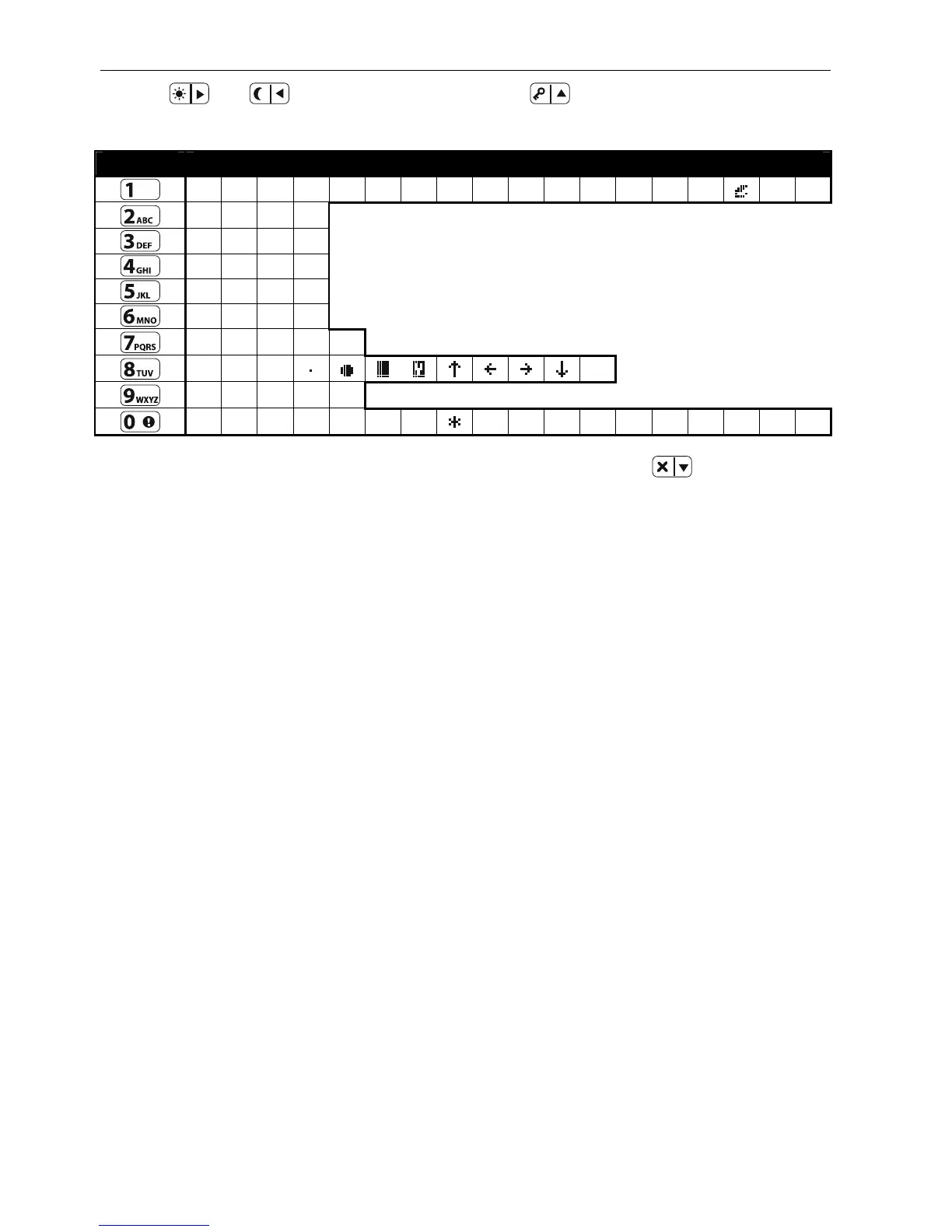
Use the and keys to move the cursor. The key deletes the character on the
left side of the cursor.
Key Character av ilab e a er n xt eys rok s a l ft e k t e
! ? ' ` " { } $ % & @ \ ^ |
# 1
a b c 2
d e f 3
g h i 4
j k l 5
m n o 6
p q r s 7
t u v
8
w x y z 9
. , : ; + -
/ = _ < > ) ( [ ] 0
Table 1. Characters available when entering names. The upper case letters are available
e keys (to change the letter case, press under the sam ).
enable calling the given submenu or
e given function from the main menu level.
1.Ch e
2.Users
[21]
chedule
d partitions
fob
● with buttons ○+●
b event write keyfob use to event log
entering the user name
[22] 2.Edi
[sele
chedule
6.7.3 User functions list
Presented below are all items of the user menu. The menu displayed on the keypad contains
only the items to which you have access, because of the rights granted to you or status of the
system.
Shown in square brackets are key sequences that
starting th
ange code changing own cod
1.New user adding new user
[211] 1.Code entering code
[212] 2.Schedule
selecting user s
[213] 3.Partitions selecting supporte
[214] 4.Add key fob adding keyfob
[215] 5.Remov.key
removing keyfob
Button
○ selecting function to run with button ○
Button □ selecting function to run with button □
Button ▲ selecting function to run with button ▲
Button ■ selecting function to run with button ■
Button ● selecting function to run with button ●
Button ○+ selecting function to run
Key fo do you want to
[218] 8.Name
t user editing a user
cting user]
1.Code
editing code
2.Schedule
changing user s













 To Next Page