SECTION 4
:
FREE MODE
SATO HT200e Page 4-17
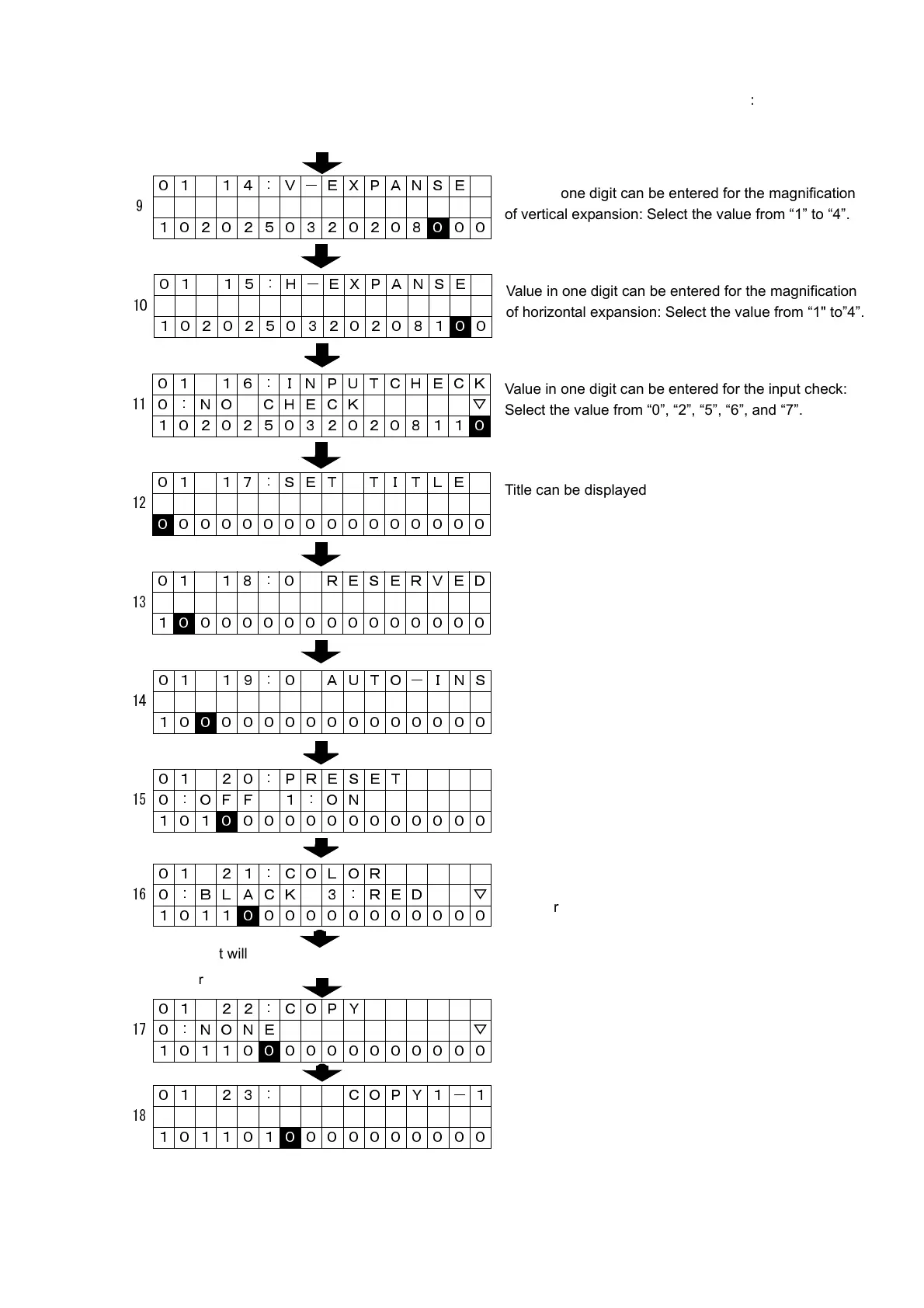
It will go to the entry for copy.
For entry of copy:
01 14 : V-EXPANSE
9
1020250320208
0 00
01 15 : H-EXPANSE
10
10202503202081
0 0
01 16 : INPUTCHECK
11 0 : NO CHECK ▽
102025032020811
0
01 17 : SET TITLE
12
0 000000000000000
01 18 : 0 RESERVED
13
1
0 00000000000000
01 19 : 0 AUTO-INS
14
10
0 0000000000000
01 20 : PRESET
15 0 : OFF 1 : ON
101
0 000000000000
01 21 : COLOR
16 0 : BLACK 3 : RED ▽
1011
0 00000000000
01 22 : COPY
17 0 : NONE ▽
10110
0 0000000000
01 23 : COPY1-1
18
101101
0 000000000
Value in one digit can be entered for the magnification
of vertical expansion: Select the value from “1” to “4”.
Value in one digit can be entered for the magnification
of horizontal expansion: Select the value from “1" to”4”.
Value in one digit can be entered for the input check:
Select the value from “0”, “2”, “5”, “6”, and “7”.
Title can be displayed:
(Note: It will be displayed in only one field per format.)
“0” is fixed.
Value in one digit can be entered for with or without
0 insertion: Select “0” or “1”.
Value in one digit can be entered for preset:
Select “0” or “1”.
Value in one digit can be entered for print color.
Select from “0”, “3”, and “4”.
Enter value in one digit for an absence of a copy
function, an issuance of copy, or a reception of copy.
Enter value in 2 digits for the first position to specify the
range of copying characters.



 To Next Page