Assembly
09.00 | PGN-plus | Assembly and Operating Manual | en | 389296
43
Ø Turn the screw (5) to adjust the position of the control cam (6).
✓ Slide control cam (6) inwards until the sensor 1 (1) no longer
responds.
Move the control cam (6) back towards the outside until the
sensor 1 (1) begins to switch.
Ø Tighten screw (4) while pressing the control cam in the direction
of the gripper fingers. IMPORTANT!The control cam may tilt in
the guide if it has not been tightened properly.
✓ Switching point is set.
Ø Bring product into the "Gripper open" or "Part gripped" position
and test the function.
Position "Gripper closed" or "Part gripped (O.D. gripping)"
Ø Loosen screw (4) and remove the contol cam (6) for inductive
sensing from the base jaw.
Ø Push the control cam (6) from the mounting kit into the base
jaw.
✓ Make sure that the side with the magnet is facing outwards.
Ø Tighten screw (4) slightly
Ø Slide the sensor 1 (1) into the bracket (2) until it stops.
Ø Tighten the screw (3) on the bracket (2).
Tightening torque: 0.2 Nm
Ø Close gripper or grip part.
Ø Unfasten the screw (4).
Ø Turn the screw (5) to adjust the position of the control cam (6).
✓ Slide control cam (6) outwards until the sensor 2 (1) no
longer responds.
Move the control cam (6) back towards the inside until the
sensor 1 (1) begins to switch.
Ø Tighten screw (4) while pressing the control cam in the direction
of the gripper fingers. IMPORTANT!The control cam may tilt in
the guide if it has not been tightened properly.
✓ Switching point is set.
Ø Bring product into the "Gripper closed" or "Part gripped"
position and test the function.
Variant Dust-tight:
Screw in set-screw into the side cover.
NOTE
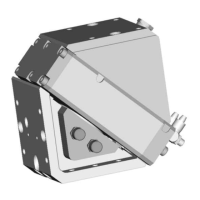
If the switching position cannot be queried, it may be that the
alignment of the control cam has to be changed,
Turn control cam [
}
26].



 To Next Page