22 •
17-10-07-652-100/05-2019B
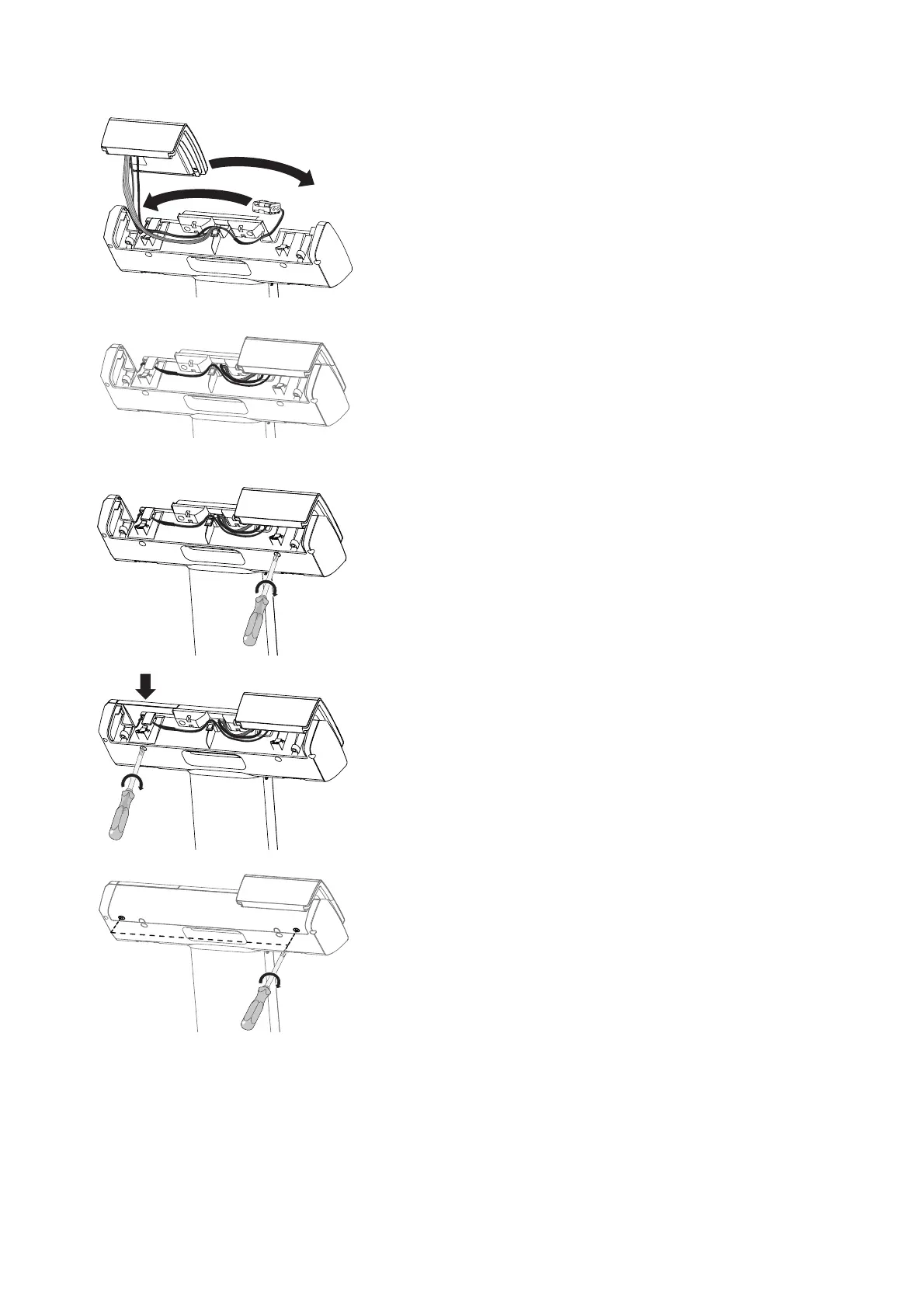
4. Switch the positions of the display unit and the battery holder:
a) Put the battery holder in its new position
b) Carefully put the display unit in its new position
5. Route the cables so that they do not dangle out of the display head.
NOTE
• When fitting on the right-hand operating side: You can gather all the
cables into the cable hook and secure them with a cable tie if
necessary.
•
seca 797 only: If a barcode scanner is installed, route the barcode
scanner cable over the strain relief and secure it with a cable tie if
required (➔ “Connecting the barcode scanner (seca 797)”,
page 25).
6. Fit the display unit:
a) Hold the display unit steady
b) Tighten the cross-head screw behind the display unit
7. Fit the battery compartment lid:
a) Insert the battery compartment lid and hold it steady
b) Tighten the cross-head screw behind the battery compartment lid
8. Fit the cover panel:
a) Insert cover panel
b) Place and tighten two cross-head screws



 To Next Page