Starting up device • 21
17-10-07-652-100/05-2019B
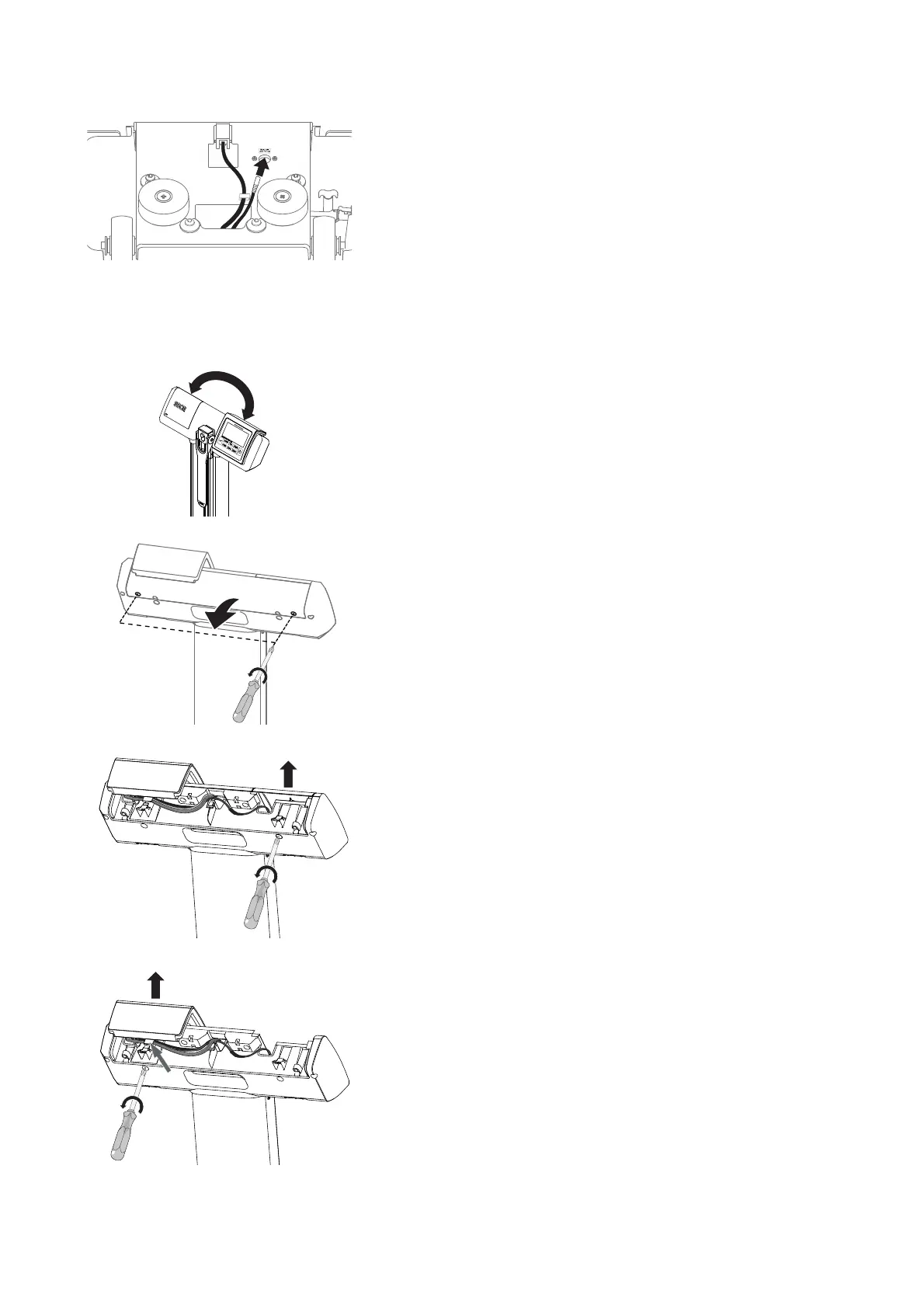
9. seca 797 only: Connect the display cable:
a) Draw the display cable out of the column
b) Plug the display cable into the labeled socket
c) Fix the display cable in position with the cable clip
10. Set the measuring station in an upright position.
Switching the positions of the
display unit and the battery
compartment
At the factory, the display unit is fitted to the right-hand operating side of the
display head. The battery compartment is on the left-hand operating side.
Proceed as follows to switch the positions of the display unit and the battery
compartment.
1. Remove the cover panel:
a) Unscrew two cross-head screws
b) Remove the cover panel
2. Remove the battery compartment lid:
a) Hold the battery compartment lid steady
b) Remove the cross-head screw behind the battery compartment lid
c) Remove the battery compartment lid
3. Remove the display unit:
a) Undo the cross-head screw behind the display unit
b) Remove cable tie on the cable hook and strain relief, if present
c) Draw cables out of the cable hook
d) Lift off display unit
Right-hand
operating side
Left-hand
operating side



 To Next Page