Troubleshooting • 39
17-10-07-652-100/05-2019B
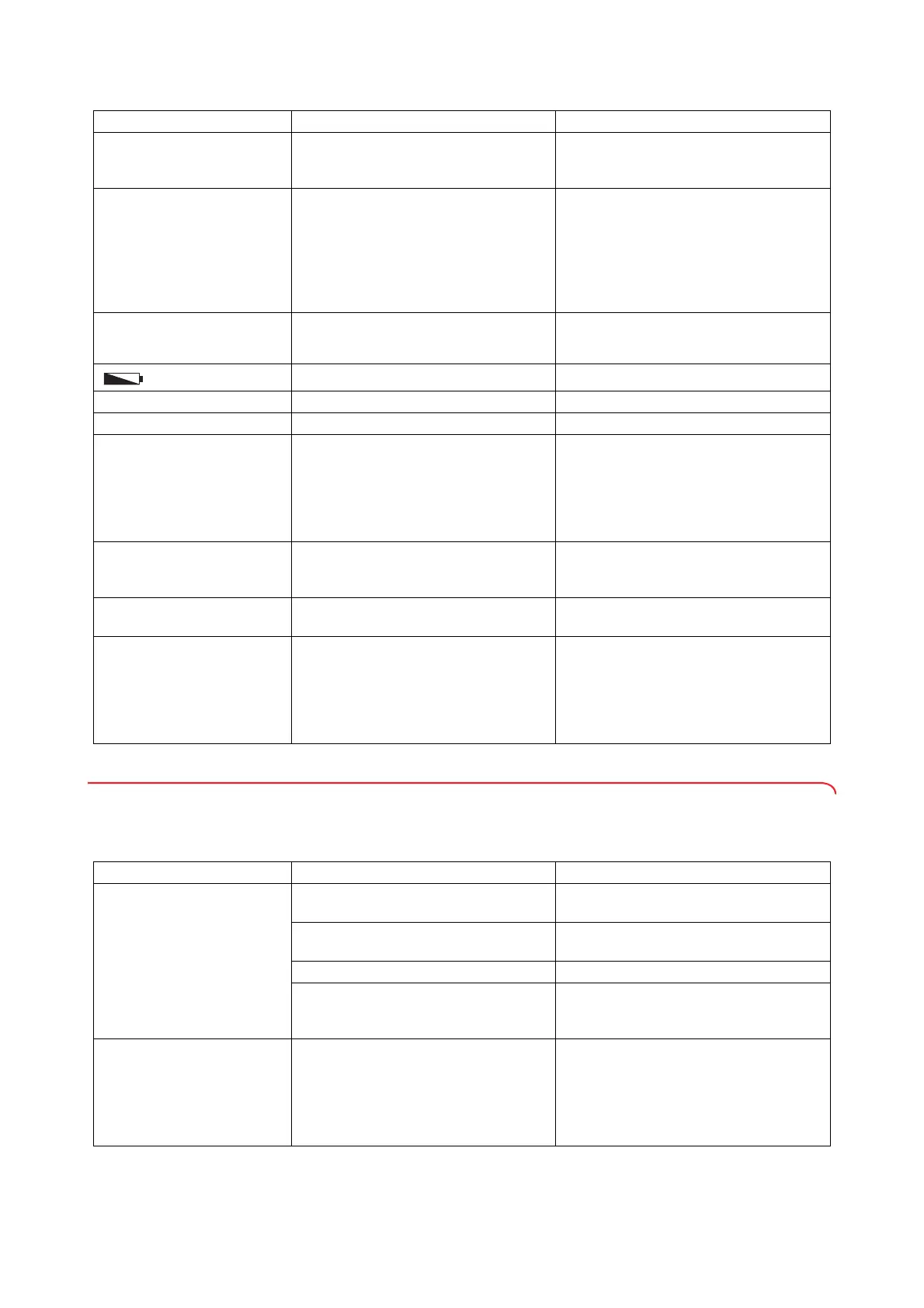
8.2 Problems with data transmission (interface module)
NOTE
Follow the System instructions for use of the seca connect 103
software and the instructions for use for the barcode scanner.
- - - - - appears before
weighing
A load was already on the device before it
was switched on
• Take the load off the measuring station
• Switch off the measuring station, then
switch it back on again
The weight display flashes
Consistent weight value has not yet been
detected
• One of the following functions is active:
Hold, Autohold, Tare. Wait until the mea-
suring station has detected a consistent
weight value. The display unit stops flash-
ing.
• Take the load off the measuring station,
wait until
0.0 is displayed and weigh again
One display segment is
displayed continuously or not
at all
The display is defective • Inform seca Service
is displayed
Battery voltage is dropping • Change the batteries
bAtt is displayed The batteries have discharged • Change the batteries
StOP is displayed Maximum capacity has been exceeded • Take the load off the measuring station
Er:[No.]:11 is displayed
The device has too high a load or too high
a load in one corner
• Remove the load from the measuring sta-
tion or distribute the weight more evenly
• Switch off the measuring station, then
switch it back on again
• If the problem persists, inform
seca Service
Er:[No.]:12 is displayed
The device has been switched on with too
high a load
• Take the load off the measuring station
• Switch off the measuring station, then
switch it back on again
Er:[No.]:16 is displayed
The device was caused to oscillate, the
zero point could not be determined
• Switch off the measuring station, then
switch it back on again
Er:[No.]:32 is displayed
An internal communication error has
occurred
• Switch off the measuring station, then
switch it back on again
• Ensure that the display cable is connected
correctly (seca 797)
• If the problem persists, inform
seca Service
Problem Cause Remedy
Problem Cause Remedy
Workflow LED does not come
on
seca 787
: No external interface module
(optional accessory) installed
• Order optional accessory
seca 452
seca 787
with seca 452: No connection to
network
• Contact your administrator or hospital
technician
seca 797: The WiFi function is deactivated • Activate WiFi function
Workflow LED is defective
• Contact your administrator or hospital
technician
• Inform seca Service
The Workflow LED illuminates
in red, the measuring result is
displayed
Errors occurred during data transmission
• Ask the patient to get off the seca mea-
suring device and wait until the Workflow
LED goes out
• Repeat measurement procedure
• If the problem persists, contact your
administrator or hospital technician



 To Next Page