Overview • 13
17-10-07-652-100/05-2019B
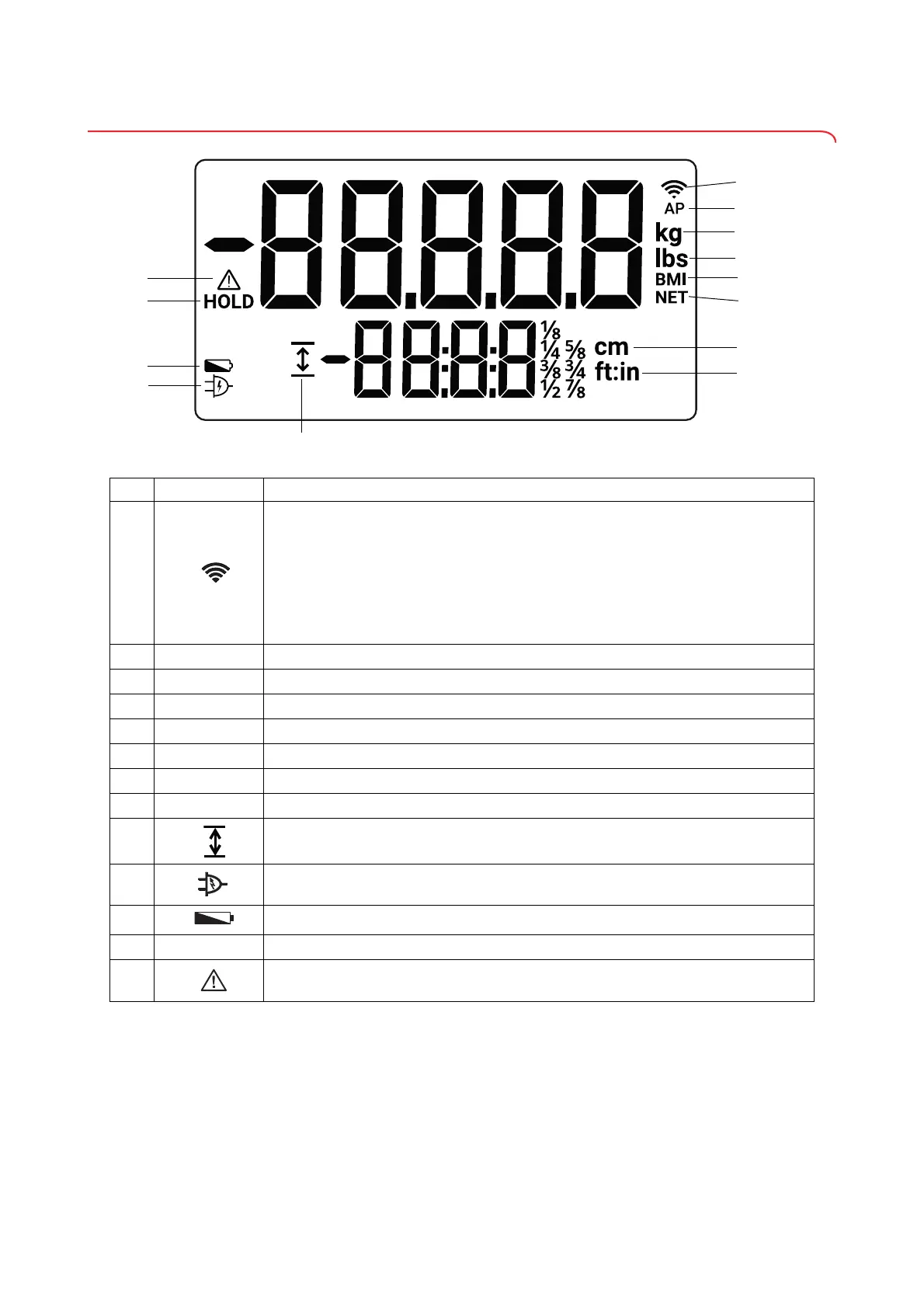
3.3 Symbols in the display
Item Symbol Meaning
A
Indicates the status of the WiFI connection and the field strength of the WiFi network
(condition: Active interface module):
• When setting up the WiFi network:
- Flashing: Device connecting to a WiFi router
- Illuminated: Device and WiFi router are connected and the WiFi connection has been
made
• In operation:
- Illuminated: The number of bars indicates the field strength of the WiFi network
B
AP
Access Point function active (service function)
C
kg
Weight value in kilograms
D
lbs
Weight value in pounds
E
BMI
Body mass index
F
NET
Additional weight tared off (Tare)
G
cm
Height in centimeters
H
ft:in
Height in feet and inches
I
Height value is displayed permanently (Height)
J
Operation with power supply unit
K
Batteries are low
L
HOLD Weight value is displayed permanently (Hold)
M
Non-verifiable function active



 To Next Page