26 •
17-10-07-652-100/05-2019B
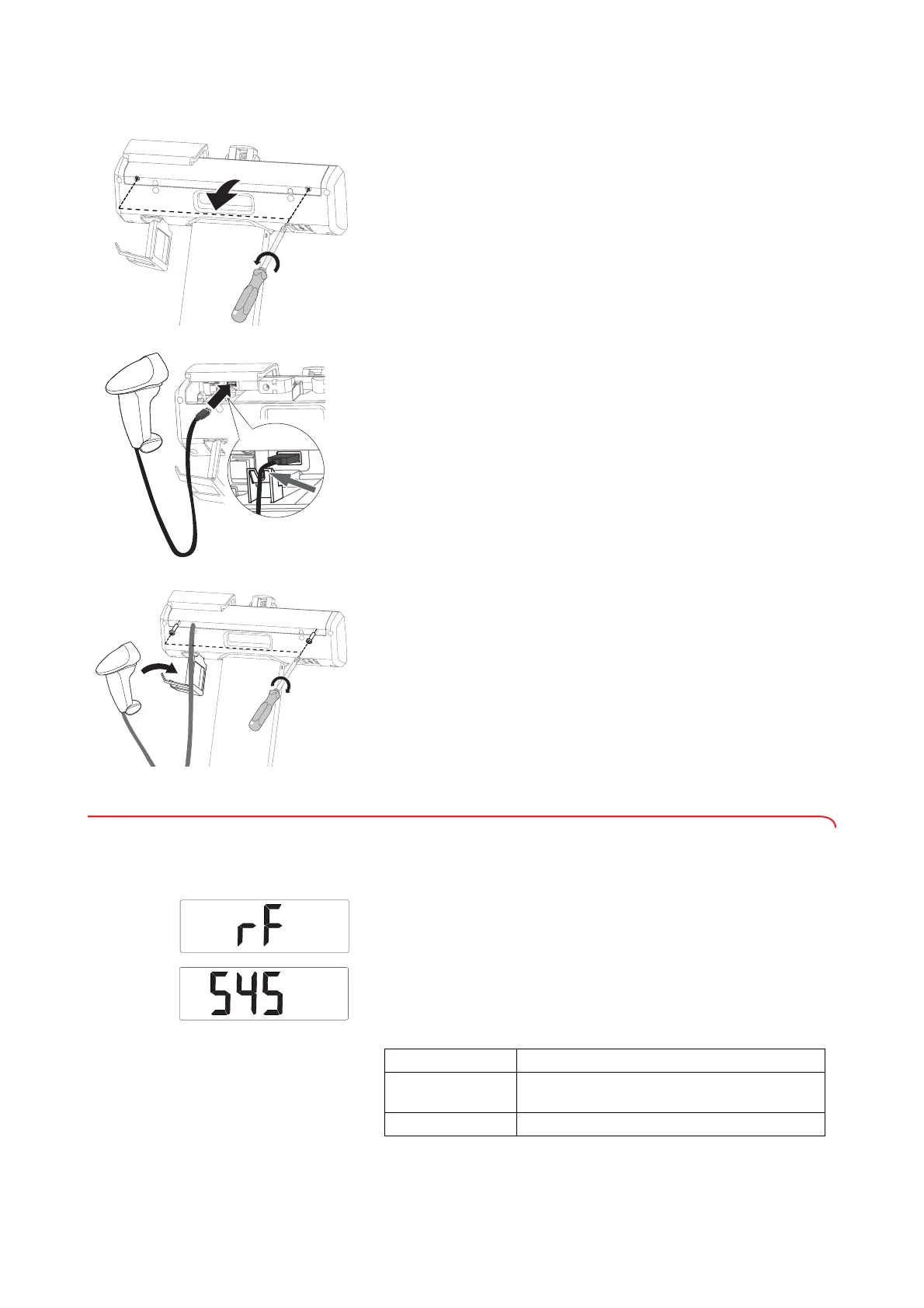
To connect a barcode scanner to the display unit, proceed as follows.
1. Remove the cover panel:
a) Unscrew 2 cross-head screws
b) Remove the cover panel
2. Connect the barcode scanner:
a) Plug the USB connector of the barcode scanner into the USB
interface of the display unit
b) Route the barcode scanner cable over the strain relief
NOTE
Some barcode scanner cables are very thin and are thus not
adequately held in place.
► Additionally fix the barcode scanner cable in the bores on the strain
relief using a cable tie.
3. Hang the barcode scanner in the barcode scanner holder.
4. Fit the cover panel:
a) Insert cover panel
b) Place and tighten 2 cross-head screws
4.7 Setting up the WiFi connection (seca 797)
Setting the WiFi function
1. Switch on the measuring station (➔ “Switching on the device”, page 28).
2. Select the
rF menu item (➔ “Navigating in the menu”, page 34).
3. Confirm your selection.
4. Select the
SYS menu item.
5. Confirm your selection.
The current setting is displayed.
6. Select the desired setting:
Option Effect
On
WiFi function is activated with power supply
operation, is deactivated with battery operation
OFF WiFi function deactivated



 To Next Page