77
COIN SELECTOR
BANK SELECT
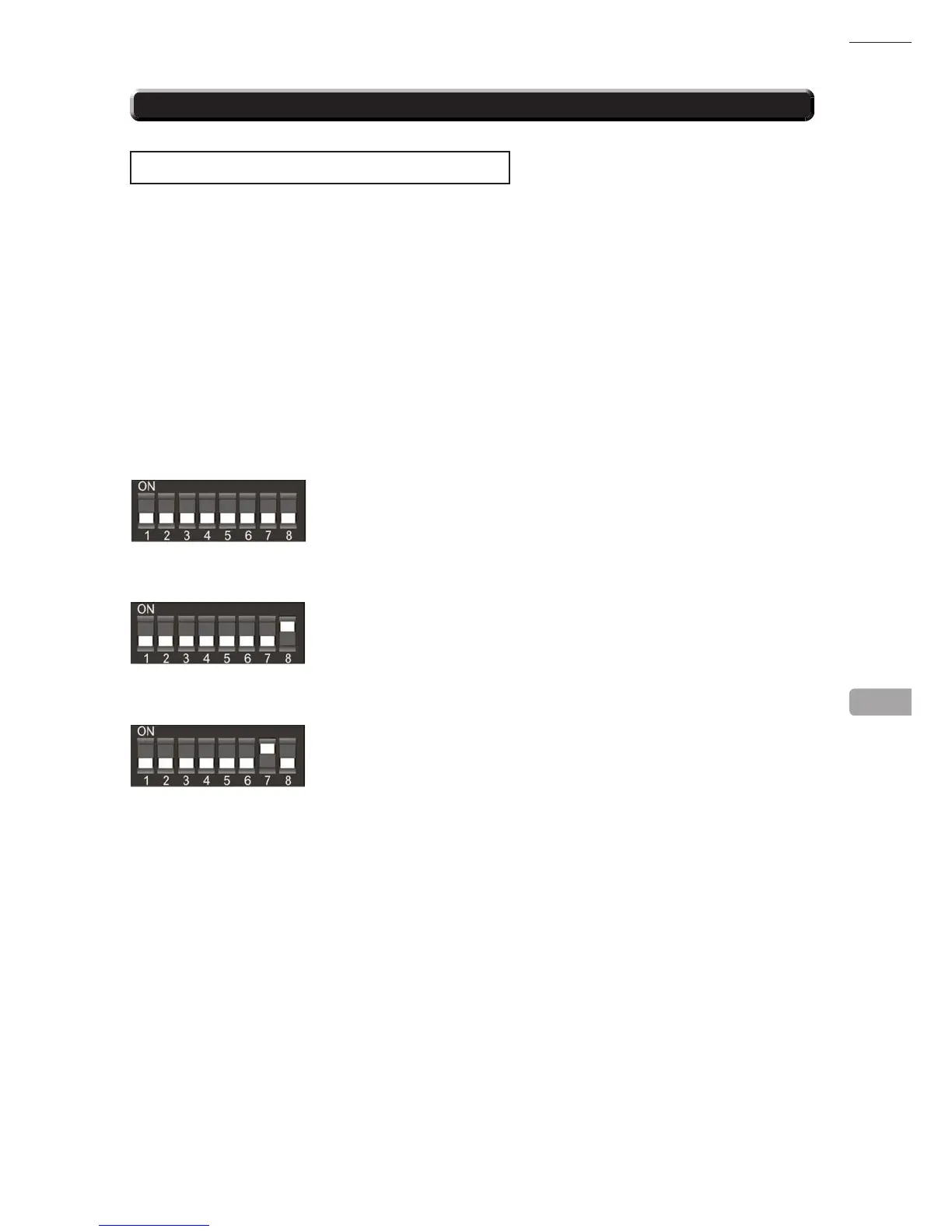
This function allows you to enable both or individual select banks of coins via switches 7 and 8 on the
8 way DIL switch.
This enables the selection of 2 different currencies, one in each bank, or 12 coins/tokens in both banks
from the same country.
To enable/disable the banks set the switches as show below.
Both Banks ON (enabled) - Sterling and Euro’ s
Bank 1 ON (enabled) and Bank 2 OFF (disabled) - Sterling ONLY
Bank 1 OFF (disabled) and Bank 2 ON (enabled) - Euro’ s ONLY
Please remove power from the SR3 before changing the status on the DIP SW.
SELECTING STERLING / EURO OPTION
The SR3 coin acceptor (supplied) is programmed to accept UK Sterling and the Euro. Factory setting is
for the UK Sterling. If the conguration needs to change to the Euro, then please follow the instructions
below for changing over to the Euro and visa versa.
14-6 SR3 OPTIONS - SWITCH SETTINGS
14



 To Next Page
 Loading...








