Using the “Conference Manager” software
132 | ADN Digital Conference System
The conference units’ built-in loudspeakers only output audio signals that are fed
in via the IN audio input (e.g. from a video- or teleconferencing system).
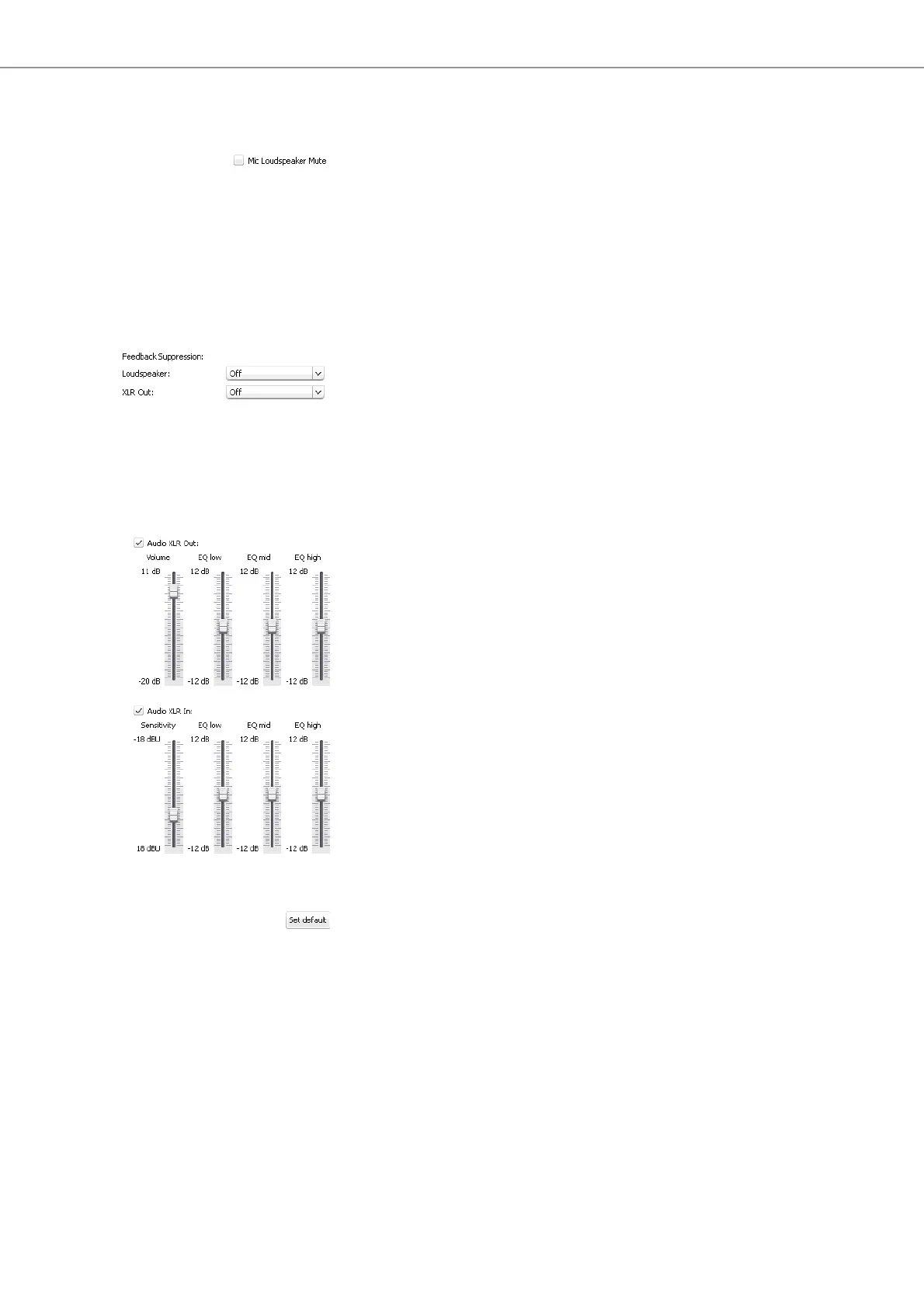
왘 Tick/untick the “Mic Loudspeaker Mute” check box.
Contributions coming from the conference units’ microphones are not repro-
duced via the conference units’ built-in loudspeakers (check box is ticked) or all
audio signal are reproduced (check box is unticked).
Activating/deactivating the function
for eliminating feedback and for
increasing the volume
Via the “Feedback Suppression” submenu, you can change the volume adjustment
of the floor channel (“Floor/Loudspeakers”) or the OUT audio output (“XLR Out”).
You can increase the maximum possible volume in two steps while the risk of feed-
back due to the increased volume is reduced.
To adjust the “Feedback Suppression” function for the floor channel (“Floor/
Loudspeakers”) or the OUT audio output (“XLR Out”):
왘 Select the desired setting from the “Loudspeaker” or “XLR Out” drop-down list.
Possible settings: “Off”, “Low Intensity” and “High Intensity“
–“Off“: The function is deactivated
–“Low Intensity“: The volume can be slightly increased (approx. +2 to +3 dB);
feedback is reduced.
–“High Intensity“: The volume can be strongly increased (approx. +5 to
+6 dB); feedback is reduced.
Using the OUT audio output/IN audio
input and setting the tone color
To activate/deactivate the OUT audio output/IN audio input:
왘 Tick/untick the “Audio XLR out”/ “Audio XLR In” check box.
The OUT audio output/IN audio input is activated (check box is ticked) or de-
activated (check box is unticked).
To set the volume of the OUT audio output/the sensitivity of the IN audio input:
왘 In the “Audio XLR
Out”/“Audio XLR In” area, move the “Volume”/ “Sensitivity”
slider
– upwards to increase the volume/sensitivity or
– downwards to reduce the volume/sensitivity.
The volume/sensitivity is changed immediately.
왘 Set the sensitivity of the IN audio input so that the audio signal is not overmod-
ulated at maximum input volume (see page 55).
To set the tone color of the OUT audio output/IN audio input:
왘 In the “Audio XLR Out”/“Audio XLR In” area, move the “EQ low”, “EQ mid” or
“EQ high” sliders to change the tone color.
왘 Click “OK”.
Your settings are saved and the “Audio Settings” window closes.
Resetting the audio settings To reset the audio settings for the floor channel, the IN audio input and the
OUT audio output to the factory default settings:
왘 Click the “Set default” button.
All sliders are reset.



 To Next Page