ADN Digital Conference System | 39
Putting the conference system into operation
Connecting external audio devices to the central unit
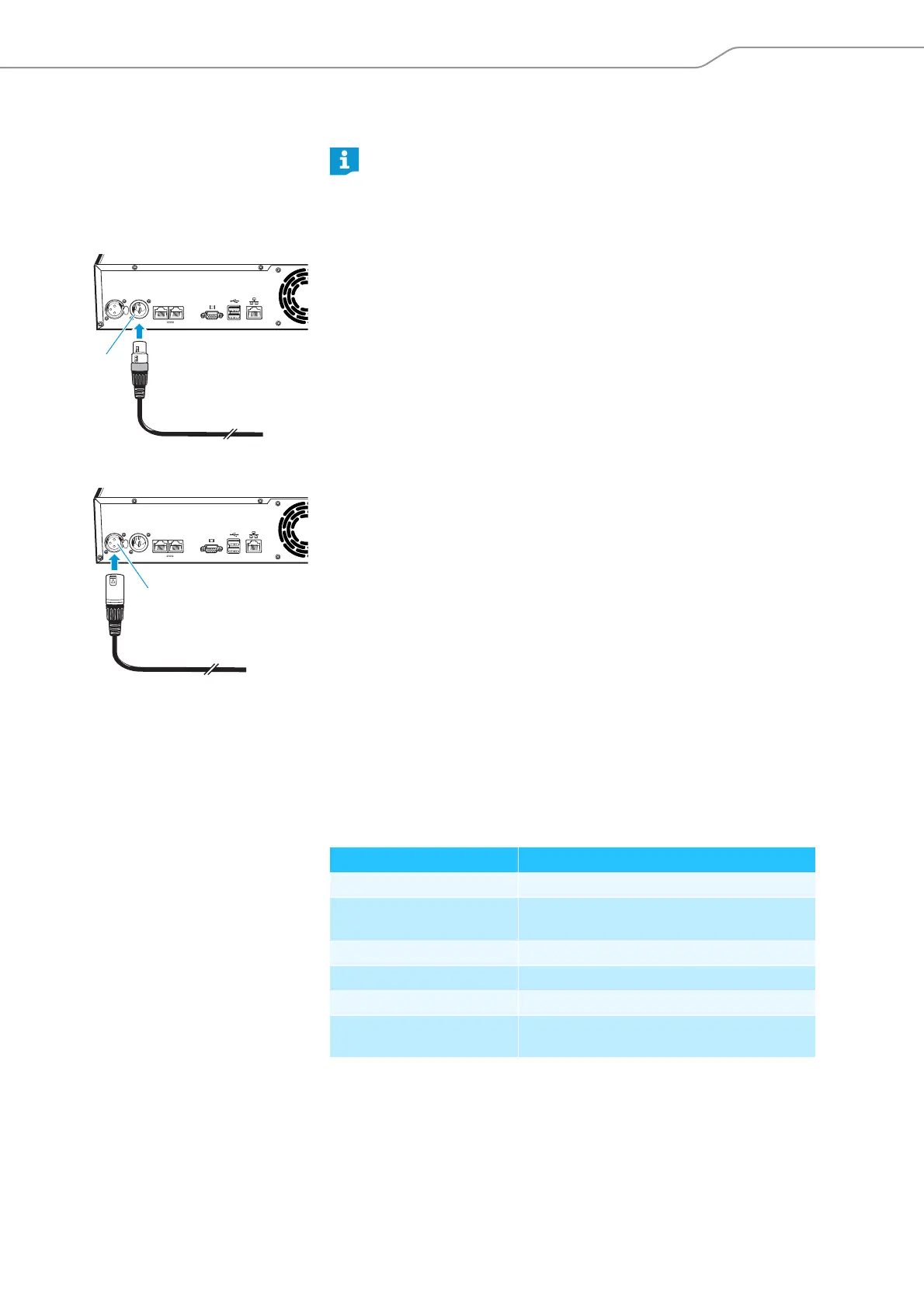
To output the floor channel via an external audio device:
왘 Use an XLR cable to connect the OUT audio output of the central unit to an
external audio device.
To connect an external audio source and to feed its signals to the floor channel:
왘 Use an XLR cable to connect the external audio source to the IN audio input
of the central unit.
Connecting a USB mass storage device for audio record-
ings to the central unit
In order to be able to use the audio recording function of the ADN CU1 central
unit (see page 77), you require a USB mass storage device with the following
characteristics:
You can use different settings for processing the audio signals of the
IN audio input and the OUT audio output in order to avoid, for example,
delayed or double audio signals in videoconferencing or teleconferencing
systems (see page 58 or page 131).
IN –– AUDIO –– OUT
PORT II PORT I
2x 52.8V 1.75A
7
IN –– AUDIO –– OUT
PORT II PORT I
6
2x 52.8V 1.75A
USB mass storage device Requirements
Recommended memory size > 500 GB
File system NTFS
FAT32
Partition 1
Connection USB type A plug
Interface USB 2.0
Power supply via USB socket (approx. 500 mA) or separate
mains unit



 To Next Page