ADN Digital Conference System | 55
Configuring the conference system via the central unit
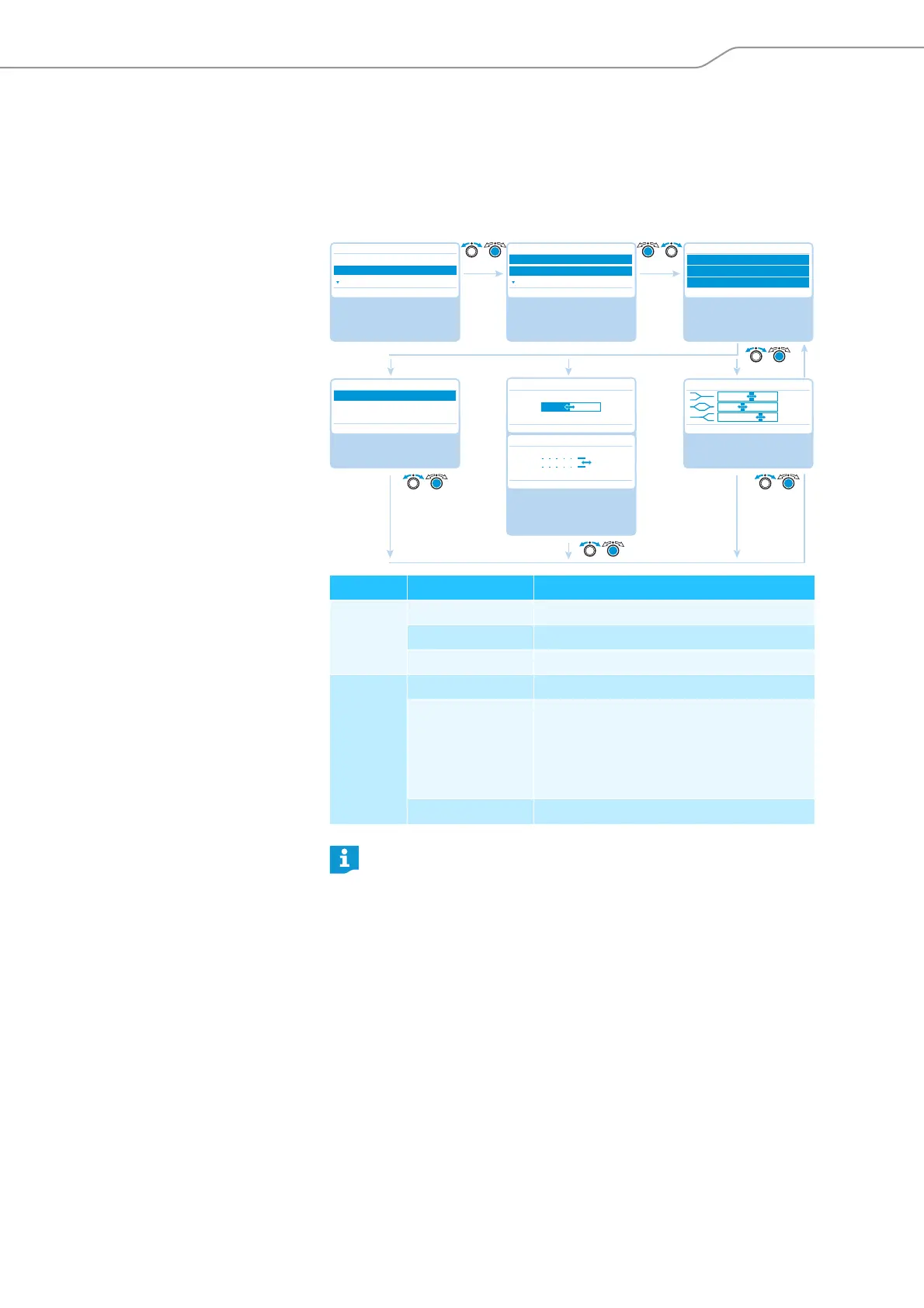
Adjusting the audio settings – “Audio Menu”
The “Audio Menu” submenu allows you to adjust settings that affect the audio
signals of the conference system.
Adjusting settings for the OUT audio output and the IN audio input –
“XLR Out” and “XLR In”
Submenu Menu item Function
“XLR Out” “XLR Out Status” Activates/deactivates the OUT audio output
“XLR Out Volume” Adjusts the volume of the OUT audio output
“XLR Out Equalizer” Adjusts the tone color
“XLR In” “XLR In Status” Activates/deactivates the IN audio input
“XLR In Sensitivity” Adjusts the sensitivity of the IN audio input
(the current level is displayed).
왘 Adjust the sensitivity so that the level
display shows an almost full deflection at
maximum input volume.
“XLR In Equalizer” Adjusts the tone color
In the “Equalizer” menu item, you can change between the frequency
ranges by pressing the jog dial .
Press the ESC key to cancel your entry and restore the previous state of
all frequency ranges.
Select and call up the
“Audio Menu”
submenu
Select and call up
different submenus
Select and call up
different menu items
Main Menu
Conference Menu
Audio Menu
System Menu
Audio Menu
XLR Out
XLR In
Floor/Loudspeakers
XLR Out/XLR In
XLR Out Status/XLR In Status
XLR Out Volume/XLR In Sensitivity
XLR Out Equalizer/XLR In Equalizer
No No
XLR Out Status/XLR In Status
XLR Out Volume
XLR Out Equalizer/XLR In Equalizer
No No
Select the “XLR Out
Status/XLR In Status”
setting; store the setting
Select the “Equalizer”
setting; store the setting
On
Off
Conf. Mode
+6 dB
Off
Conf. Mode + 02 dB
– 03 dB
Off + 05 dB
On
XLR In Sensitivity
No
Select the “XLR Out
Volume/XLR In Sensiti-
vity” setting; store the
setting
+6 dB
+07.5 dBu
+07.5 dBu



 To Next Page