Putting the conference system into operation
38 | ADN Digital Conference System
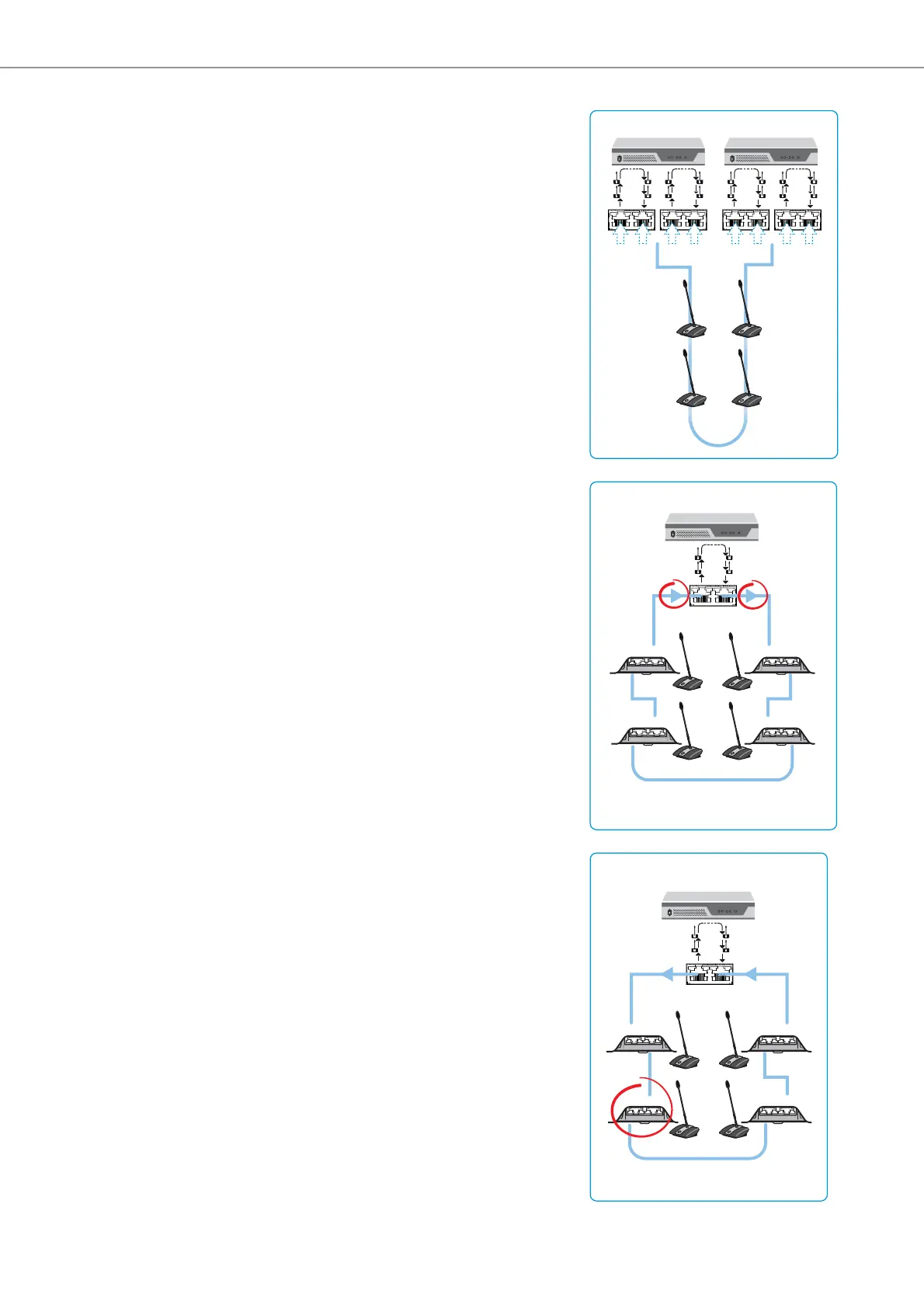
Ring topology connected to
different ADN PS power supplies
Ring topology connected to the
wrong outputs of a PORT socket
Wrongly connected
conference unit
in the cable ring
A ring topology cannot be connected
to different PORT sockets of two dif-
ferent ADN PS power supplies.
The error message “Error 60006 Ring
cabling between two PS” appears on
the display panel of the ADN CU1
central unit. The display panel lights up
red.
On the two ADN PS power supplies, the
respective status LED for the PORT
outputs in question flashes orange.
To eliminate the error:
왘 Set up the conference system cor-
rectly (see page 32).
왘 Switch the conference system on
again (see page 41).
PORT I
12
PORT II
12
PORT I
12
PORT II
12
ADN PS
ADN PS
The ring topology is connected to the
wrong outputs of the PORT socket.
The conference units connected in the
cable ring do not function and are not
displayed in the “Units” menu item of
the ADN CU1 central unit’s “System
Menu”. The “Topology” menu item of
the “System Menu” nevertheless dis-
plays “ring topology” for the PORT in
question.
To eliminate the error:
왘 Set up the conference system cor-
rectly (see page 34).
왘 Switch the conference system on
again (see page 41).
PORT I
12
ADN PS
IN OUT
IN OUT
IN OUT
IN OUT
The IN socket and the OUT socket on
one conference unit in the cable ring
have been accidentally swapped.
The wrongly connected conference
unit in the cable ring does not function
and is not displayed in the “Units”
menu item of the ADN CU1 central
unit’s “System Menu”.
To eliminate the error:
왘 Set up the conference system cor-
rectly (see page 34).
왘 Switch the conference system on
again (see page 41).
PORT I
12
ADN PS
IN OUT
IN OUT
IN OUT
IN OUT



 To Next Page