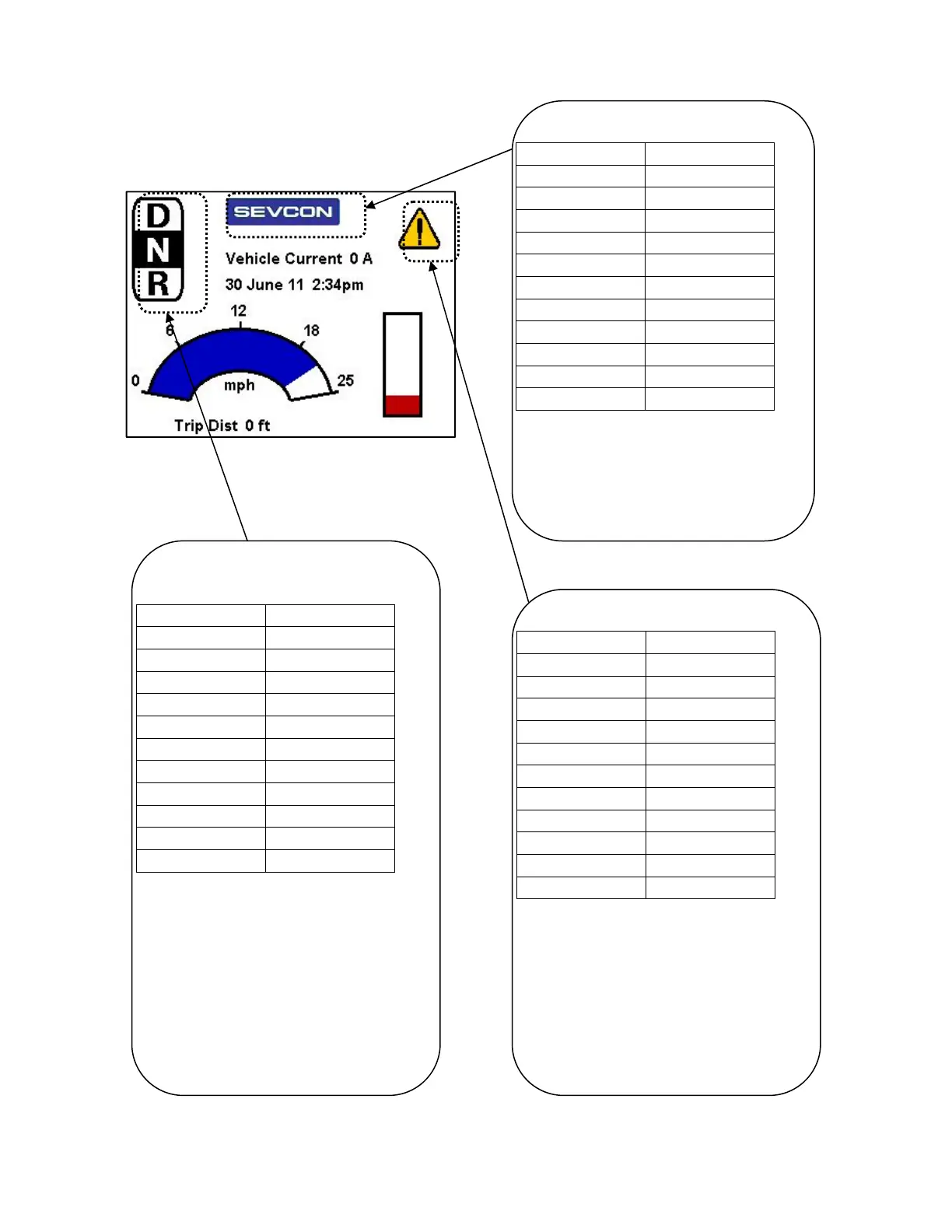
Example Screen Layout
Doc. 177/5250x
Rev. A
9-3
The layout – bitmaps
Bitmap showing forward, neutral, reverse
drive state.
Object 0x2903 Value
Sub 1 4
Sub 2 10
Sub 3 10
Sub 4 0x0023
Sub 5 0x000d
Sub 6 9
Sub 7 1
Sub 8 10
Sub 9 0
Sub 10 11
Sub 11 2
Sub 1 (4) for a btimap, located at (x,y)
location of (sub2,sub3). Associated DO of
0x23, which is the composite vehicle drive
mode item. Sub 5 (0x0d) so 3 bitmaps, data
dependent, and all displayed when reference
values equal the actual value. Bitmap 1 is
shown when the value is 1, bitmap 2 when
the value is 0, bitmap 3 when the value is 2.
Bitmap Sevcon Logo.
Object 0x2906 Value
Sub 1 4
Sub 2 100
Sub 3 10
Sub 4 N/A
Sub 5 0x0004
Sub 6 1
Sub 7 N/A
Sub 8 N/A
Sub 9 N/A
Sub 10 N/A
Sub 11 N/A
Sub 1 (4) for a btimap, located at (x,y)
location of (sub2,sub3). Sub 5 (0x04) so 1
bitmap, not data dependent. Bitmap 1 is
the Sevcon logo.
Bitmap showing fault state
Object 0x2904 Value
Sub 1 4
Sub 2 265
Sub 3 20
Sub 4 0x0016
Sub 5 0x100d
Sub 6 15
Sub 7 1
Sub 8 16
Sub 9 2
Sub 10 17
Sub 11 2
Sub 1 (4) for a btimap, located at (x,y)
location of (sub2,sub3). Associated DO of
0x16, which is the highest fault level set on
the vehicle. Sub 5 (0x1d) so 3 bitmaps, and
data dependent. Bitmap 1 is shown when
the value is 1, bitmap 2 when the value is 2,
bitmap 3 when the value is greater than 2.



 To Next Page