12
Product Version 1.0 | Revision D | Released 2022-06-20
CONNECTING POWER
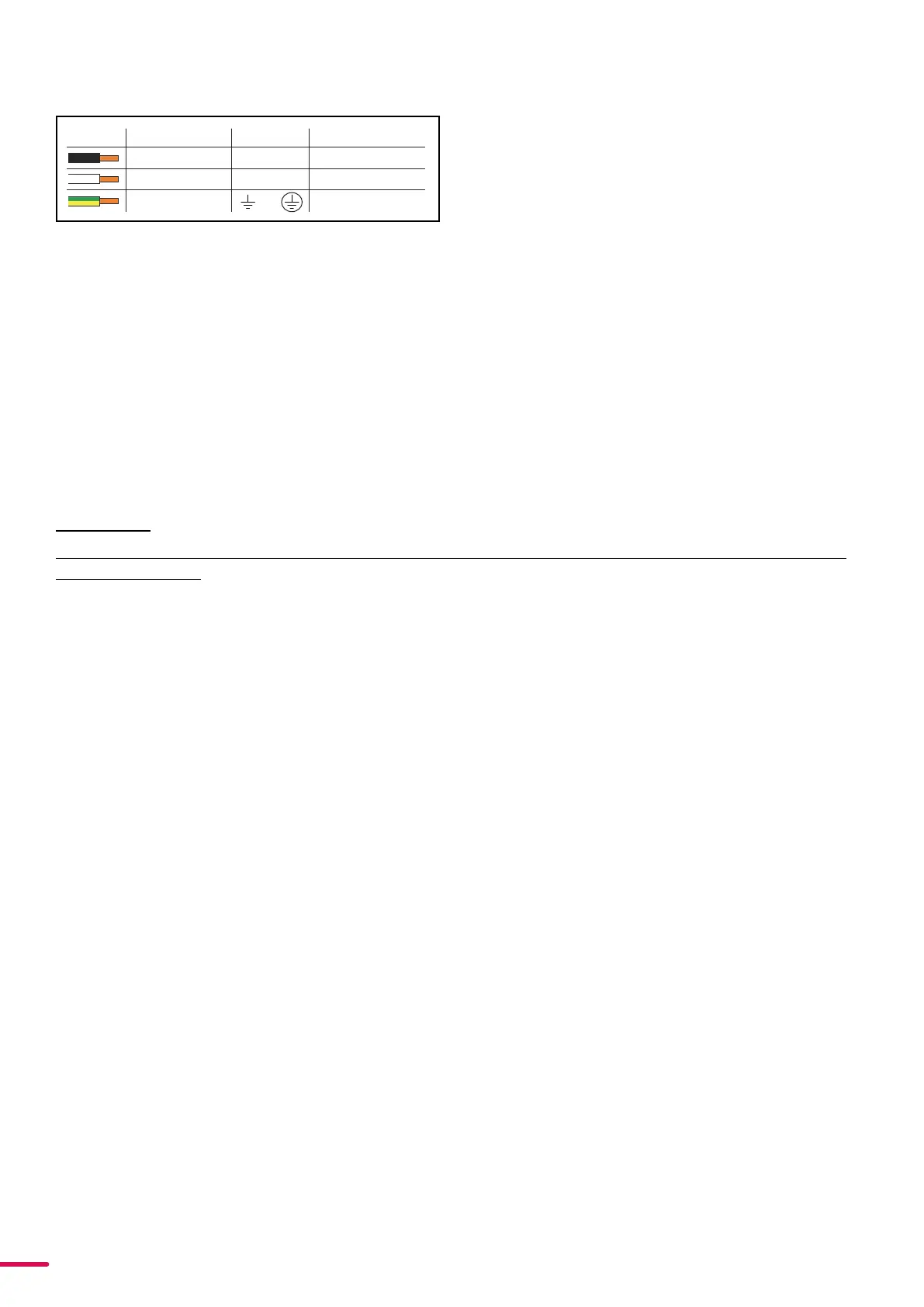
The power cable color coding is given in figure 6:
• Connect the black wire to live
• Connect the white wire to neutral (or phase 2 on 208V
supplies)
• Connect the green/yellow wire to ground (earth)
For a temporary outdoor installation the mains cable must be fitted with a grounded connector intended for exterior
use.
For permanent installations, a qualified electrician must wire the mains cable directly to a suitable branch circuit and
as per local code. The junction’s ingress protection (IP) rating must be suitable for the location. Always use a junction
box with a proper IP class suitable for the environment.
After connecting the fixture to power, run the on-board test by selecting the option “TEST→ SELFTEST” in the menu,
to ensure that the fixture and each LED are functioning correctly. (POI versions are tested through RDM.)
PLEASE NOTE!
THE PROTECTIVE CAPS MUST BE SECURELY MOUNTED ON ANY UNUSED CONNECTORS, IN ORDER TO MAIN
CAUTION!
DO NOT CONNECT THE FIXTURE TO AN ELECTRICAL DIMMER SYSTEM, AS DOING SO MAY
CAUSE DAMAGE
CONNECTING DATA
The fixture is controllable using a DMX control device, and it can be connected using either a DMX cable, or via the
fixture’s built-in CRMX wireless receiver system (POI only).
When using a cabled DMX system, connect the DMX-In cable to the input connector and DMX-Out cable to the out-
put, both on the rear of the fixture’s base (chassis mounted male and female 5-pin XLR plugs). For outdoor installa-
tions, use only IP-rated XLR connectors suitable for outdoor use. Terminate the DMX out cable of the last fixture in the
data link with a 120 ohm DMX termination.
Note that SGM fixtures provide a passive DMX Thru signal as DMX Out, instead of an active output signal.
PLEASE NOTE! FOR POI VERSIONS, PLEASE REFER TO “INSTALLATION POI FIXTURE”
CONNECTING A WIRELESS TRANSMITTER
The fixture is designed to look for wireless transmitters in ‘connect’ state when this option is not yet enabled. The fix-
ture comes tested for wireless functionality from the factory, therefore the beginning of the pairing process is discon-
nect from the factory wireless DMX transceiver.
To connect the fixture to a wireless transmitter:
1. Log off the currently paired wireless transmitter. Go to SETTINGS → WIRELESS DMX → LOG OFF in the menu.
Fixture confirms logged off.
2. Press the connect button on the wireless transmitter.
3. Confirm that the fixture has paired with the wireless transmitter.
PLEASE NOTE! FOR POI VERSIONS, REFER TO “WIRELESS DATA CONNECTION” ON PAGE .
SIGNAL PRIORITY
The fixture can be paired to an active wireless transmitter simultaneously when connected to a cabled DMX. The fix-
ture will prioritize cabled DMX over wireless DMX.
The active input type is displayed under the wireless signal strength indicator. The signal strength can be also checked
via RDM data by using an external RDM device.
Color
Black
White
green/yellow
Conductor
live
neutral
ground (earth)
Symbol
or
L
N
Wire
(L2)
Figure 6: Connecting AC Power



 To Next Page