17
Product Version 1.0 | Revision D | Released 2022-06-20
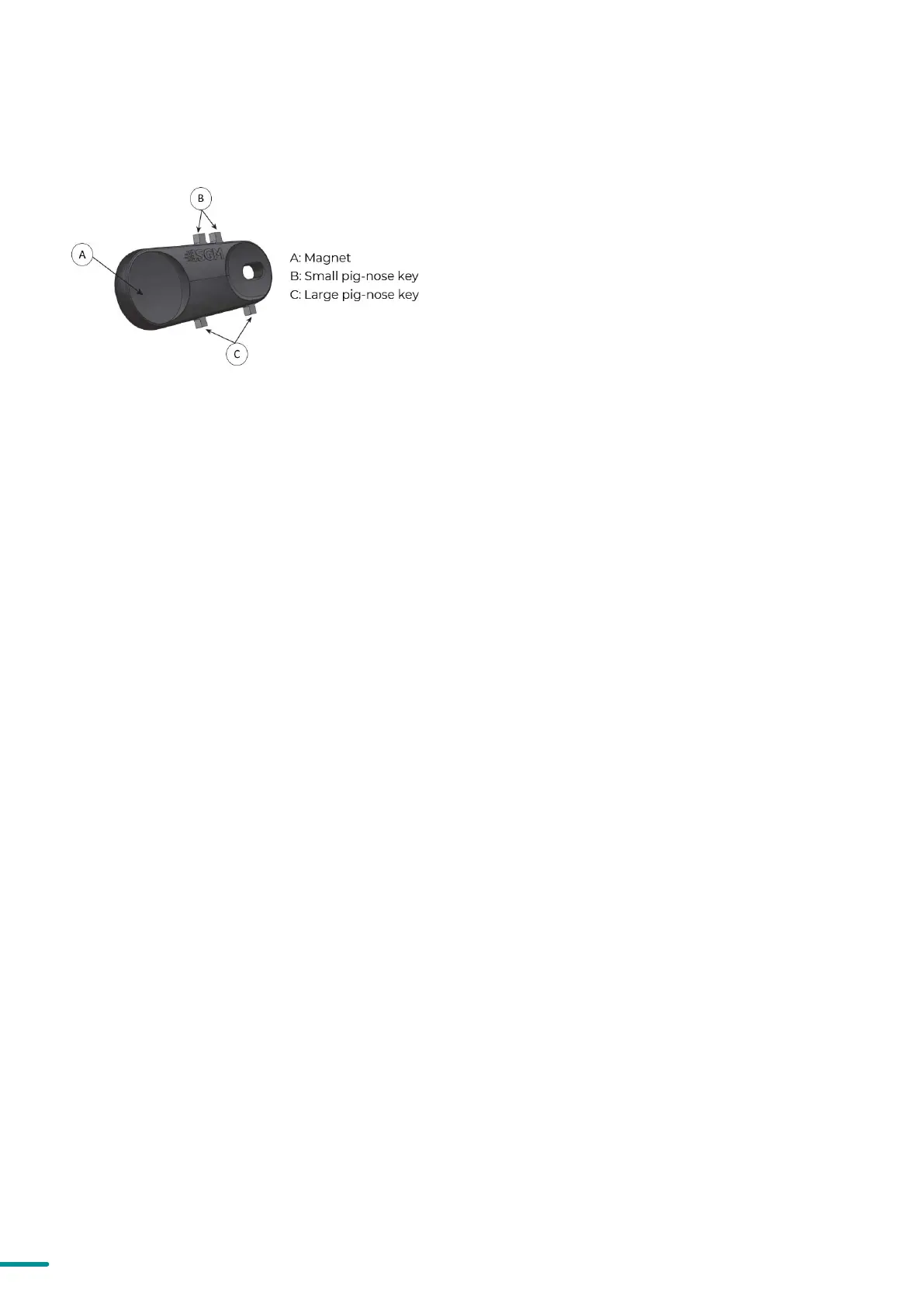
Figure 11: POI Spanner
LED INDICATOR BEHAVIOUR
The fixture displays the status of connections, setting and errors through the LED indicator. It can have different colors
and three possible stages: static, flashing, or off.
Once configuration is complete, temporary power and data can be disconnected.
In POI fixtures with wireless, it is necessary to pair the fix-
ture with a new transmitter (by default, the fixture is linked
to the SGM factory transmitter during the testing and QA
process).
In order to do so, make sure the fixture is powered on be-
fore taking the following steps:
STEP 1: Using a SGM magnetic spanner tool, place the mag-
net close to the LED indicator, and wait for 3 seconds. The
LED indicator will blink orange for 1-2 seconds, before
switching to static green again. The fixture can now be
paired to a new transmitter.
STEP 2: Select “connect” or “link” on a wireless DMX trans-
mitter. The transmitter and the internal SGM receiver
should now be linked together.
Repeat the process to link the fixture to another transmit-
ter.
To disconnect the fixture from the currently paired wireless
transmitter, hold the magnet for 3 seconds over the LED in-
dicator. The LED indicator will blink orange for 1-2 seconds,
switching later to green again. The fixture is now logged off.
WIRELESS DATA CONNECTION
POI LED enabled:
• Solid Orange: Fixture is starting up.
• Blinking Orange-Green: Fixture is initializing its functions.
• Blinking Green: Initialization has completed, no errors and no wireless or wired DMX connection.
• Solid Green: Wireless and / or wired DMX connected.
• Blinking Green-Red: Error(s) have occurred.
• Solid Red (3 seconds): Hall sensor is activated. When activated for longer than 3 seconds, wireless DMX connec-
tion is logged off.
• Off: fixture is off or LED indicator is set to auto-dimming (set via RDM).
POI LED disabled:
• Solid Orange: Fixture is starting up.
• Blinking Orange-Green: Fixture is initializing its functions.
• Blinking Green: Initialization has completed, no errors and no wireless or wired DMX connection.
• Solid Green: Wireless and / or wired DMX connected.
• Blinking Green-Red: Error(s) have occurred.
• Solid Red (3 seconds): Hall sensor second activation. (within 20 seconds). When activated more than 3 seconds
wireless DMX connection is logged off.
Once configuration is complete, temporary power and data can be disconnected.


 To Next Page