30
Product Version 1.0 | Revision D | Released 2022-06-20
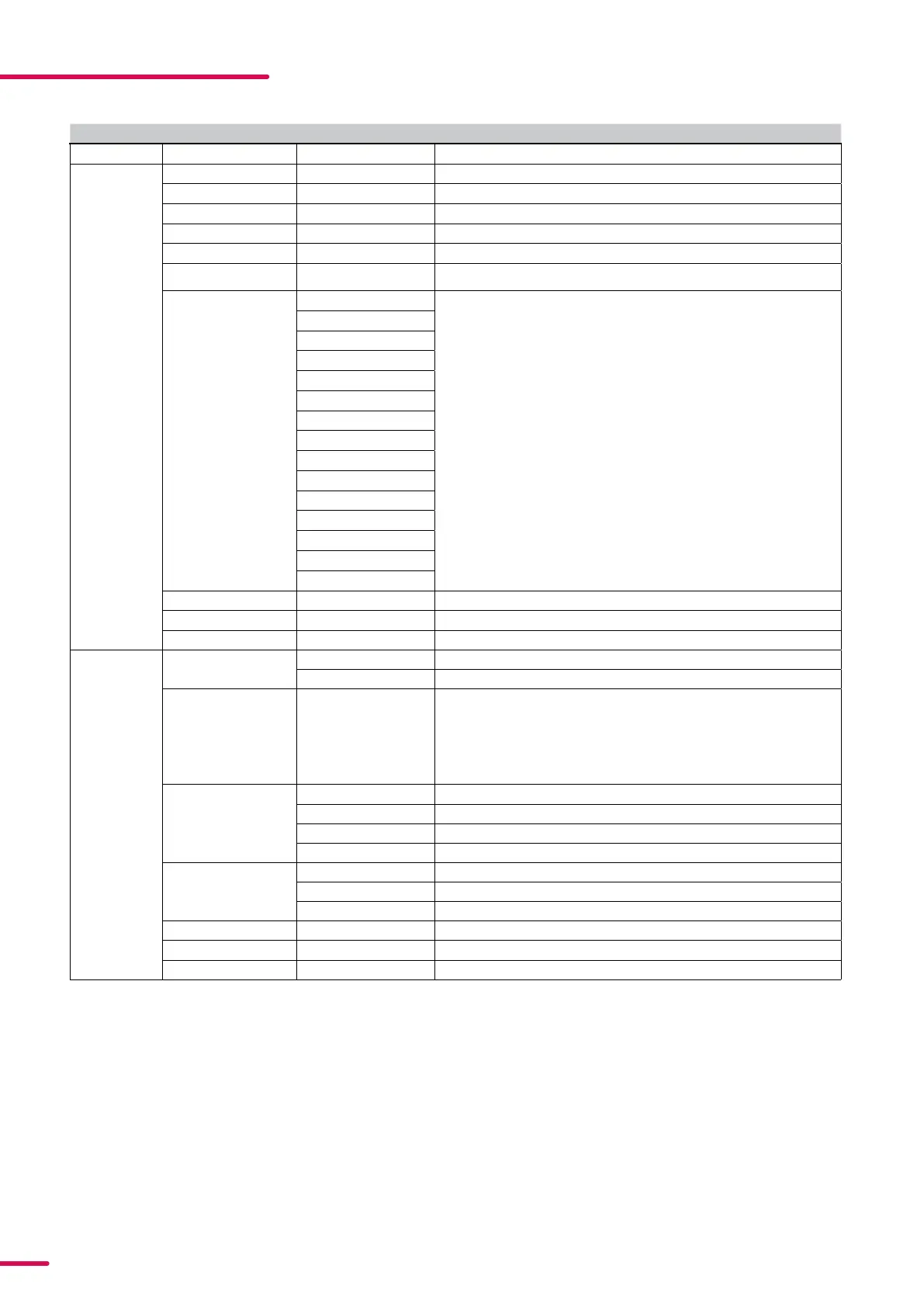
CONTROL MENU
LEVEL 1 LEVEL 2 LEVEL 3 FUNCTION
Mode Select Mode - Select DMX mode.
Info Product Type - Displays product type.
Firmware Version - Displays installed firmware version.
Hardware Revision -
Serial Number - Displays SGM serial#.
RDM ID - Displays RDM ID (Unique RDM ID for identification).
DMX View Up to 504 DMX ad
-
dresses
Displays received DMX levels.
Temperatures MAIN TEMP Displays fixture temperatures.
RGB L TEMP
RGB R TEMP
STROBE LB TEMP POI only
STROBE RB TEMP POI only
STROBE LT TEMP POI only
STROBE RB TEMP POI only
HUMIDITY BASE
HUMIDITY HEAD
VOLTAGE 50V
VOLTAGE 16V
WIRELESS SIGNAL
WIRELESS PAIRED
RGBW PWM
FIXTURE DERATING
Power on time - Displays fixture total power on time.
LED On Time - Displays LED total power on time. (R, G, B, W).
Errors - Displays error codes.
Settings Wireless DMX Wireless log off Send Log off command to the CRMX System.
BRIDGE DMX Displays strength of the wireless connection.
Startup Mode Select Startup Mode Default operating mode when fixture is powered on:
STARTUP MODES:
1. DMX (Factory default) 2. Quick color 3. Program 1
4. Program 2 5. Program 3 6. High speed
DMX loss function DMX HOLD
ALL ON
BLACKOUT
QUICK COLOR
Fan Mode Auto Adjusts fan speed relative to internal fixture temperature.
Low Noise Low fan speed for quiet operation.
Fan off Turns off the fan completely.
Factory Default Standard Reset the fixture to factory default settings.
Service Pin
Service Menu


 To Next Page