AR-5726/5731 SIMULATION 6 - 19
Operation/procedure
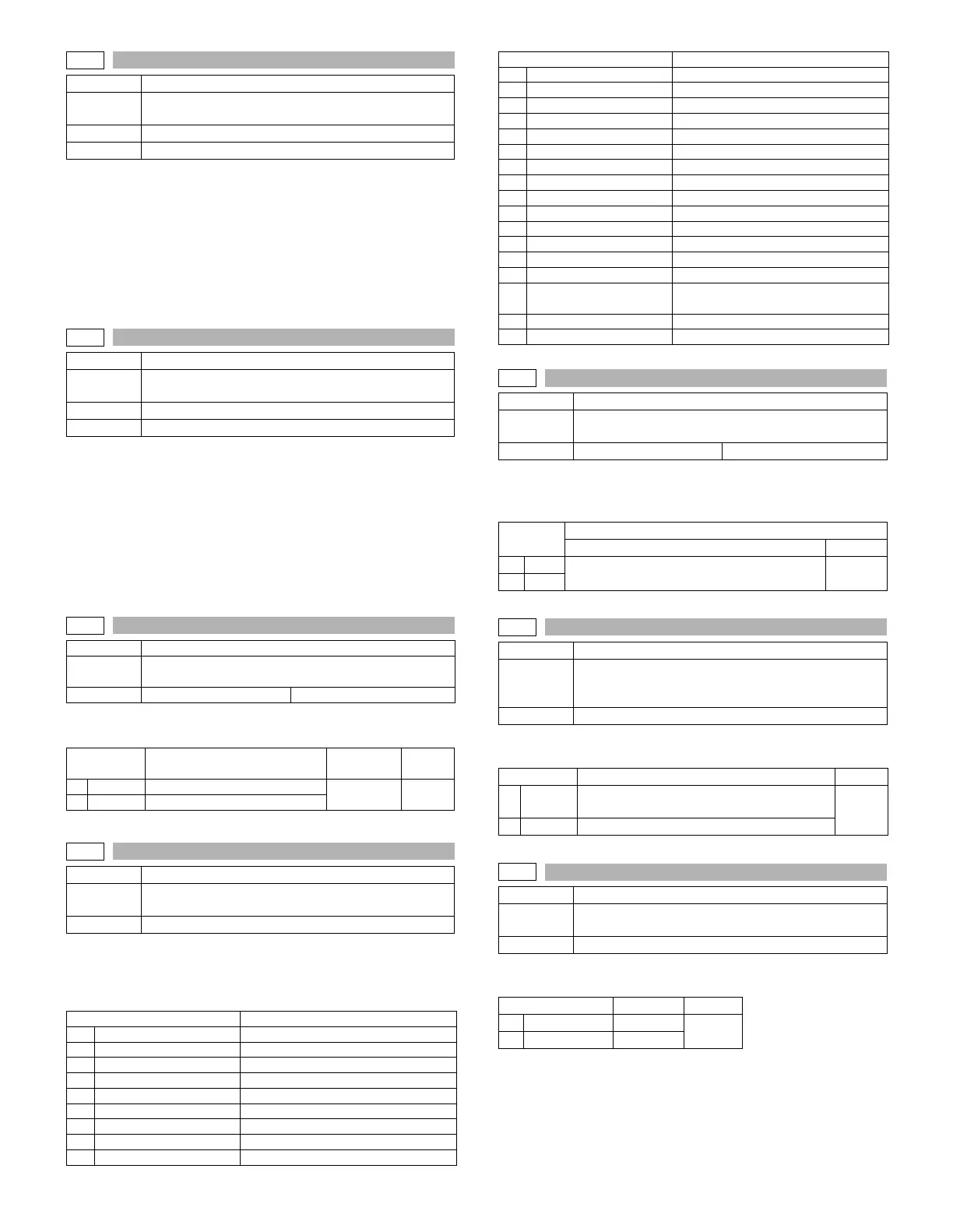
The current setup is displayed with ON or OFF.
Enter an input (20 digits) of the E-MAIL RIC soft key with the 10-key
and press the [START] key, and the collating result is displayed with
OK or NG.
After canceling the simulation, if OK, the E-MAIL RIC function is
enable; if NG, the E-MAIL RIC function is disabled.
This setting must be reset after the simulation cancel.
Operation/procedure
The current setup is displayed with ON or OFF.
Enter an input (20 digits) of the PS expansion kit soft key with the 10-
key and press the [START] key, and the collating result is displayed
with OK or NG.
After canceling the simulation, if OK, the PS expansion kit function is
enable; if NG, the PS expansion kit function is disabled.
This setting must be reset after the simulation cancel.
Note: Executable only when the PCL/PS3 is installed.
Operation/procedure
Input the set value with the 10-key and press the [START] key.
Operation/procedure
Select the display language with the 10-key, and press the [START]
key.
This setup varies in connection with SIM 26-6 (Destination setup).
Operation/procedure
Input the set value with the 10-key and press the [START] key.
This setup varies in connection with SIM 26-6 (Destination setup).
Operation/procedure
Enter the set value with 10-key, and press [START] key.
Operation/procedure
Input the set value with the 10-key and press the [START] key.
26-12
Purpose Setting
Function
(Purpose)
Used to input the Software Key for E-MAIL RIC.
Section E-MAIL RIC
Item Specifications
26-14
Purpose Setting
Function
(Purpose)
Used to input the Software Key for the PS extention kit.
Section Printer
Item Specifications
26-18
Purpose Setting
Function
(Purpose)
Used to set enable/disable of toner save operation.
Item Specifications Operation mode (Common)
Item Content
Setting
range
Default
0
OFF
Disable
0-1 1
1
ON
Enable
26-22
Purpose Setting
Function
(Purpose)
Used to set the specification (language display) for the
destination.
Item Specifications
Item Remarks
0 JAPANESE
1 ENG.US
2 ENG.UK
3 FRENCH
4GERMAN
5ITALY
6 DUTCH
7SWEDISH
8SPANISH
9 PORTUGUESE
10 TURKISH
11 GREEK
12 POLISH
13 HUNGARIAN
14 CZECH
15 RUSSIAN
16 FINNISH
17 NORWEGIAN
18 DANISH
19 CHINESE
20 TAIWANESE Traditional Chinese supported locally
21 SLOVAK
22 HEBREW Supported locally
23
BRAZILIAN
PORTUGUESE
24 ARABIC
25 FARSI
26-30
Purpose Setting
Function
(Purpose)
Used to set ON/OFF of the heater lamp slow-up control
conforming to the CE mark control.
Item Specifications Operation mode (Common)
Item
Default
U.S.A, Canada, Australia, France, Taiwan Others
0
OFF
01
1
ON
26-35
Purpose Setup
Function
(Purpose)
Used to set whether the same continuous troubles are
displayed as one trouble or the series of troubles with
SIM 22-4 when the same troubles occur continuously.
Item Specifications
Item Content Default
0
ONCE
When two or more troubles occur, only one is
registered.
0
1
ANY
All the troubles occurred are registered.
26-36
Purpose Setting
Function
(Purpose)
Used to set whether the machine is stopped or not
when the maintenance counter life is expired.
Item Operation
Item Content Default
0STOP Stop
1
1 NON STOP Non stop
Item Remarks



 To Next Page