SECTION 6 OPERATION
34
263-13228
6
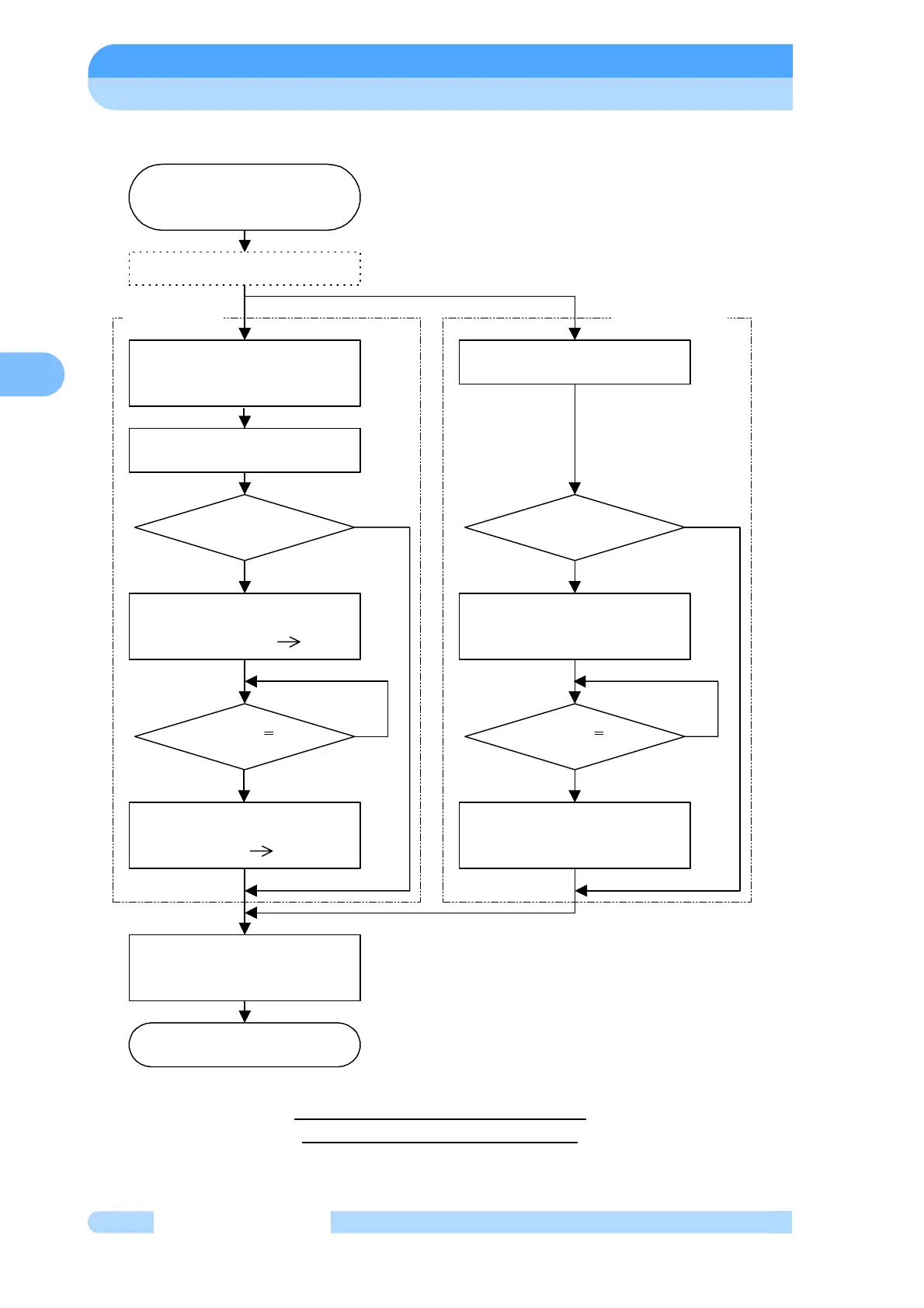
Low Speed to Rated Speed Rotation
Fig. 6-6 Speed Setting Flowchart
Select the NORMAL mode
using the LCD setting mode/
speed setting.
NO
YES
Speed setting complete.
"
∗
" " disappears after the LCD
monitor mode/speed display
"NORMAL" signal output OFF.
"ACCELERATION" signal
output ON.
Speed setting flowchart
Low speed to rated speed
rotation
The acceleration stops at the
rated speed and the speed is
maintained.
Cancel "LOW SPEED" signal.
"ACCELERATION" signal
output OFF.
"NORMAL" signal output ON.
LOCAL
operation
REMOTE
operation
Low speed rotation
NORMAL SPEED lamp lights.
LCD monitor mode/operation mode
Display : "ACC." "NORMAL"
YES
Speed <
80% rated speed
Speed >
80% rated speed
NO
YES
Speed <
80% rated speed
YES
NO
NORMAL SPEED lamp goes out.
LCD monitor mode/operation mode
Display : "NORMAL" "ACC."
NO
Speed >
80% rated speed



 To Next Page