SECTION 6 OPERATION
50
263-13228
6
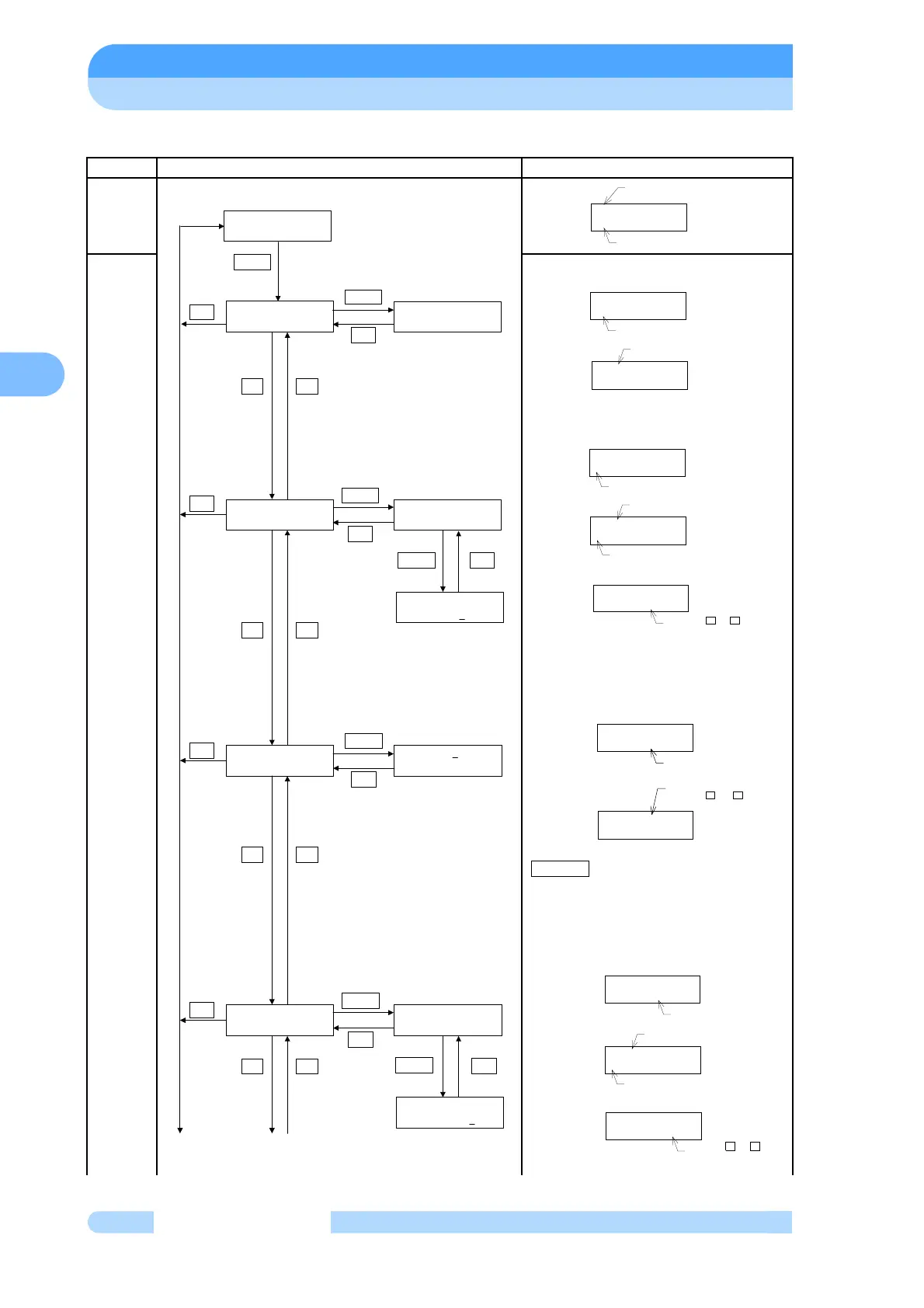
(3) MENU MODE/TIMER
Mode Operation and LCD Display Description of Display
MENU
INTEGRA
TING
TIMER
The pump's integrated run time is
displayed.
The pump's integrated run time is
displayed. Reset is possible at the same
time as, for example, maintenance.
Select Reset Timer
If the integrated value for the
maintenance call time exceeds the set
value, alarm code 99 (maintenance call
warning) occurs. Setting the set value to
0 disables this function.
A cursor moves to the right when pushes
SELECT key.
The number of power failure touch-downs
is counted. If this number exceeds 250,
alarm code 12 (number of power failure
touch-downs alarm) occurs. Refer to
Table 7-4 for the appropriate remedy.
Select Reset Counter
MENU
INTEGRAING TIMER
INTEGRATING TIMER
RUN TIME=99999HR
INTEGRATING TIMER
LAST MAINT.=99999HR
INTEGRATING TIMER
MAINT.CALL=99999HR
INTEGRATING TIMER
POWER FAILURE=999
MAINT.CALL=99999HR
(99999HR)
at 2003/12/31 23:59
+-
+-
+-
+-
SELECT
SET
SET
SET
SET
SELECT
SET
SELECT
SET
at 2003/12/31 23:59
at 2003/12/31 23:59
SELECT
SET
SELECT
SET
LAST MAINT.=99999HR
RESET TIMER=NO
SELECT
SET
POWER FAILURE=999
RESET COUNTER=NO
SELECT
SET
from2003/12/31 23:59
from2003/12/31 23:59
MENU
INTEGRATING TIMER
MENU MODE
TIMER MODE TITLE
INTEGRATING TIMER
RUN TIME=99999HR
RUN TIME
at 2003/12/31 23:59
Update TIME
INTEGRATING TIMER
MAINT.CALL=99999HR
Settings of Maintenance
call time
MAINT.CALL=99999HR
The value is changed
using the and
keys.
+ -
(99999HR)
INTEGRATING TIMER
LAST.MAINT.=99999HR
Maintenance call time
at 2003/12/31 23:59
from2003/12/31 23:59
Reset TIME
Update TIME
LAST MAINT.=99999HR
RESET TIMER=NO
Press the + or -
key to select between
NO or YES
at 2003/12/31 23:59
from2003/12/31 23:59
Reset TIME
Update TIME
INTEGRATING TIMER
POWER FAILURE=999
Number of POWER
FAILURE
POWER FAILURE=999
RESET COUNTER=NO
Press the + or -
key to select between
NO or YES



 To Next Page