SECTION 6 OPERATION
52
263-13228
6
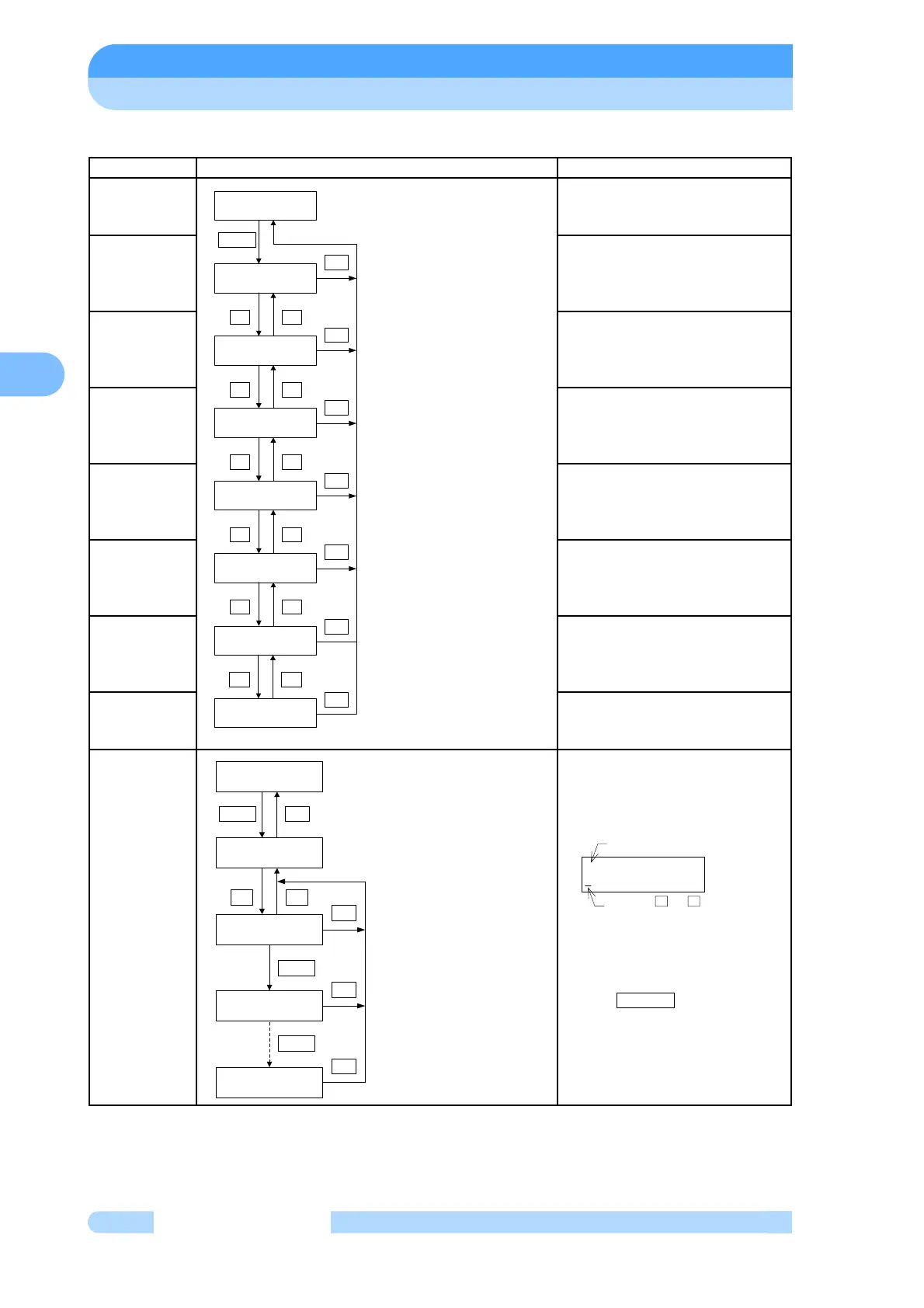
(4) MENU MODE/SETTINGS
(Note 1) The warning output setting function is installed in some custom-specification instruments;
it is not available in all instruments. Modifications are required to install this function in an
instrument that does not incorporate it. Consult your Shimadzu representative for details.
Mode Operation and LCD Display Description of Display
SETTINGS Select settings mode
USER MEMO
SETTINGS
Select user memo settings
RS-232C
SETTINGS
Select RS-232C settings
RS-485
SETTINGS
Select RS-485 settings
ROTATIONAL
SPEED
SETTINGS
Select rotational speed settings
REMOTE-
CONTROL
SIGNAL
SETTINGS
Select remote-control signal
settings
WARNING
OUTPUT
SETTINGS
(Note 1)
Select warning output setting
DEFAULT
SETTINGS
Select default settings
USER MEMO
SETTINGS
Setting of any 20 characters is
possible. (Ex. Connection name of
Turbo Molecular Pump) Characters
are displayed during monitor mode.
A cursor moves to the right when
pushes SELECT key.
MENU
SETTINGS
SETTINGS
USER MEMO INPUT
SETTINGS
RS232C
+-
SETTINGS
RS485
+-
SETTINGS
ROT.SPEED
+-
SETTINGS
REMOTE SIGNAL MODE
+-
SETTINGS
WARNING DISPLAY=ON
+-
SELECT
SET
SET
SET
SET
SET
SET
SETTINGS
DEFAULT SETTINGS
+-
SET
USER MEMO INPUT
USER MEMO INPUT
_
+
USER MEMO INPUT
A_
USER MEMO INPUT
ABCD123_
SELECT
-
SET
SET
SET
SET
SETTINGS
USER MEMO INPUT
SELECT
SELECT
USER MEMO INPUT
Press the + or - key
to select characters
"A" to "Z", or " 0" to "9".
USER MEMO INPUT
MODE



 To Next Page