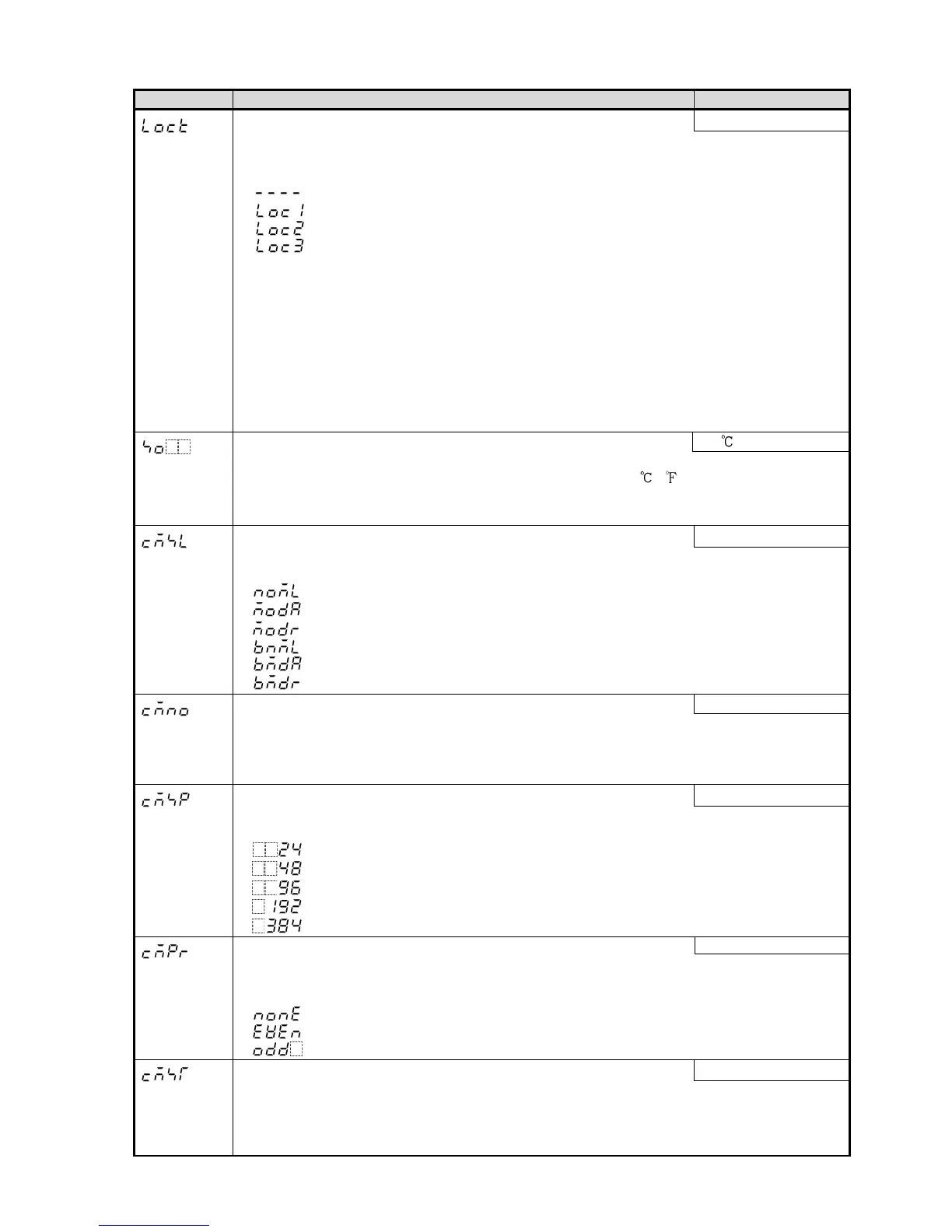
Set value lock
Unlock
• Locks the set values to prevent setting errors.
The setting item to be locked depends on the selection.
• Auto-tuning (AT) cannot be carried out if Lock 1 or Lock 2 is selected.
• (Unlock): All set values can be changed.
(Lock 1): None of the set values can be changed.
(Lock 2): Only main setting mode can be changed.
(Lock 3): All set values – except input type and Controller/Converter – can be
changed. However, changed values revert to their previous values
after power is turned off because they are not saved in the
non-volatile memory.
Do not change any setting item in Auxiliary function setting mode 2.
If any item in Auxiliary function setting mode 2 is changed, it will
affect other setting items such as the SV and Alarm value.
Be sure to select Lock 3 when changing the set value frequently via
software communication. (If a value set by the software
communication is the same as the value before the setting, the
value will not be written in non-volatile memory.)
Sensor correction 0.0
• Sets the sensor correction value. (For details, see ‘Sensor correction function’ on p.18.)
• Setting range: Thermocouple, RTD input: –100.0 to 100.0 ( )
DC voltage, current input: –1000 to 1000 (The placement of the decimal
point follows the selection.)
Shinko protocol
• Selects communication protocol.
• Available only when serial communication (C5 option) is ordered.
• : Shinko protocol
: Modbus ASCII mode
: Modbus RTU mode
: Shinko protocol (Block read available)
: Modbus ASCII mode (Block read available)
: Modbus RTU mode (Block read available)
0
• Sets an individual instrument number for each DCL-33A when connecting multiple
DCL-33A units in serial communication.
• Available only when serial communication (C5 option) is ordered.
• Setting range: 0 to 95


 To Next Page