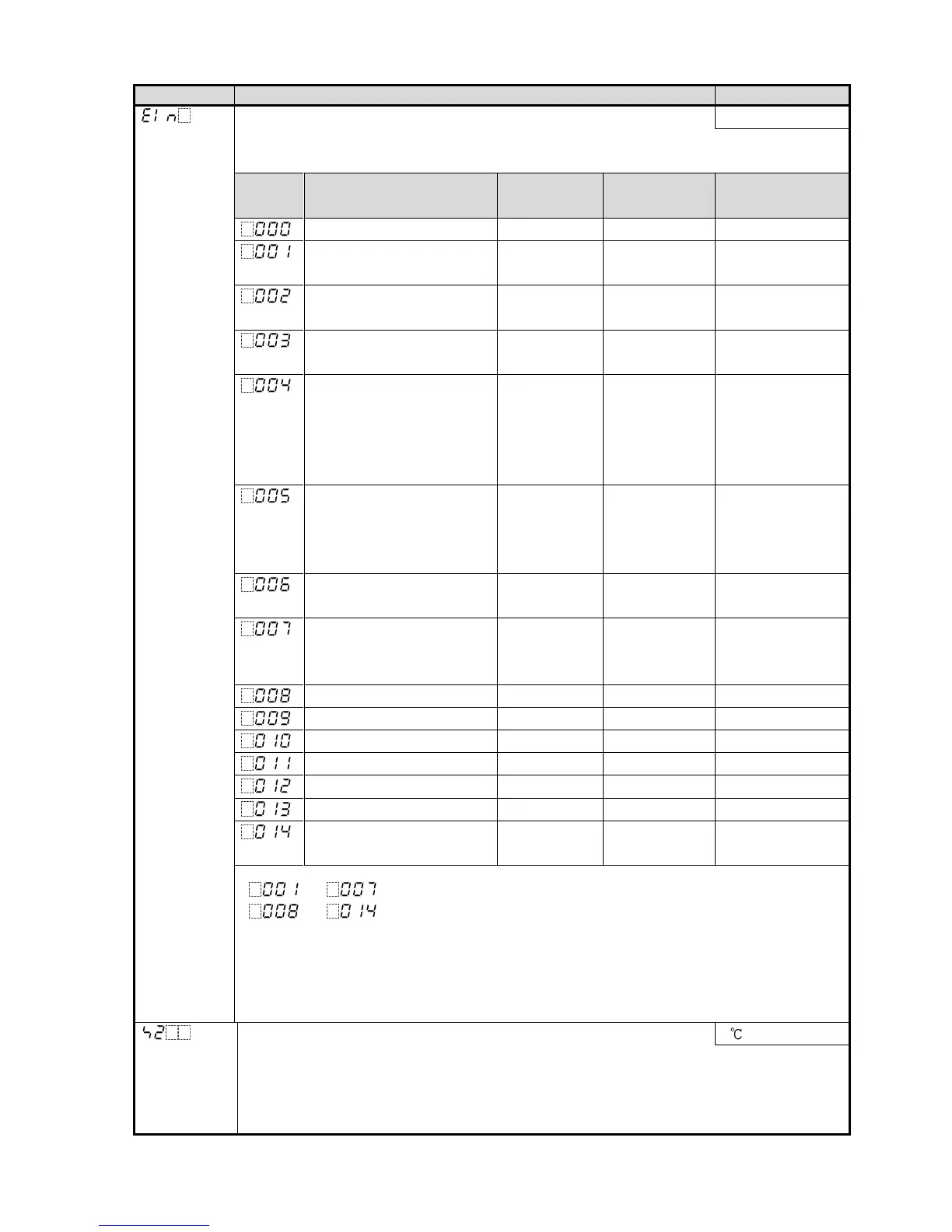
Event input DI allocation No event
• Selects Event input DI function from the following.
• Available only when Set value memory external selection (EI option) is selected.
Event Input Function
Input ON
(Closed)
Input OFF
(Open)
Remarks
No event
Set value memory SV2 SV1 SV1/SV2
selectable
Control ON/OFF (*1) Control OFF Control ON Control ON/OFF
selectable
Direct/Reverse action Direct Reverse Direct/Reverse
control selectable
Preset output 1 ON/OFF Preset output Usual control If sensor is burnt
out, the unit
maintains control
with the preset
MV.
Preset output 2 ON/OFF Preset output Usual control The unit
maintains control
with the preset
MV.
Auto/Manual control (*2) Manual Automatic Auto/Manual
control selectable
Integral action Holding/
Usual integral action
Integral
action
Holding
Usual integral
action
Control continues
with the integral
value being held.
Set value memory SV1 SV2
Control ON/OFF (*1) Control ON Control OFF
Direct/Reverse action Reverse Direct
Preset output 1 ON/OFF Usual control Preset output
Preset output 2 ON/OFF Usual control Preset output
Auto/Manual control (*2) Automatic Manual
Integral action Holding/
Usual integral action
Usual integral
action
Integral action
Holding
to : Functions work when Event input DI is closed.
to : Functions work when Event input DI is open.
(*1) When selecting Control ON/OFF, if ‘Control output OFF’ has not been selected
in [SUB-MODE key function], Event input DI allocation will return to No event.
(*2) When selecting Auto/Manual control, if ‘Auto/Manual control’ has not been selected
in [SUB-MODE key function], Event input DI allocation will return to No event.
SV2 0
• Sets SV2 (the 2
nd
desired value).
• Available when Set value memory external selection (EI option) is ordered.
• Available when 001 or 008 is selected in [Event input DI allocation].
• Setting range: Scaling low limit to Scaling high limit



 To Next Page