18
Sensor correction function
This corrects the input value from the sensor. When a sensor cannot be set at the exact location where
control is desired, the sensor measured temperature may deviate from the temperature in the controlled
location.
When using multiple controllers, sometimes the measured temperatures (input value) do not match (even
if SV is the same value) due to differences in sensor accuracy or dispersion of load capacities.
In such a case, the control can be set at the desired temperature by adjusting the input value of sensors.
However, it is effective within the input rated range regardless of the sensor correction value.
PV after sensor correction = Current PV + (Sensor correction value)
Loop break alarm
The alarm will be activated if the PV (process variable) does not reach the Loop break alarm span
setting within the time allotted to assess the Loop break alarm after the MV (manipulated variable) has
reached 100% or the control output high limit value. The alarm will also be activated if the PV (process
variable) does not drop to the Loop break alarm span setting within the time allotted to assess the Loop
break alarm after the MV has reached 0% or the control output low limit value.
When the control action is Direct (Cooling), read “drop to” for “reach” and vice versa.
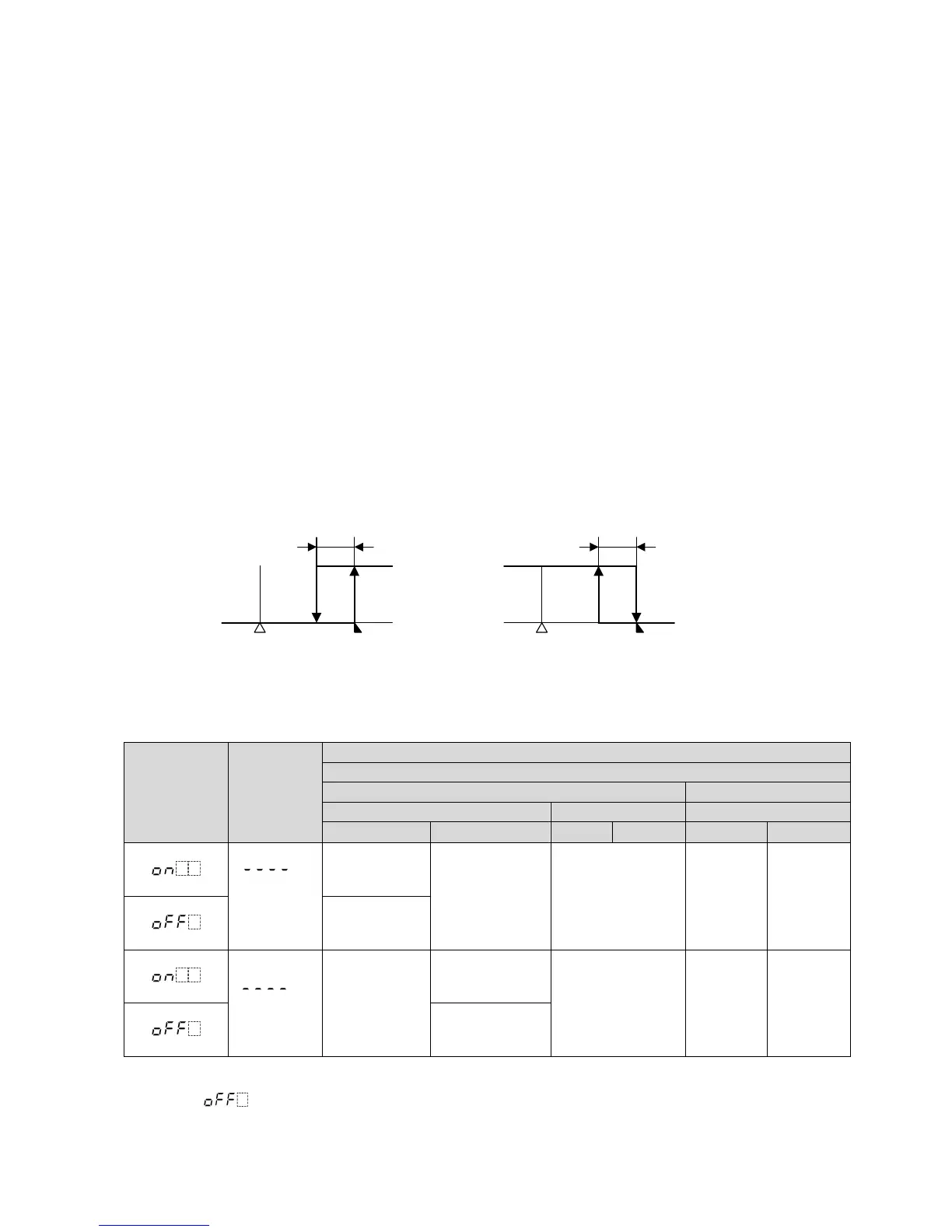
Energized/De-energized
[If alarm action Energized is selected]
When the alarm output indicator is lit, the alarm output (between terminals 8 and 9) is conducted (ON).
When the alarm output indicator is unlit, the alarm output is not conducted (OFF).
[If alarm action De-energized is selected]
When the alarm output indicator is lit, the alarm output (between terminals 8 and 9) is not conducted (OFF).
When the alarm output indicator is unlit, the alarm output is conducted (ON).
High limit alarm (Energized setting) High limit alarm (De-energized setting)
(Fig. 5.4-1) (Fig. 5.4-2)
Output status when input errors occur
Control output status differs depending on the selection in [Output status when input errors occur] as
follows.
Output status
when input
errors occur
(*1)
Contents
and
Indication
Output status
Controller/Converter
Controller Converter
OUT1 OUT2 OUT1
Direct action Reverse action
Direct Reverse Direct Reverse
“ ”
flashes.
ON (20 mA)
or OUT1 high
limit value (*2)
OFF (4 mA)
or
OUT1 low limit
value
OUT2
low limit value
20 mA
or
OUT1
high limit
value
4 mA
or
OUT1
low limit
value
OFF (4 mA)
or OUT1 low
limit value
“ ”
flashes.
OFF (4 mA)
or
OUT1 low
limit value
ON (20 mA) or
OUT1 high limit
value (*2)
OUT2
low limit value
4 mA
or
OUT1
low limit
value
20 mA
or
OUT1
high limit
value
OFF(4 mA) or
OUT1 low limit
value
(*1) [Output status when input errors occur] can be used only for controllers using direct current and voltage
inputs, and direct current output. If OUT1 is not Direct current output, the output status will be the same
as when is selected in [Output status when input errors occur].
For manual control, the preset MV is output.
(*2) Outputs a value between OFF (4 mA) and ON (20 mA) or between OUT1 low limit value and OUT1
high limit value, depending on deviation.
OFF
ON
Alarm hysteresis
+ Alarm value
OFF
ON
+ Alarm value
Alarm hysteresis
SV
SV



 To Next Page