16
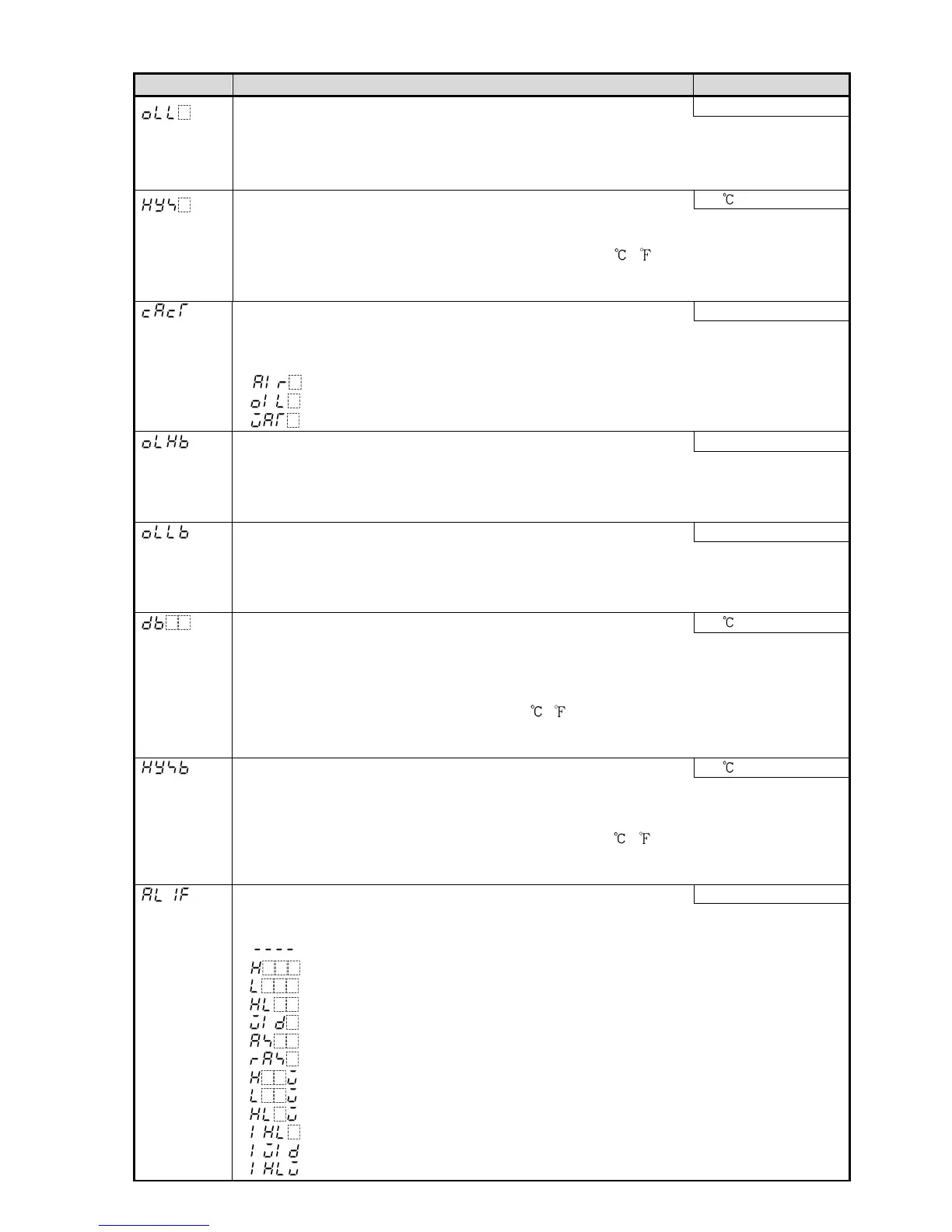
Character Name, Description, Setting Range Factory Default
OUT1 low limit 0%
• Sets the OUT1 low limit value.
• Available for direct current output. Not available if OUT1 is in ON/OFF control.
• Setting range: 0% to OUT1 high limit value
(Direct current output type: –5% to OUT1 high limit value)
OUT1 ON/OFF hysteresis 1.0
• Sets the ON/OFF hysteresis for the OUT1.
• Available only for ON/OFF control (P=0).
• Setting range: Thermocouple, RTD input: 0.1 to 100.0 ( )
DC voltage, current input: 1 to 1000 (The placement of the decimal point follows the
selection.)
Air cooling
• Selects air, oil or water cooling for OUT2 action.
• Available only when Heating/Cooling control (DC option) is ordered.
Not available if OUT2 is in ON/OFF control action
• : Air cooling
: Oil cooling
: Water cooling
100%
• Sets OUT2 high limit value.
• Available only when Heating/Cooling control (DC option) is ordered.
Not available if OUT2 is in ON/OFF control action
• Setting range: OUT2 low limit value to 100%
0%
• Sets OUT2 low limit value.
• Available only when Heating/Cooling control (DC option) is ordered.
Not available if OUT2 is in ON/OFF control action
• Setting range: 0% to OUT2 high limit value
0.0
• Sets Overlap/Dead band.
• Available only when Heating/Cooling control (DC option) is ordered.
Not available if OUT2 is in ON/OFF control action
• Setting range:
Thermocouple, RTD input: –100.0 to 100.0 ( )
DC voltage, current input: 1 to 1000 (The placement of the decimal point follows the
selection.)
1.0
• Sets the ON/OFF action hysteresis for the OUT2.
• Available only when Heating/Cooling control (DC option) is ordered.
Available only when OUT2 is in ON/OFF control action (P=0).
• Setting range: Thermocouple, RTD input: 0.1 to 100.0 ( )
DC voltage, current input: 1 to 1000 (The placement of the decimal
point follows the selection)
No alarm action
• Selects an Alarm 1 type.
Note: If Alarm 1 type is changed, Alarm 1 value returns to 0 (0.0).
• : No alarm action
: High limit alarm
: Low limit alarm
: High/Low limits alarm
: High/Low limit range alarm
: Process high alarm
: Process low alarm
: High limit with standby alarm
: Low limit with standby alarm
: High/Low limits with standby alarm
: High/Low limits independent alarm
: High/Low limit range independent alarm
: High/Low limits with standby independent alarm



 To Next Page