23
Character Name, Description, Setting Range Factory Default
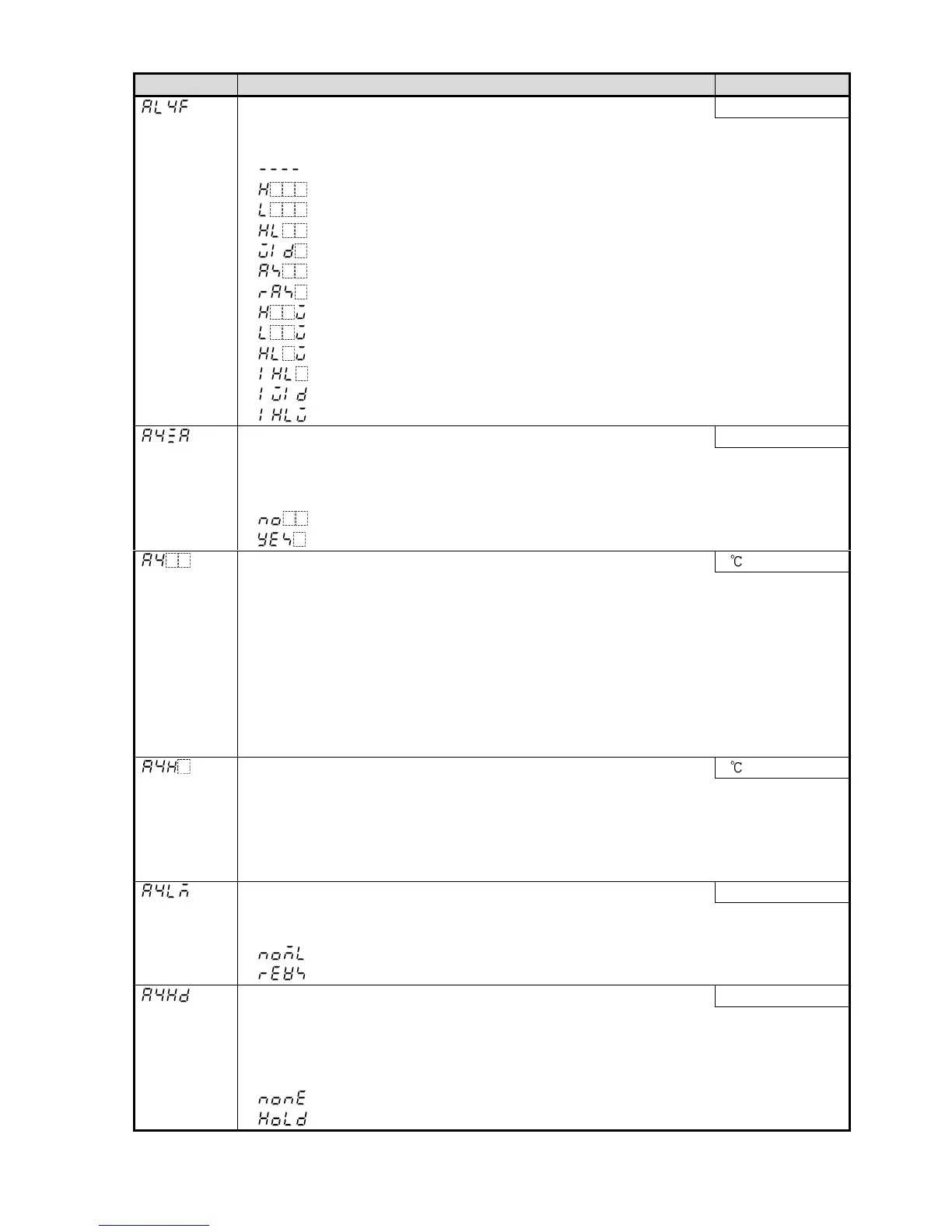
Alarm 4 type No alarm action
• Selects an Alarm 4 type.
Note: If Alarm 4 type is changed, Alarm 4 value returns to 0 (0.0).
• : No alarm action
: High limit alarm
: Low limit alarm
: High/Low limits alarm
: High/Low limit range alarm
: Process high alarm
: Process low alarm
: High limit with standby alarm
: Low limit with standby alarm
: High/Low limits with standby alarm
: High/Low limits independent alarm
: High/Low limit range independent alarm
: High/Low limits with standby independent alarm
Alarm 4 value 0 Enabled/Disabled Disabled
• Selects Alarm 4 action Enabled or Disabled when Alarm 4 value is 0 (zero).
• Not available if No alarm action is selected in [Alarm 4 type].
• Invalidated for Process alarm
• : Disabled
: Enabled
Alarm 4 value 0
• Sets Alarm 4 action point.
• Alarm 4 value matches Alarm 4 low limit alarm value in the following cases:
When ‘High/Low limits independent alarm’, ‘ High/Low limit range independent alarm’
or ‘High/Low limits with standby independent alarm’ is selected in [Alarm 4 type].
• When Alarm, Loop break alarm and Heater burnout alarm are used together, they
utilize common output terminals.
• Not available if No alarm action is selected in [Alarm 4 type].
• Setting range: See (Table 5.2-1) on p.13. (For DC voltage, current input, the
placement of the decimal point follows the selection.)
Alarm 4 high limit alarm value 0
• Sets Alarm 4 high limit alarm value.
•
Available when ‘High/Low limits independent alarm’, ‘ High/Low limit range independent
alarm’ or ‘High/Low limits with standby independent alarm’ is selected in [Alarm 4 type].
• Setting range: See (Table 5.2-1) on p.13. (For DC voltage, current input, the
placement of the decimal point follows the selection)
Alarm 4 Energized/De-energized Energized
• Selects Alarm 4 action Energized/De-energized. (For details, see p.18.)
• Not available if No alarm action is selected in [Alarm 4 type].
• : Energized
: De-energized
Alarm 4 HOLD function Not holding
• Selects either Holding or Not holding in Alarm 4.
When “Holding” is set, once alarm is activated, the alarm output remains ON
until the power is turned off.
• Not available if No alarm action is selected in [Alarm 4 type].
• : Not holding
: Holding



 To Next Page