1. Select Configuration in the web application
2. Select a lobe in the room view to reveal the channel properties menu
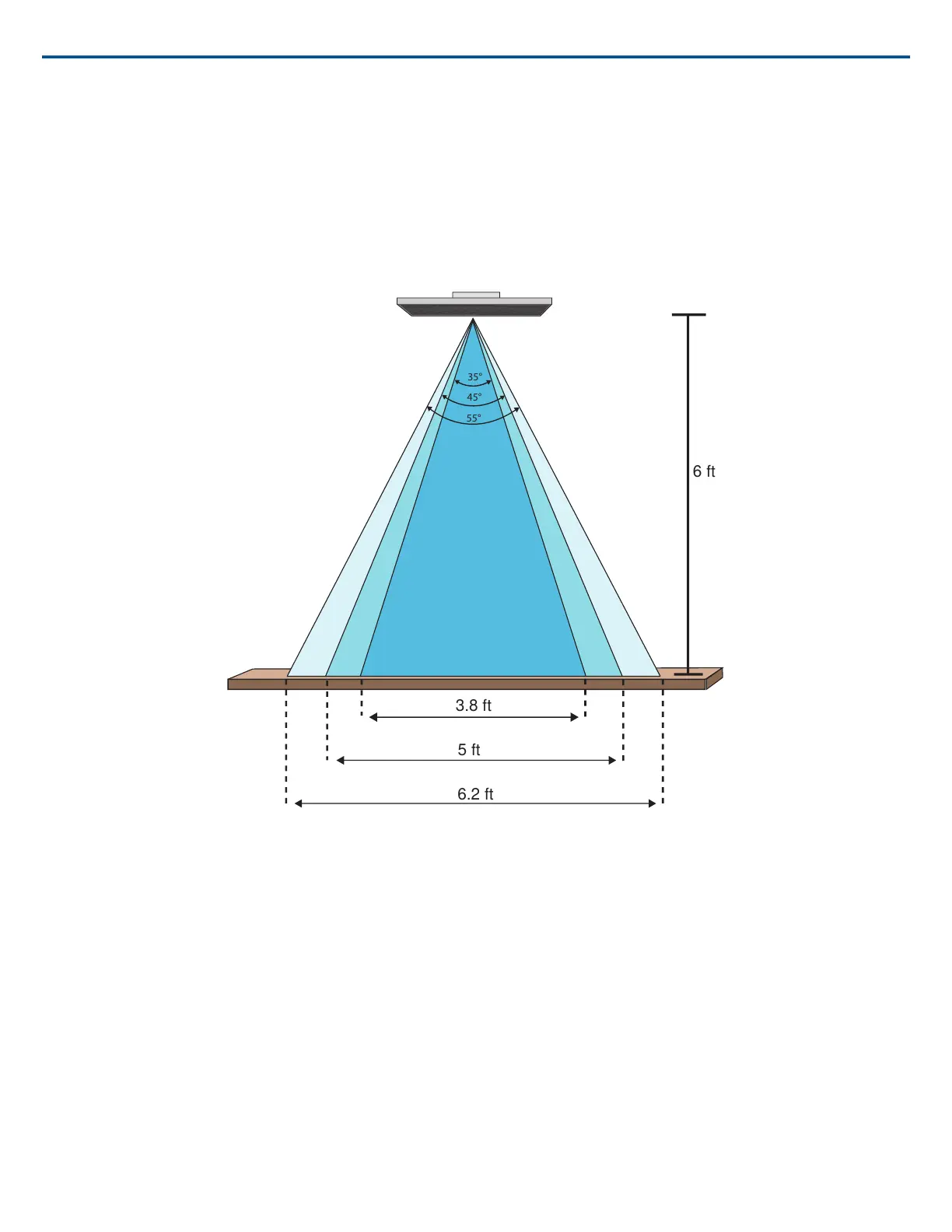
3. Choose a channel width setting from the pull-down menu. The width is calculated and displayed, based on the lobe location and ceiling height.
Lobe Width Settings:
• Narrow (35°)
• Medium (45°)
• Wide (55°)
Lobe widths for the three settings with the microphone 6 feet above a table
Adjusting Levels
Gain levels on Microflex
®
Advance™ microphones must be set for each saved coverage preset to ensure optimized gain structure for all seating scenarios.
Always adjust the levels before making any changes to automix settings to ensure the best performance.
1. Perform a level check for each coverage area, using a typical speech volume. Adjust the faders so the meters are peaking at approximately -20 dBFS.
2. Adjust the equalizer settings to optimize speech intelligibility and minimize noise (such as low-frequency rumble caused by HVAC systems).
3. If equalizer settings cause a significant increase or decrease in levels, make any necessary level adjustments according to step 1.
Parametric Equalizer
Maximize audio quality by adjusting the frequency response with the parametric equalizer.
Common equalizer applications:
• Improve speech intelligibility
• Reduce noise from HVAC systems or video projectors
• Reduce room irregularities
• Adjust frequency response for reinforcement systems
Shure IncorporatedMXA910 Ceiling Array Microphone
2017/10/1832/57













 To Next Page