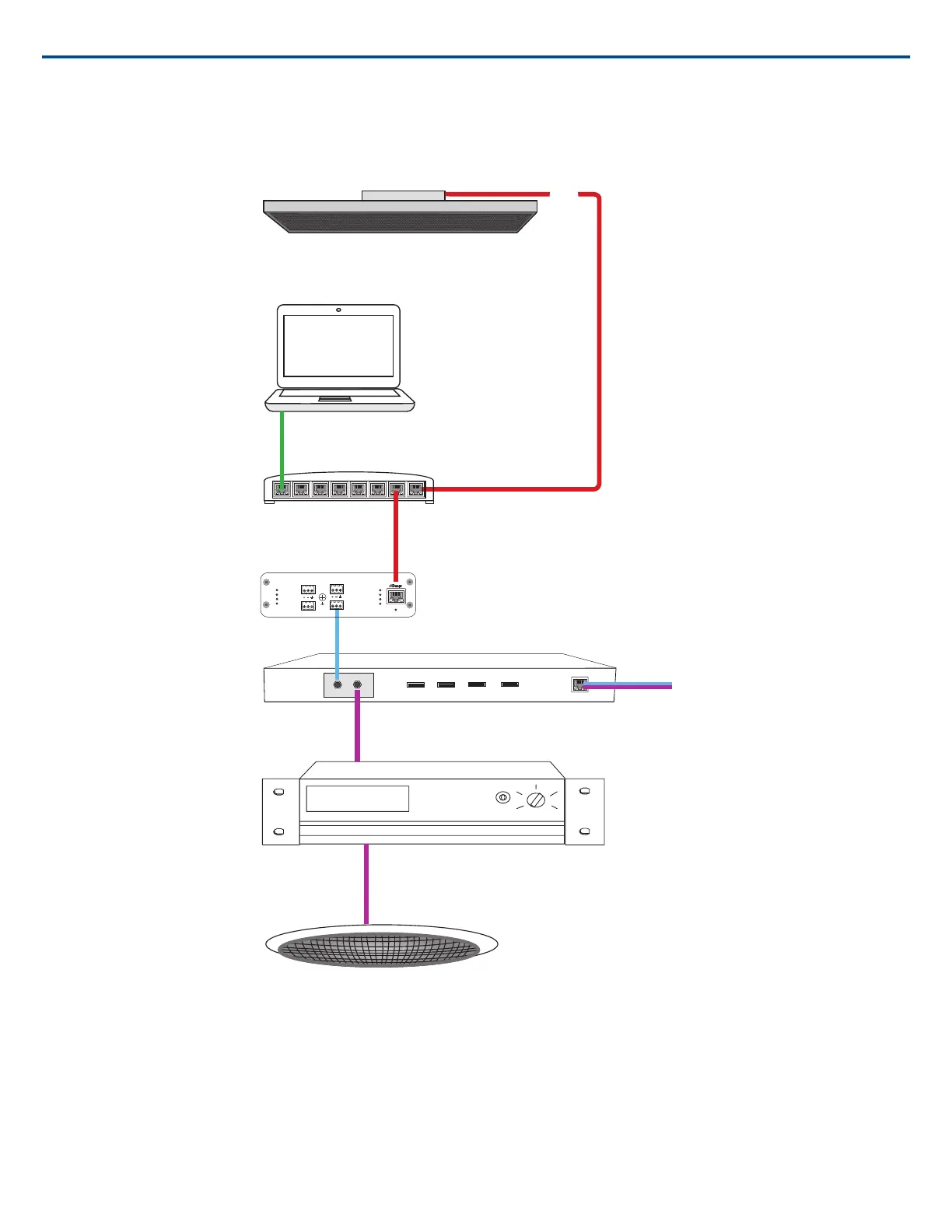
Video Conference
sig/clip
power
reset
PoE
network
network audio
encryption
1
1
2
2
3
4
3
4
OUTPUT
Ceiling array microphone
Software control
Network switch
Shure ANI4OUT
Video codec
Ceiling speaker
① Array microphone to network switch
Connect the array microphone output with a network cable to any port on the switch that supplies power over ethernet (PoE).
② Computer to network switch
Connect a computer to the network switch to provide control of the array microphone and other networked components through the software control panel.
③ ANI4OUT (digital-to-analog conversion)
Each ANI4OUT receives 4 channels of Dante audio, and converts them to 4 analog signals, delivered through XLR outputs or block connectors.
Input: Connect the ANI4OUT to the network switch with a network cable
Ouput: Connect the analog output to the audio input on the video codec
Shure IncorporatedMXA910 Ceiling Array Microphone
13/572017/10/18













 To Next Page