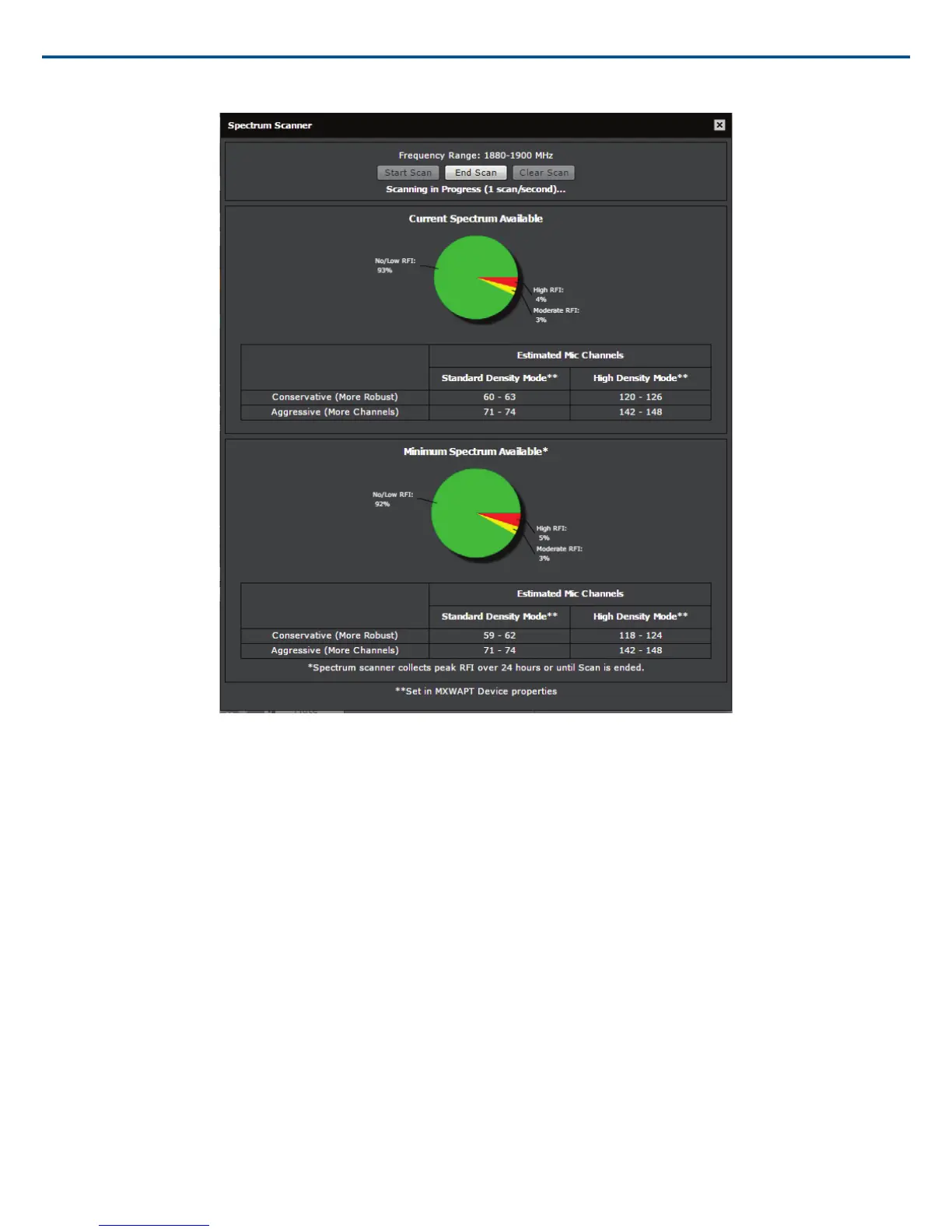
Spectrum Meter During a Scan
Displays the percentage of available spectrum
Radio Frequency Interference (RFI)
The scanner analyzes the spectrum and divides the data into three categories:
No/Low (Green)
Clean RF available for MXW system.
Moderate (Yellow)
Some moderate interference is detected, still usable by the MXW system.
High (Red)
Busy RF occupied by other devices.
Estimated Mic Channel Count
The scanner provides two estimate levels for MXW microphones:
Conservative (More Robust)
Reference this channel estimate for maximum channel stability. It includes extra usable spectrum for optimal interference avoidance, allowing multiple microphones
to find available frequencies simultaneously.
Aggressive (More Channels).
Reference this estimate to get the most channels on air. It reserves only the minimum required extra spectrum for interference avoidance. Be sure to occasion-
ally monitor the spectrum and make channel adjustments if the RFI increases.
Performing a Scan
Follow these steps to perform RF scan.
Tip: Perform the scan during typical hours of operation to best capture the typical interference in an environment.
1. Ensure all typically used devices are turned on, including any MXW equipment already in use.
Shure IncorporatedMXW
2017/05/1738/72














 To Next Page