• Use only 1 DHCP server per network. Disable DHCP addressing on additional servers.
• Power on the switch and DHCP server prior to MXW equipment.
• To expand the network, use multiple Ethernet switches in a star topology.
• Connect each device directly to the port of an Ethernet switch. Avoid "daisy-chaining" Ethernet port connections between devices for larger networks.
• Do not loop network connections.
• All devices must be at the same firmware revision level.
Configuring IP Settings
Go to the Utility tab of the control software to manage the IP configurations of each network interface. By default, they are set to Automatic (DHCP) mode. DHCP
mode enables the devices to accept IP settings from a DHCP server, or automatically fall back to Link-Local settings when no DHCP is available. To manually
set the IP address of an interface, select Manual (Static).
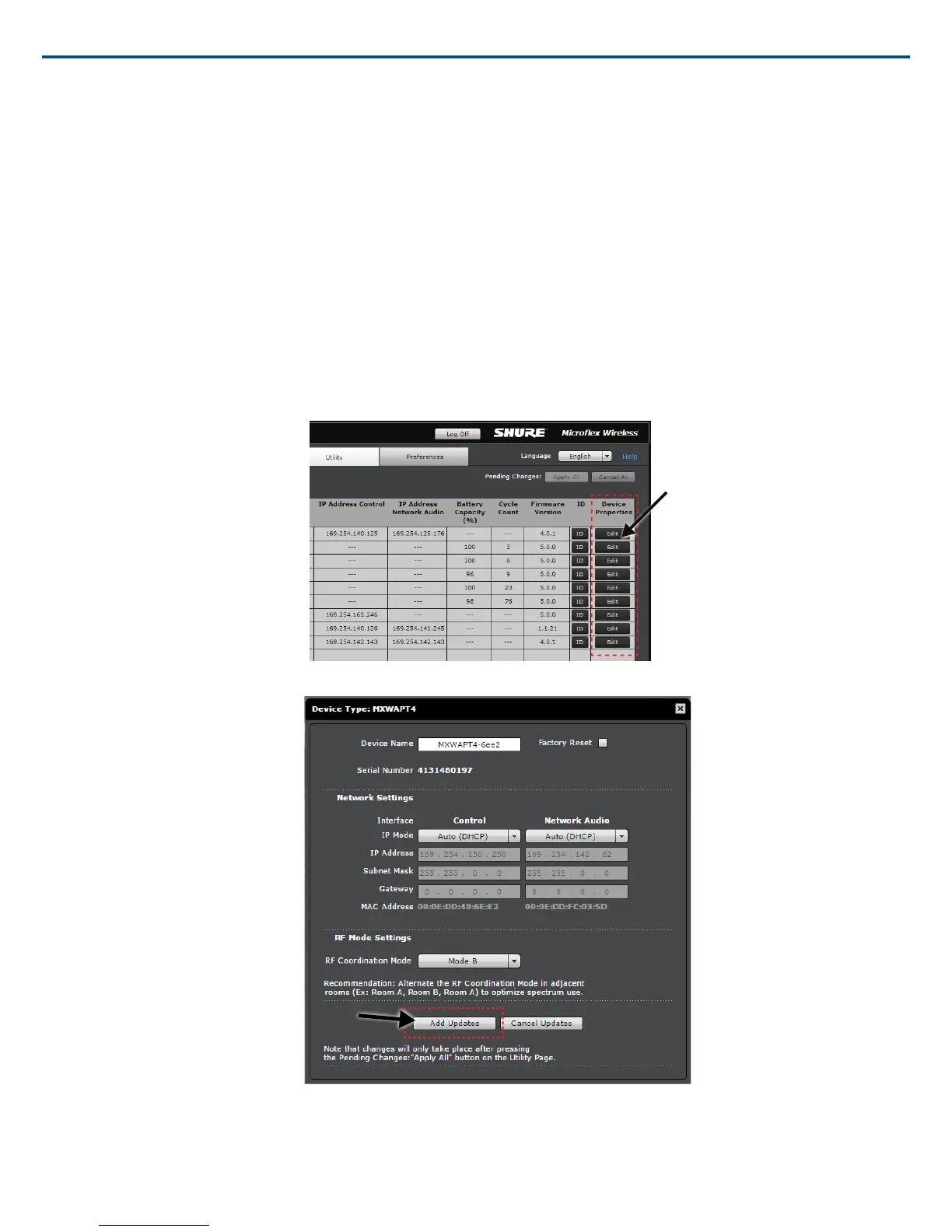
The MXW control software coordinates IP updates across the entire system of devices. To configure the IP properties, follow these steps:
1. Open the MXW control software from the Shure Web Device Discovery app.
2. Go to the Utility tab.
3. Adjust IP settings for each device by selecting the Device Properties.
4. After adjustments have been made, select Add Updates. This saves the settings to the changes queue.
5. Repeat for any additional components.
Shure IncorporatedMXW
41/722017/05/17














 To Next Page