SolutionIndicatorProblem
•Place the device in a Group to automati-
cally route the audio
•Ensure the subnet of the Access Point
Transceiver's network audio settings
match the subnet of the Audio Network
Interface
Off
•Perform a Spectrum Scan to monitor RF
interference
•Decrease channel count to verify if sys-
tem is overloading the RF spectrum
Audio is
intermittent
Audio is
cutting in
an out
(intermittent)
SolutionIndicatorProblem
•Check that devices are powered and
connected to the same network and sub-
net)
•Open the Utility tab of the MXW Control
Software and un-check the Configuration
Filter to display all MXW devices on the
network. If the device shows up as
"OTHER", then it is part of another Con-
figuration.
•Un-associate the component by selecting
'none' from the Group row in the other
Configuration.
•Perform a factory reset on the device to
clear any association.
Device
drop-down not
displaying the
desired
component in the
Group row on the
Configuration tab
Can't
associate
component
to a
Group
SolutionIndicatorProblem
•Ensure the devices are powered
•Ensure PC and equipment are on the
same network and set to the same subnet
•Turn off other network interfaces not used
to connect to the device (including WiFi)
•Check that DHCP server is functioning (if
applicable)
•Ensure Bonjour is running on the PC
•If connected via Port 4 of the Audio Net-
work Interface (ANI), ensure it is set to
Switched Mode.
Device not
appearing in
Shure Web
Device Discovery
application
Can't
Connect
to the
Control
Software
from a
PC
•Download latest version of Adobe®
Flash®
•Ensure PC and device are on the same
network and subnet
•Check that Windows firewall settings are
not blocking Shure software
•Set the router to not send default gateway
as a part of DHCP
•Set the Shure Web Device Discovery ap-
plication to open by IP address
•Manually set the computer to a static IP
address on the same network as the de-
vice
Web browser
cannot connect to
the control
interface
Control
Software
is taking
a long
time to
load
•Reduce the number of windows or tabs
that are open to the same Configuration
•See Network section for properly setting
up the network
Indicators are
moving slowly or
not displaying in
real time.
Control
Software
is
performing
poorly
Additional Resources
For additional Troubleshooting assistance or further information on complex
installations, contact Shure to speak with a support representative. In the
Americas region, call Systems Support group at 847-600-8440. For users in
other locations, go to www.shure.com to find support contact for your region.
For digital audio networking help, advanced networking guidelines and Dante
software troubleshooting, visit Audinate's website at www.audinate.com.
Factory Reset
If a device isn't appearing on the network after trying troubleshooting methods,
perform a reset on the specific hardware to return the device to default set-
tings. Factory default settings are designed for automatic compatibility with
other Shure networked devices.
Note: A factory reset will clear any MXW Group and Link associations. The
password to access the software will reset to admin.
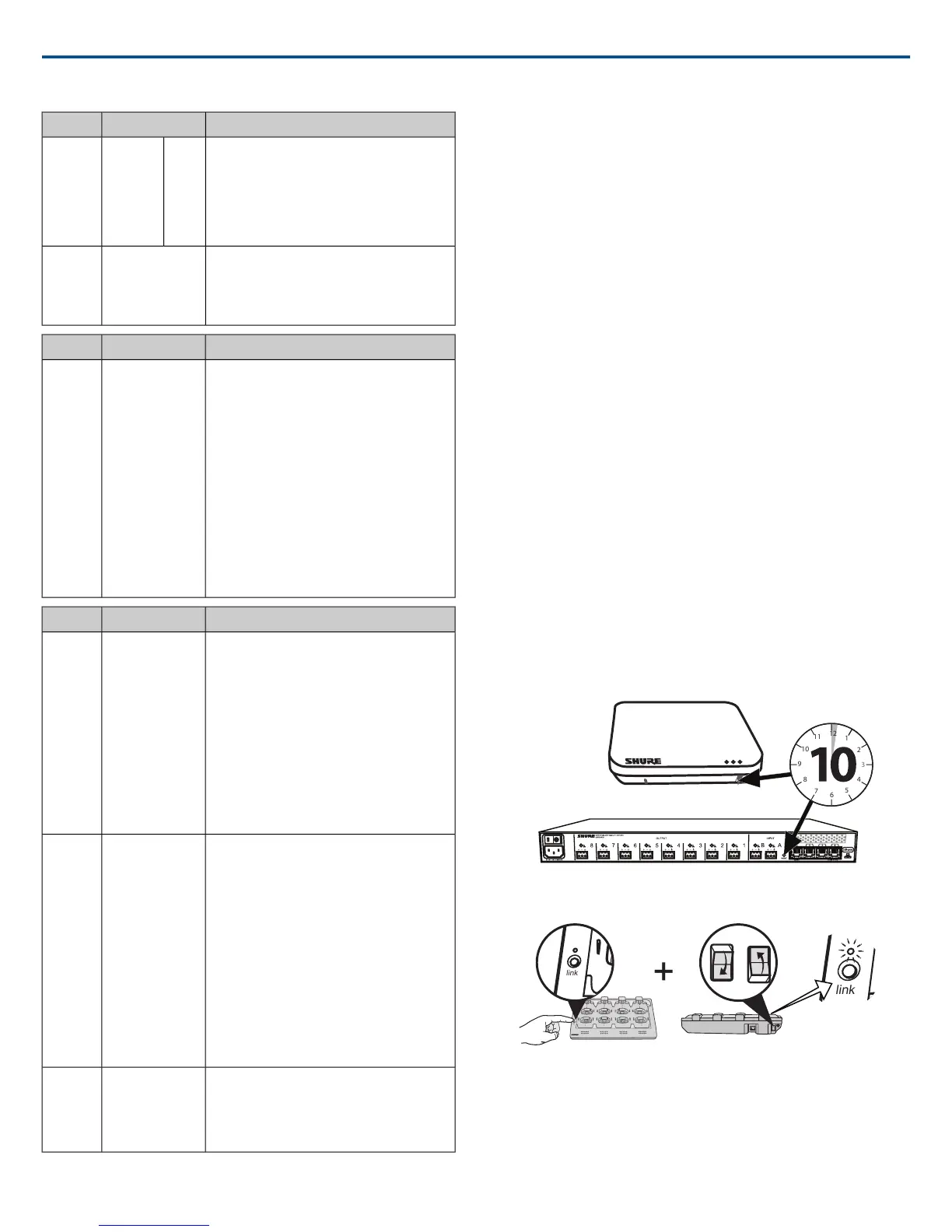
From the Hardware
Access Point Transceiver
Press and hold the recessed reset button for 10 seconds. The network audio
status LED will briefly turn off to indicate the unit is rebooting.
CAUTION: A factory reset deletes all Group associations and microphone
Links saved in the device.
Audio Network Interface
Press and hold the reset button for 10 seconds. The front panel LEDs will
flash to indicate the unit is rebooting.
Networked Charging Station
1. Turn off the power switch.
2. Press and hold the Link button.
3. While holding the Link button, turn on the power switch.
4. Continue to hold the Link button for 12 seconds until the LED illuminates
amber.
From the Control Software
1. Open the Utility Tab of the MXW control software.
2. Select the Edit Properties button for the device.
3. Select the factory reset check-box.
Shure IncorporatedMXW
2017/05/1758/72














 To Next Page