Commissioning the device
4.1 Overview
Comfort Panels
66 Operating Instructions, 08/2018, A5E36770603-AC
No write access to the memory and/or system memory card is currently taking place.
Note
Use only a SIMATIC HMI memory card as a system memory card
Only the SIMATIC
HMI Memory Card ≥ 2 GB may be used as a system memory card. All
other memory cards are not recognized as system memory card by the HMI device.
The following description uses a Comfort V1 device with a ≥7" display diagonal as an
example.
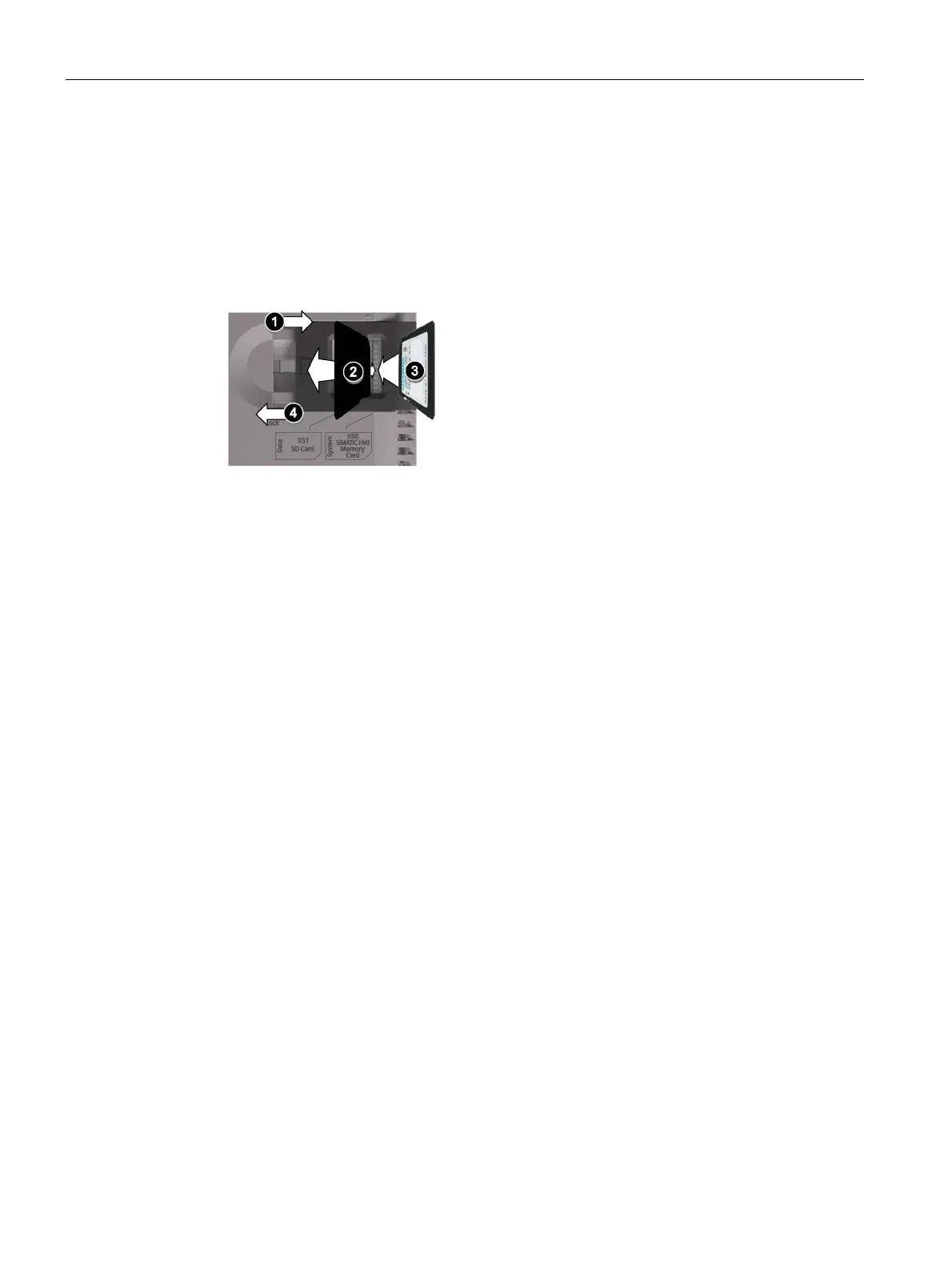
1. Slide the safety catch into the required position.
2. To remove the memory card and/or system memory card, briefly press the card in
question.
The card will be released and can be removed. This step is not required during
commissioning.
3. Insert the new memory card and/or system memory card.
4. Slide the safety catch back into its original position.
When you have inserted the system memory card, you will be prompted by the HMI
device to enable the "Automatic Backup" function.
The memory card and/or system memory card is replaced.
Accessories (Page 22)









 To Next Page