Commissioning
4.3 Creating a STEP 7 project
Connecting SIMOVERT MASTERDRIVES MC to the Technology-CPU
Product Information, 03/2008, A5E00272072-05
45
Setting the system clock cycles
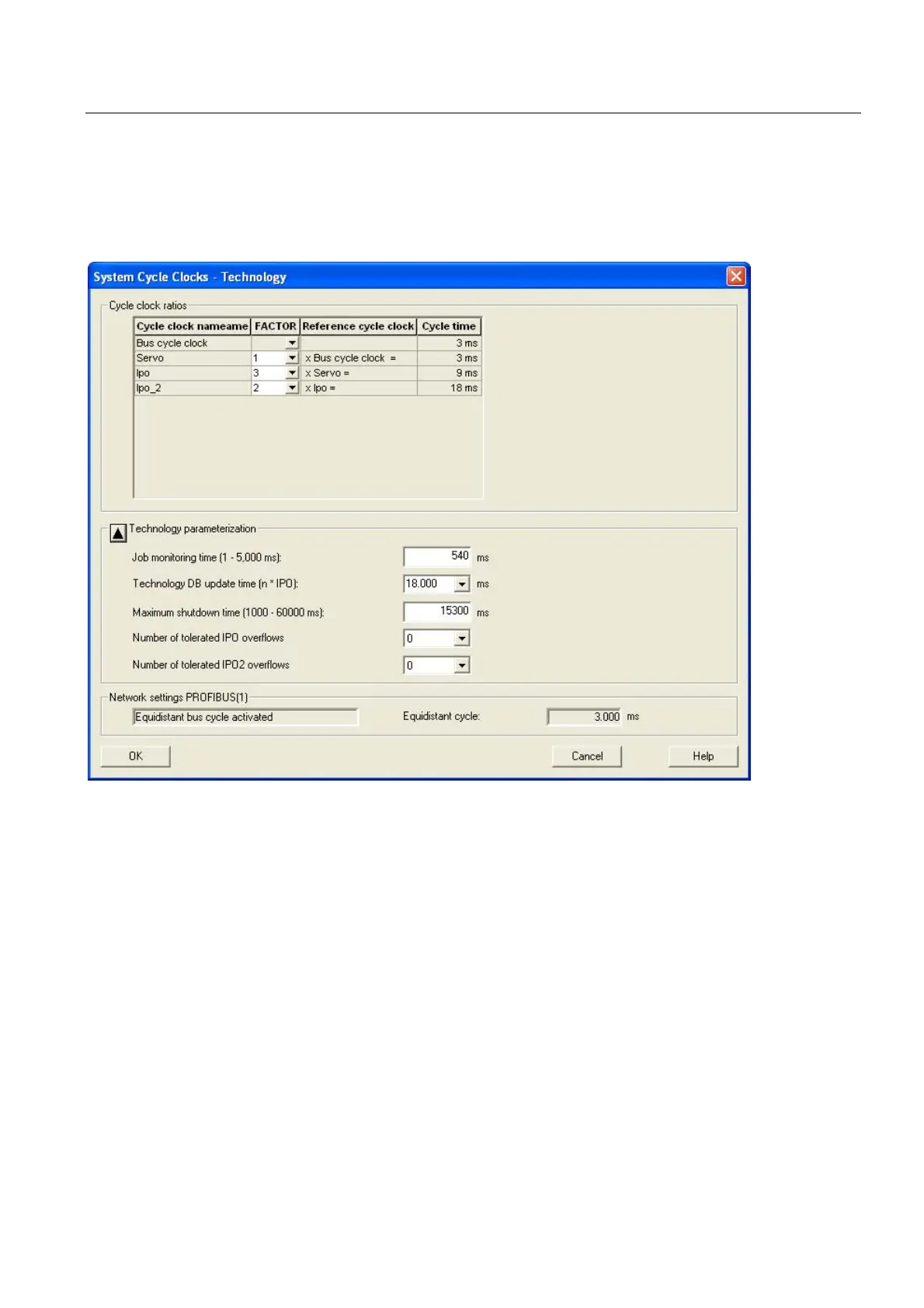
Right-click Technology and select the Set system clock cycles entry in the context menu.
The following window opens:
Figure 4-25 Setting the system clock cycles
Specifying the system clock cycles
The specification of the system clock cycles in the Technology CPU affects the position
reference value adaptation in MASTERDRIVES MC.
Technology CPU
The ratio of the DP clock cycle to the position controller clock cycle and to the interpolator
clock cycle (diagram above) is, e.g. set to 1:2:2. This represents a DP clock cycle of 3 ms, a
position controller clock cycle of 6 ms and an interpolator clock cycle of 6 ms.
To activate and use the interpolator clock cycle 2, refer to the online documentation in S7T
Config.



 To Next Page
 Loading...