Installation and Startup
Rev 4 March 2019 11 41110030
Step 1—Insert the SIM Card and Optional
IoT Card
The Sierra Wireless FX30 has one mini-SIM (2FF) card slot.
If the SIM card has not already been installed, insert the SIM card into the
gateway before connecting any external equipment or power to the FX30.
To install the SIM card:
1. Use a Phillips screwdriver to remove the cover.
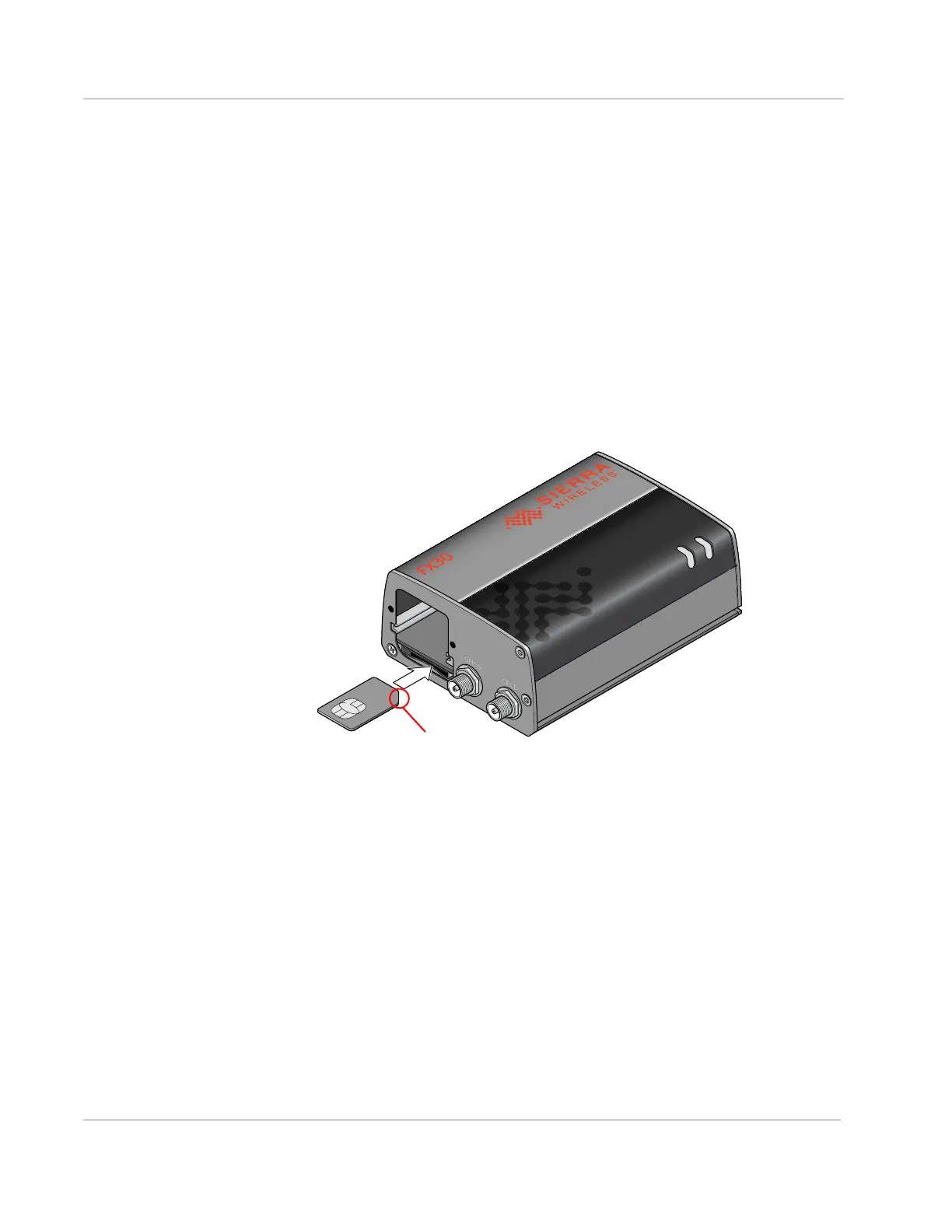
2. Orient the SIM card, as shown in Figure 2-1. The gold contacts on the SIM
card face up.
3. Gently slide the SIM card into the slot until it clicks into place.
To remove the SIM card, press it in, and release it. Gently grip the SIM card
and pull it out.
Figure 2-1: Installing the SIM card
4. Reattach the cover.
The FX30 has a slot for an Internet of Things (IoT) Expansion card that provides a
standard hardware interface for sensors, network adapters and other IoT
technologies. Using Legato, you can design host applications for the IoT
Expansion Card. For more information, see Internet of Things (IoT) Expansion
Card on page 51.
To install an IoT Expansion card:
1. Use a Phillips screwdriver to remove the SIM card/IoT Expansion card cover.
2. Orient the IoT Expansion card as shown in Figure 2-2 and slide the card into
the IoT slot.
3. Reattach the cover.
Note the location of the notch















 To Next Page